The Many Functions
absboolintpowlen- …
Python has many, many built-in functions. You could never learn them all in this course. You will learn a few, but it’s far more important that you learn how to learn more about functions.
Learning about a Function
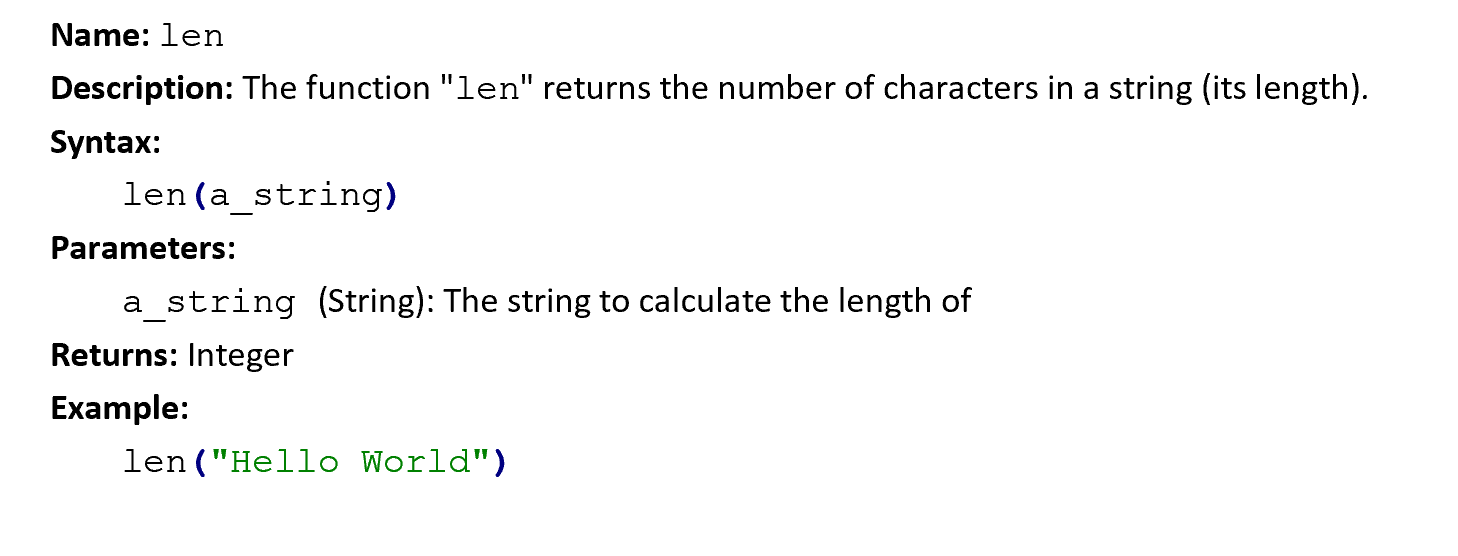
Good programmers create documentation for their functions. Documentation is extra information about a function that makes it clear how it works. There are many ways to write documentation, but they usually have a few things in common.
Function Documentation
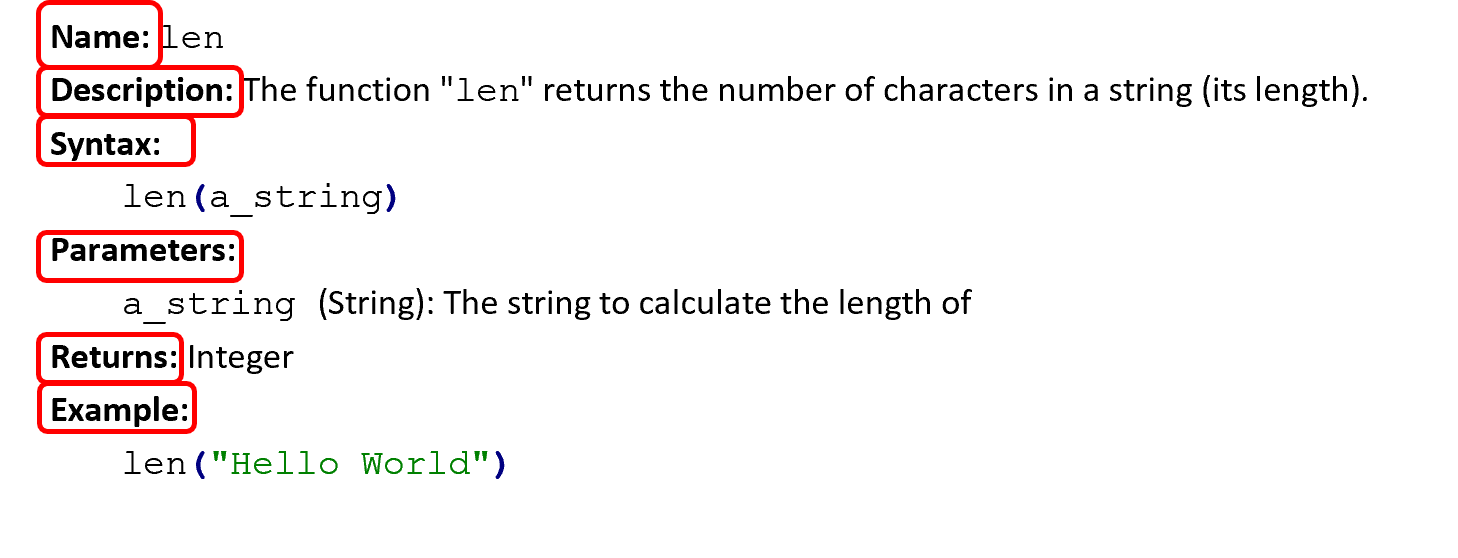
You should look for these parts: the function’s name, a description, its syntax, its parameters, its return value, and an example of how to use it.
Parameters and Arguments
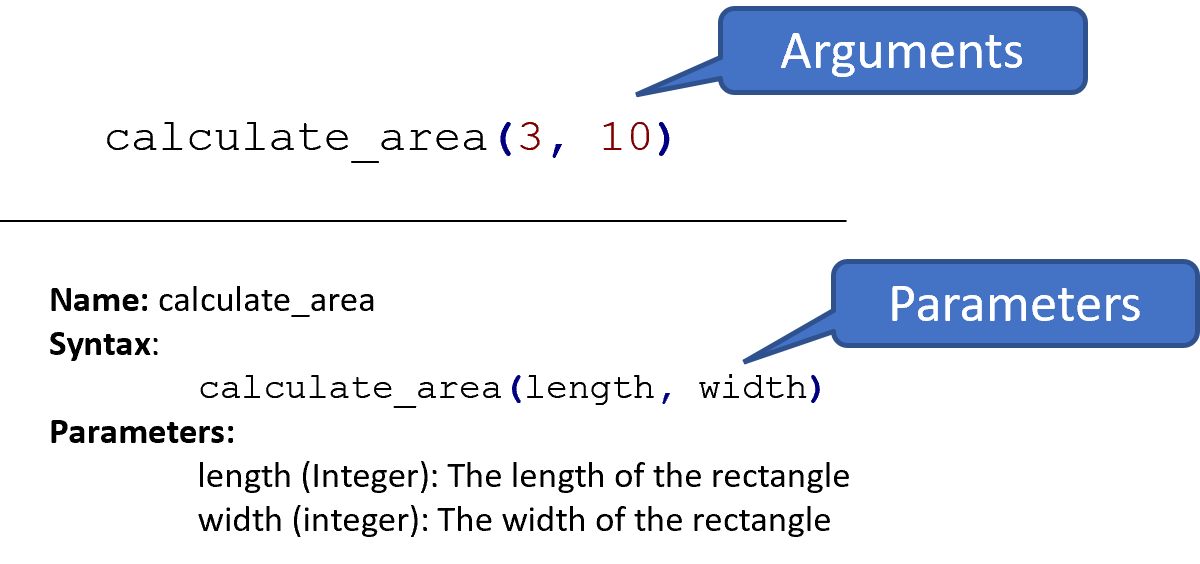
The values passed into a function are its arguments. The documentation gives the formal names for those values, its parameters — the names used to refer to them inside the function. In the example above, 3 and 10 are the arguments; the documentation tells us the corresponding parameters are length and width.
Nesting Function Calls
![print(len("Hello World")) with arrows pointing from the string to len, and from len to print, showing how the block-based version print[length of["Hello World"]] nests the same way.](media/functions_builtin_nested_function_calls.png)
A common task is nesting function calls inside other function calls. When nesting function calls, you read from the inside outward. This can be a little unintuitive, but it may help to treat the parentheses the same way you would in math. It’s critical to remember, though, that the parentheses are there because they call the function — not because they’re doing math.
Chaining Methods

When you need to call several methods on the same string, it works a little differently. As shown above, you repeat the period, name, and parentheses each time. By placing them side by side, you keep using the same value, transforming it in turn from left to right.
Functions, Methods, and Operators
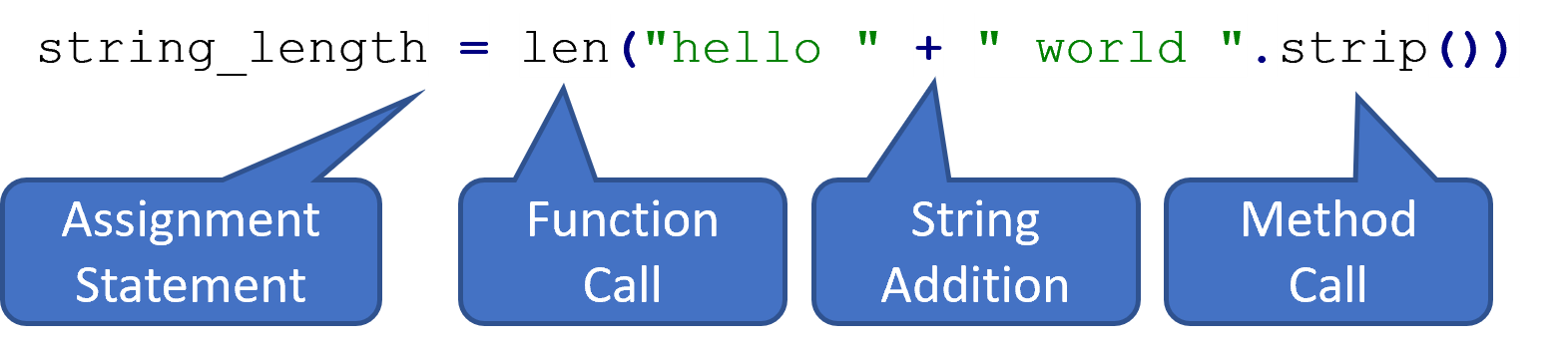
Since calls are just another kind of expression, you can freely combine them with each other. The example above combines string addition, a string method call, and a function call. Notice the order of execution here — it can be tricky to follow.
The order of operations here is that the method call happens first, removing the space characters from around the " world " string literal. Then, the two string literals are added together. Finally, the outer function call is executed with the "hello world" value; this counts the number of characters in the string, which is the value 11. Note that neither 11 nor "hello world" is written anywhere in the code; both are computed at runtime.
Input/Output
print: consumes any number of arguments, writes them to the console, and returnsNone.input: consumes a single string, reads user input, and returns the user’s input as a string.
You already know two functions. print takes in arguments and writes them to the console. input reads from the console and returns it as a string value. Both are a little unusual, because they have side effects: input displays a text box for the user, and print writes text to the console.
int, float, str, bool
str: converts an argument to a string valueint: converts an argument to an integer valuefloat: converts an argument to a float valuebool: converts an argument to a Boolean value
Four other functions that are useful to know are int, float, str, and bool.
These four functions are used for type conversion, or type casting values.
They can consume one value of any type and convert that value to the new type.
int and float
# int: Consumes anything, returns an integer (if possible)
print(int("27"))

# float: Consumes anything, returns a float (if possible)
print(float("29.4"))

# This will fail with an error!
print(int("two"))
For integers and floats, this requires the value to make sense: you can convert strings of digits but not strings with letters. Those values will cause an error if you attempt to convert them.
str
# str: Consumes anything, returns a string (always possible)
print(str(27) + " is a string now and can be safely added!")
print(str(True))
The str function, however, allows you to convert ANYTHING to a string.
Using the str function is particularly important since we cannot add values of different types; if we want to use values of other types in a string, we must convert the values first.
bool
# bool: Consumes anything, returns a Boolean (always possible)
print(bool("Hello World"))
print(bool(""))
Similarly, the bool function also allows you to convert anything to a Boolean value.
We’ll discuss the rules for how values get converted in the next chapter, but for now you just need to know that everything can be converted to a string or Boolean.
Summary
- Python has many built-in functions available for you to use.
- Function documentation explains how to use a new function by explaining the function’s purpose and details.
- Function documentation usually also includes the name of the function, the names and purpose of the function’s parameters, the type and description of the function’s return value, and examples of how the function works in practice.
- Parameters are the formal names used to describe the arguments.
- Function calls can be nested inside of each other; you evaluate their arguments before the call itself, so they are evaluated “inside out” relative to each other instead of “left to right”.
- Method calls can be chained together one after the other; method calls are evaluated left to right, with the new value being passed as an argument to the next method.
- Function and method calls can be arbitrarily nested along with other operations.
- The basic conversion functions are:
str: converts an argument to a string valueint: converts an argument to an integer valuefloat: converts an argument to a float valuebool: converts an argument to a Boolean value
- The basic functions for interacting with the terminal are:
print: consumes any number of arguments, outputs them on the console, and returnsNone.input: consumes a single string, takes user input, and returns the user’s input string.