Documentation
- For sharing code,
- To organize our current code, and
- To make re-reading old code easier
Until now, documentation has probably seemed like a tedious afterthought to writing programs, done just to appease an autograder. If a function is short and only being used in one place, why bother to write an explanation of what it does? You just wrote it, of course you know what it does. Plus, it passes the autograder’s tests, so we know it must be correct!
Unfortunately, this view is short-sighted. First, it is critical to separate the process of learning how to code from actually writing code. At this early phase of your learning, you are still building your mental model of how code works, and we are giving you short, simple problems that are detached from each other. Learning how to integrate and connect together functions into bigger programs is very difficult. There is still pedagogical value in practicing documentation skills, even for small functions, so that you will be ready when we start working on larger projects.
The reality is that most code is read far more often than it is written - after all, it can only be written once, but it can be read many times. Documentation is one of the key tools we have to make our code more understandable and maintainable, in addition to choosing good variable names, writing tests, and following consistent coding styles. Without documentation, it would be very difficult to share code and work on existing codebases.
Docstrings
def choose_word(level: int) -> str:
    """
    Choose a word from a predefined list based on the given level.

    Args:
        level (int): The level to choose a word for.
    Returns:
        str: The chosen word.
    """
    levels = ["heat", "dogs", "jazz"]
    return levels[level]
The primary form of documentation in Python is docstrings, where we describe the purpose and behavior of a function or module using a string literal that is the first statement in the function or module. The location and formatting of that string literal is absolutely key, and makes the text recognizable to the Python compiler itself. It’s not just convention, it’s a fundamental part of how Python works.
The text of the docstring usually begins with an explanation of the function’s purpose, followed by a description of its parameters and return value.
The exact structure of that information depends on the conventions used in the codebase and any relevant style guides.
In this curriculum, we follow Google’s standard.
That means we write the word Args and the word Returns with colons after them, and then write the parameters and return types in a particular way.
You should be aware that there are other possible conventions, especially when you encounter other code online.
However, we have found the Google style to be clear and effective for our purposes.
Reading Documentation
from string import printable

# ...

def check_if_valid_guess(guess1: str, guess2: list[str]) -> bool:
    """ ... """
    return not len(guess1) > 1 and guess1 in printable and guess2 not in guess1
External documentation can be a valuable resource when working with unfamiliar code or libraries.
In this project, something called printable gets imported from the string module, which is a builtin Python module.
Searching through the code, it seems to be a variable that gets used in is_valid_word and check_if_valid_guess.
We previously identified that the is_valid_word function is not used anywhere, so we can ignore it and focus on check_if_valid_guess.
Searching Effectively
Knowing how to search a program is a useful skill.
Programmers have developed many tools to make it easier to search effectively.
Most environments (including your web browser) allow you to search for a specific word or phrase, often by typing Ctrl+F (or Cmd+F on macOS) to open a search box.
More sophisticated development environments (like Visual Studio Code or PyCharm) offer advanced search features, such as searching across multiple files or more advanced pattern matching. As you work with larger codebases, these tools become absolutely essential. For now, since we are working in a single file, we can get a lot of mileage out of the basic search functionality.
Reading a Function
def check_if_valid_guess(guess1: str, guess2: list[str]) -> bool:
    """
    Check if the user's letter guess is valid.

    Args:
        guess1 (str): The first guess, should be a single letter.
        guess2 (list[str]): The list of previous guesses.

    Returns:
        bool: True if the guess is valid, False otherwise.
    """
    return not len(guess1) > 1 and guess1 in printable and guess2 not in guess1
The check_if_valid_guess function checks if the user’s letter guess is valid by ensuring it is a single letter and has not been guessed before.
This means the function must take the user’s previous guesses (a list of strings) in addition to the current letter being guessed.
We’ll discuss later about how the parameters’ names are poorly chosen and could be more descriptive, but for now, notice how the docstring helps clarify the function’s purpose and usage.
A good heuristic is that if you find yourself having to explain things in a comment, you probably want to rename a variable or function name.
In this case, the guess1 parameter is actually meant to be user’s single letter guess.
The guess2 parameter is their list of previously guessed letters.
Reading External Documentation
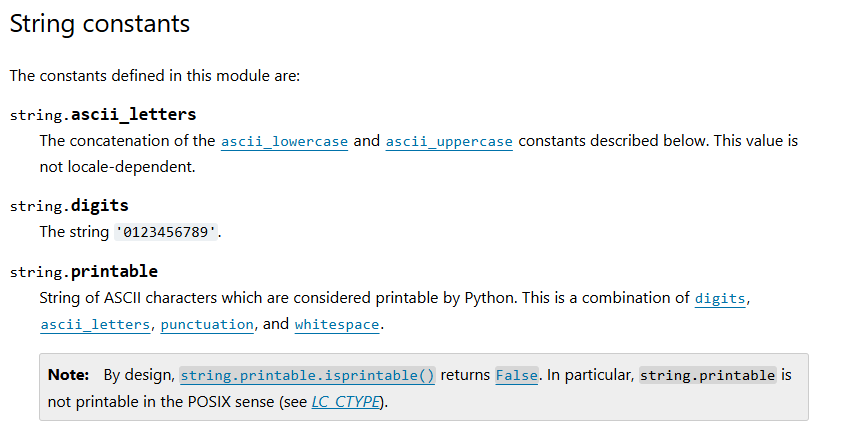
In this screenshot, we are viewing the official Python documentation for the printable variable, at the current time of writing.
The formatting is consistent with other variable descriptions in the documentation, showing the name of the module, a period, and then the name of the variable. On the next line is an explanation of the variable and what it contains: a string of all the possible characters you can print in Python.
There is a grey “Note:” box below the description.
Is this note relevant to our use case?
You can’t know unless you read it, so make sure you always read the documentation thoroughly.
But even after reading it, you might be completely unsure whether it is applicable or not.
You might need to do further research on what the note is talking about, or ask a colleague for clarification.
In this case, we can clarify that the note is not relevant or helpful, as it explains an important distinction about the term printable that experienced users might be confused about, but which has no relevance for our use case.
Identifying the Conflict
from string import ascii_letters

# ...

def check_if_valid_guess(guess1: str, guess2: list[str]) -> bool:
    """ ... """
    return not len(guess1) > 1 and guess1 in ascii_letters and guess2 not in guess1
Reading through this documentation, you might have a realization that the documentation of our function and the documentation of this variable are in conflict with its usage.
The docstring says that guess should be a single letter, but the printable variable contains all printable characters, including digits and punctuation.
Assuming that the docstring is correct, it is likely that we should have used the ascii_letters variable instead, which contains only the letters a-z and A-Z.
How do we know if the documentation is correct, or the code is correct? There’s no magical way to tell - you have to think critically about the problem domain and the specific requirements of your application. Reading over the whole program and applying our other techniques can help clarify the situation.
Noticing New Things
@route
def play_level(state: State) -> Page:
    so_far = reveal(state.secret, state.guesses)
    return Page(
        state,
        [
            Header("Level " + str(state.level)),
            Div("Word: ", so_far),
            "Guesses so far: ",
            BulletedList(state.guesses),
            "Guess a letter:",
            TextBox("guess"),
            Button("Submit", "submit_guess"),
        ],
    )
As you read through the code, you should be on the lookout for parts that you do not understand.
Pursue clarification on mysteries aggressively.
For instance, if you did not understand what the BulletedList component does, you should look it up in the documentation.
Drafter Documentation
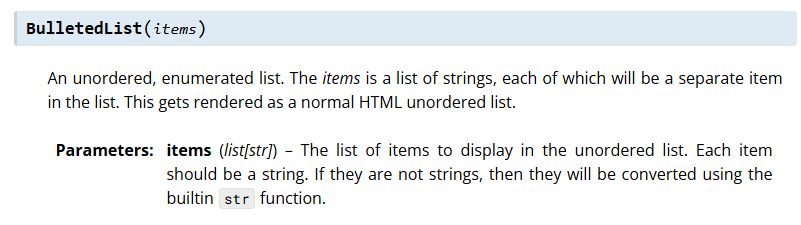
The documentation for the BulletedList explains how the component can be used to display a list of items with bullet points.
It takes in a list of strings, and renders each string as a bullet point in the list.
If you were not sure what that explanation meant, you could try using the component in a simple example to see how it behaves.
Or you could try looking up the terminology online to gain a better understanding.
Finally, never be afraid to just go ask for help.
However, try to ask specific questions that will help you get the information you need.
The more you are thinking critically and struggling with the material, the more likely you are to learn and remember what you figure out.
Summary
- Docstrings can be a valuable source of information about how a function is supposed to be used.
- Documentation helps us remember our own thought processes and decisions.
- Good documentation can make it easier for others to understand and use our code.
- Documentation can also help us identify and fix bugs more easily.
- When working with frameworks like Drafter or using built-in Python features, read over documentation from external sources.
- When debugging a codebase, critically evaluate the documentation and code to identify discrepancies and areas for improvement.