Defining Your Own Functions
You can create your own functions in Python. In fact, this is one of the most powerful features of programming, the ability to create your own functions.
Why Functions?
- Code Reuse
- Easier to debug
- Clean decomposition
Let’s talk about three major advantages of functions: First, they allow us to reuse code. Second, they allow us to debug a chunk of code in isolation from the rest of the program. Third, they let us break a program down into smaller pieces, and we don’t have to worry about how the functions work internally.
Definition Syntax
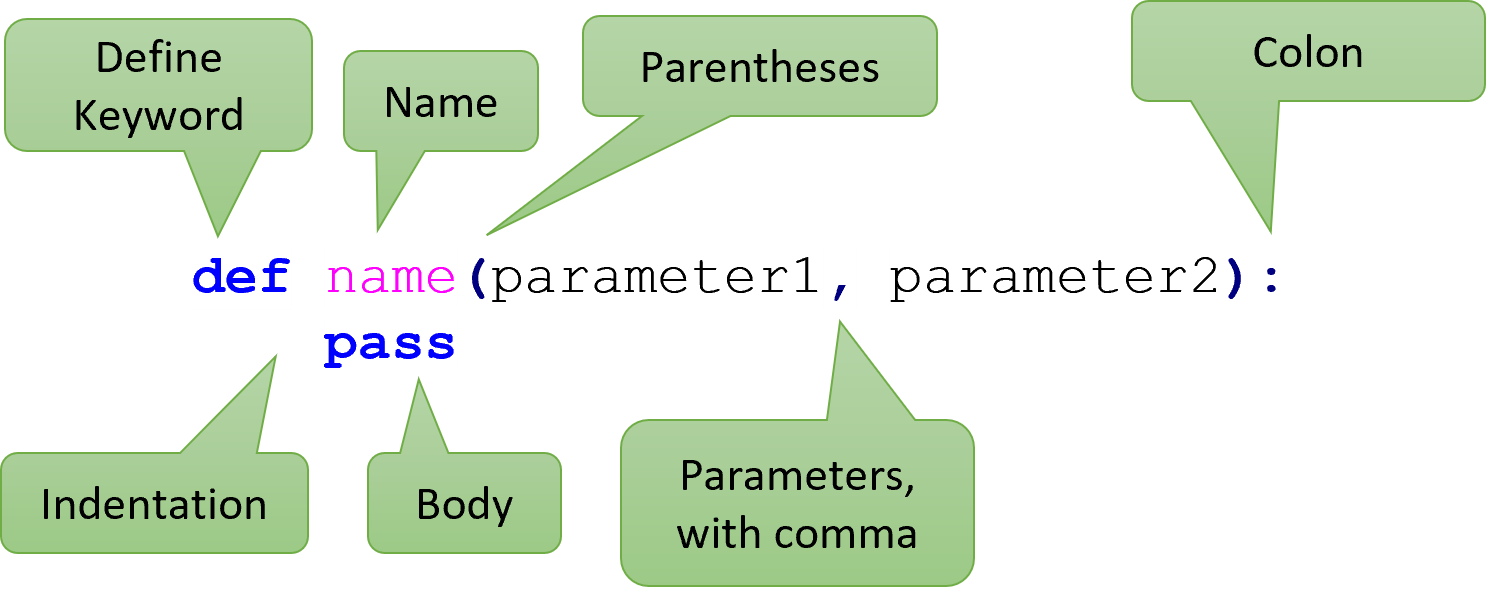
To create a new function, you use the def keyword, which stands for “define”.
You write def, the name of the function, an open parentheses,
each of the parameters separated by commas,
a closed parentheses,
a dash and a greater than,
the return type of the function, and a colon.
The parameters need: variable names, a colon, and their parameter type.
This entire line is called the Header.
Function Body
def add(left: int, right: int) -> int:
    return left + right
When you call a function, you are executing the code stored in the “Body” of the function. Everything “inside” the body should be indented 4 spaces. The body must be there - in other words, it cannot be empty.
Naming a function
- Try to use verbs
- Function names can only have letters, numbers, and underscores
- Function names cannot start with numbers
Usually, you should use a verb as the name of the function. The name helps other programmers understand what the function does. Naming a function is just like naming a variable: you may only use letters, numbers, and underscores, and it cannot start with a number.
Calling Your Functions
def add5(a_number: int) -> int:
    return a_number + 5

add5(10)
add5(3)

# To see the result, you will need to use print:
print(add5(10))
After you’ve defined a function, you can use it by calling the function.
As we did before, we combine the name of the function with calling parentheses.
Note how we still pass in arguments.
Here we call the function add5 twice, first passing in the argument 10
and then calling it again with the argument 3.
Control Flow
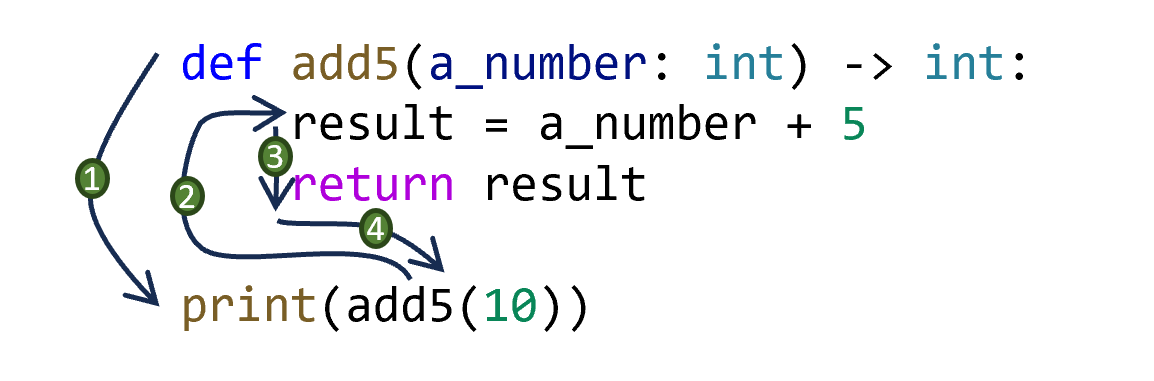
When a function is called, the control flow jumps to the header of the function, where the arguments are assigned to the parameters.
Then, the body of the function is executed one line at a time until a return statement is encountered or the function runs out of lines in its body.
In the diagram shown here, the first line executed is the header, but the second line executed is the last line of code where the function call is located.
Then the third line is the first line of the body, and the fourth line is the line after that.
That line is the return statement, so execution returns to the line with the original function call.
Parameters
def subtract(first: int, second: int) -> int:
    return first - second

print(subtract(3, 8))
print(subtract(-2, 5))

result = subtract(10, 10)
print(result)
When you define a function, you can choose to add in parameters to the header.
These parameters will take on the value of the arguments when the function is called.
This can be very tricky to understand.
Each argument exactly matches one parameter.
In the code below, the parameter first will match to 3, -2, and 10.
The parameter second will match to 8, 5, and 10.
Remember, each function call happens one after the other.
Parameters and Types
def get_speed(distance: int, time: int) -> float:
    return distance / time

get_speed(6, 2)
get_speed(3, 8)
In modern Python, we specify the type of each parameter. So far, we know of five types: int, str, float, bool, and None. Any time you call that function, the arguments must match the type of the parameter.
Technically, Python does not actually check that arguments match the type of their parameters. However, any good editor will tell you if you pass in the wrong type by mistake. Still, this is often the source of cryptic errors since it seems like Python should stop you from making this kind of mistake. It is important to remember that Python will not try to convert arguments or return values according to what it sees in the header - it lets you make whatever mistakes you want!
Return
# Even though this says it returns a string,
#   it will actually return an integer!
def area(length: int, width: int) -> str:
    return length * width

# Try running it yourself!
print(type(area(5, 3)))
When defining a function, you can make it return a value.
Most functions return some kind of value.
We make Python return values using the return statement.
We describe what type of value the function returns
using the arrow and a type in the header.
But note that it is the return statement that actually makes a value
get returned; the header just describes what should be returned.
Like the parameters, Python will not check that the returned value’s type matches the return type in the header.
You are expected to make these parts match up correctly.
Calling and Printing
def area(length: int, width: int) -> int:
    return length * width

print(area(3, 4))
area(1, 8)
print(area(5, 2))
When you call a function, a value is always returned.
Even if you forget the return statement, the special value None will be
returned.
If you are writing code in a console, then you will see any non-None values
appear.
But if you are writing code in a regular editor, the value will not appear in
the console unless you use print.
We will sometimes print the result of calling a function, but remember
that printing is not necessary to call a function.
Pass
def func(abc: bool) -> str:
    pass

func(True)
print(func(True))
Sometimes, we want to define a function without writing its body just yet.
We use a special statement named pass to fill in the body until we’re ready to write it.
pass is a very special statement: it does absolutely nothing but take up space, telling the computer to “pass over” this line.
Since we always have to have a body, if we didn’t put the word pass there, Python would crash with a syntax error.
Pass vs Passing
pass: a special Python statement that does nothing but take up space- “passing into”: a phrase coders use to describe how values are provided to a function call
- “consumed by”: a phrase coders use to describe how values are used by a function definition
A somewhat confusing bit about terminology here: we talk about “passing arguments into functions” and the “pass statement”. Even though it’s the same word each time, they have two different meanings. One is a verb and the other is a noun. We use other words for this idea of “passing in arguments”, saying the function “takes in” or “consumes” arguments.
Signature and Arity
- Signature: the type of the function’s parameters and return value
- Arity: the number of parameters
When we talk about the type of a function, we are talking about its signature. Much like a human signature identifies someone (but not uniquely), a signature tells you something useful about a function. Specifically, you can find out how to use the function.
The signature is composed of two parts: the types of the parameters and the type of the returned value. You will say things like, “This is a function that consumes an integer and a float, and produces a string.” In addition to saying “consumes”, you might say “takes in” or “accepts”. Besides “produce”, you might say “returns” or “gives back”.
The arity is another funny word that means “the number of parameters”. A function with one argument has arity 1, with two arguments has arity 2, and so on. We sometimes call arity 0 functions “nullary”, arity 1 functions “unary”, arity 2 functions “binary”, arity 3 functions “ternary”, although this is largely just a formalization, rather than being something terribly important to know.
Importantly, if someone points to a well-defined function, you should be able to accurately describe its signature and arity just from looking at its header. Count the number of parameters to determine the arity, and then look at the parameters’ types and the return type to determine the signature. If someone asks you to define a function with a particular signature, you should know how to do that as well.
Summary
- You can define your own functions using the
defkeyword in Python. - Functions have two parts: the header and the body.
- The header of a function includes the name of the function, its parameters, and its expected return type.
- The body of a function is a sequence of one or more statements that are executed when the function is called.
- Functions have parameters, which are formal names given to the arguments that are passed in to calls to the function.
- Every parameter has a name and its expected type.
- Function names follow the same rules as variable names but should usually include verbs.
- Function definition has several key advantages:
- Code reuse so that we don’t have to write the same statements repeatedly.
- Easier to debug a chunk of code in isolation from the rest of the program.
- Clean decomposition to break a program down into smaller pieces without keeping the whole thing in our mind at once.
- Once a function has been defined, the function can be called using the name of the function, parentheses, and any arguments that are needed.
- When a function call begins, execution jumps to the header. Each argument is assigned to a parameter. Then, the body is executed one line at a time.
- A function can return a value using a
returnstatement. Thereturnstatement terminates the function when it is reached, and execution returns to where the function was originally called. - Often, the result of function calls is printed. However, the
printfunction is NOT required to call a function. - The
passstatement is a meaningless statement that does nothing, but it is a way to have an empty body in a function. - The signature of a function is the type of its parameters and its return value.
- The arity of a function is the number of parameters that the function takes.