In the project, you will be taking strings and encrypting them, which will make them more difficult for other people to understand. We can tell other people how to decrypt the strings, which will allow them to read the string later. As long as we don’t let other people know how to decrypt our encrypted strings, we can securely send messages.
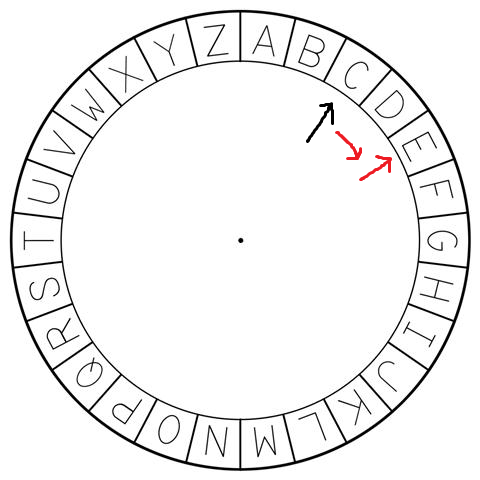
Our encryption algorithm will be based off the idea of a Caesar Cipher, where we “rotate” letters by a given amount.
For example, the letter "A" is rotated forward by 1 to get "B". We can rotate it by -1 to get "A" again. If
you rotate "C" by 2, then you get "E", and so on. If you imagine all of the printable characters being on a wheel,
we can “rotate” the wheel forward or backwards to reach another character.
Instead of one character, we can also rotate entire strings. For example, the string "CAT" can be turned into "DBU"
by rotating 1. The string "CAT" could be turned into "ECV" by rotating 2.
What should happen when we rotate the string "Z" by 1? Since it’s a wheel, it should become letter "A". And that
would be true, if we are limited to just the letters A-Z. However, you just saw how there are actually many more
characters: not just capital letters, but lowercase, digits, and symbols. The ASCII standard has 256 characters,
although we are only going to really care about the printable 32-126 characters.
Rotation Formula
Regardless of how many letters we want, we can’t just add or subtract a single number. We need to have a way to “wrap” the numbers back around. To accomplish this, we use the modulo operator (which you learned earlier). Recall that modulo lets us keep numbers in a certain range (it is also known as “the remainder”).
print(18 % 12)
# 6

print(51 % 10)
# 1

print(127 % 100)
# 27
So, when we are given a character, we can translate it to a number representing the character_code. Then, we increase
it by some rotation amount. At that point, whatever number might be outside of the range of printable characters
(32-126), so we need to use math to keep it within the proper range. The formula for this is as follows:
(character_code+rotation-32) % 94 + 32
That formula might be better written as:
(character_code + rotation - PRINTABLES_OFFSET) % PRINTABLES_LENGTH + PRINTABLES_OFFSET
Where the new variables and constants are all integers as follows:
character_codeis theordof the character (e.g., “C” is 67)rotationis the amount we want to move the wheel forward or backwardPRINTABLES_OFFSETis the constant value32, which is theordof the first printable character (" ", the space)PRINTABLES_LENGTHis the constant value94, which is the number of printable characters (126-32) excluding the ~tilde (which will become a special character in our code).
We combine the character_code with the rotation to get the new character position (“move the wheel forward”).
However, if we moved past the last printable character, then we need to restart from the beginning. That’s what the %
(modulo) operator does for us. However, if we just used that value directly, it would not be offset correctly (it would
wrap back to zero instead of starting at 32, the space). Therefore, we need to offset before and after we apply the
modulo.
Rotation Example
Here’s a concrete example:
If we rotate the character "C" (ord is 67) by 1, we get "D". If we rotate by 2, we get "E". If we rotate by
-1, we get "B". If we rotate by 12, we get "O".
What if we rotated by a very large amount on a character near the end? For instance, we rotated "n" (ord is 110) by
50 using our formula, we would get 66 (chr is "B"). Here’s the math spelled out:
print( (110 + 50 - 32) % 94 + 32  )
#       128            % 94 + 32
#                        34 + 32
#                             66
I strongly recommend defining a helper function to do this math, and then building a series of test cases from the above to test it!
All of this is based upon the idea of a Caesar Cipher.