What is Truthiness
- Truthiness: the ability to use any type of value as a conditional, not just booleans
Unlike some languages, Python does not require that if statements have boolean expressions in their conditional. This may seem surprising, but it is actually an extremely convenient feature named Truthiness. The idea is that any expression, whether it is an integer, string, boolean, or otherwise, can be evaluated in a conditional.
Type Truthiness
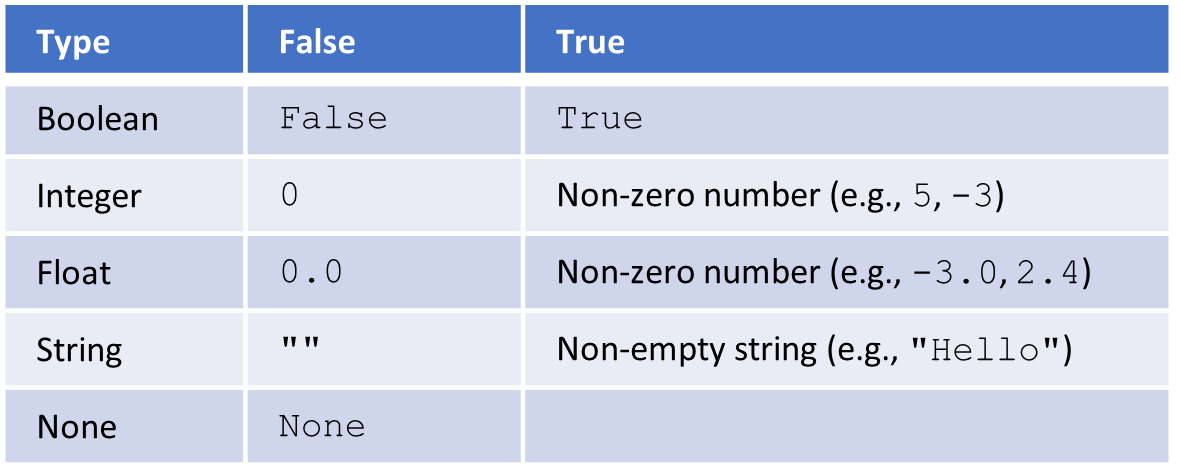
Any expression can be evaluated as a conditional according to the rules of Truthiness. How it is evaluated depends on its type. For integers and floats, any non-zero value is considered True. For strings, any non-empty string is considered True. The None type has no true values.
Testing Truthiness
if 5:
    print("This will be printed because 5 is Truthy")
else:
    print("This will not be printed!")
It is important to remember that most non-boolean values are not strictly equal (==) to True or False. Their truthiness is whether or not they will be considered True or False when evaluated in the context of an if statement.
The bool Function
print("The integer 5 is", bool(5))
print("The integer 0 is", bool(0))
print("The string 'Cat' is", bool('Cat'))
print("The string '' (the empty string) is", bool(''))
You can also test for truthiness by converting the expression to a boolean value using the bool conversion function. The result will then be either True or False, indicating what the original expression’s truthiness was. Here, the zero and empty string will evaluate to False when passed into the bool function, but the 5 and "Cat" string will evaluate to True.
Truthy and Falsy
# This is False because True is not equal to 5
print(True == 5)

# This is True because 5 is Truthy
print(True == bool(5))
Because the expressions themselves are not True or False, we sometimes say that the values are “truthy” and “falsy” instead of “true” and “false”. This distinguishes a “truthy” value (like 5) from the actual True boolean value.
String Example
name = input("What is your name?")
# `name` is a string variable
if name:
    # This path if `name` is NOT the empty string
    print("Your name is", name)
else:
    # This path if `name` is empty string
    print("No name given.")
Let’s look at a simple example, where we take some input from a user. If the user entered an empty string, then we’ll print out a different message.
Unnecessary Comparisons
if a_string != "":
    ...
# Simplifies to
if a_string:
    ...
#-----------------------
if a_number != 0:
    ...
# Simplifies to
if a_number:
    ...
When you need to check if a string is not empty, or a number is not 0, truthiness is the way to go. Notice how each of the following can become much more concise and clear.
Empty Check
dollar_amount = input("Enter a dollar amount")
if dollar_amount:
    # Need the string to be non-empty before we can index
    dollar_symbol = dollar_amount[0]
#-----------------------
people = input("How many people are there?")
if people:
    # Need the string to be non-empty before we can convert
    number_of_people = int(people)
    if number_of_people:
        # need the integer to be non-zero before we can divide
        print("The price per person is:", 5/number_of_people)
Testing with truthiness is often useful when you want to check if a string is not empty (for example, before you index the first element or convert the string to an integer) or check if a number is not zero before you divide.
Accidental Truthiness
alpha = 5

# incorrect!
if alpha == 3 or 4:
    print("This WILL be printed!")

# correct!
if alpha == 3 or alpha == 4:
    print("This will NOT be printed!")
One of the reasons why understanding Truthiness is so important is that it opens up an entire new set of mistakes. The example program shown here demonstrates the mistake. If you read over the code out loud, you would probably expect the condition to evaluate to False and the print statement to not be executed. The variable alpha holds the value 5, which is not equal to 3 or 4. However, you may recall that the or operator has a lower priority than the == operator. Python will first evaluate the equality test between the variable alpha and the value 3, which will result in False. Since the operator is or, we next evaluate its right-hand operand, so Python will evaluate the value 4 on its own, and use that value as the result of the conditional expression. Since 4 is a non-zero value, the entire expression evaluates to True, thanks to the rules of Truthiness. The correct version is also shown; you just repeat the comparison operator a second time. When evaluating expressions, you must keep track of whether Truthiness was accidentally involved.
Summary
- All expressions in Python can be evaluated for their Truthiness.
- Non-empty strings and non-zero numbers are Truthy.
- Empty strings and zero numbers (
0and0.0) are Falsey.
- Truthiness is used in
ifstatements’ conditionals and when you convert values using theboolfunction. - Truthiness is not the same thing as being equal to the values
TrueorFalse. - Truthiness can make conditional expressions slightly more readable by removing a comparison operation.
- Truthiness can also be the source of mistakes, such as when you try to use
orandandto chain together comparisons.