The Types
- Primitive Types: Integer, float, Boolean, string, None
- Composite Types: List, dataclasses
The five primitive types we’ve learned about are integer, float, Boolean, string, and None.
The two composite types we’ve seen so far are lists and dataclasses.
These two new composite types are special because they are composed of other types.
It’s worth reminding you that dataclasses are not actually a type themselves but a way of making new types.
There are many more composite types in Python.
But, for now, we’ll stick to these basic seven types.
In the earlier parts of this chapter, we saw how we could mix and match those composite types to make lists of dataclasses, dataclasses inside of dataclasses, and lists of lists.
There’s no limit to how much we can combine these different types.
Example Nested Data
from dataclasses import dataclass

@dataclass
class Person:
    name: str
    pets: int

@dataclass
class House:
    address: str
    owner: Person

@dataclass
class Neighborhood:
    name: str
    houses: list[House]

green_acres = Neighborhood("Green Acres", [
  House("14 Sun Drive", Person("Mary", 1)),
  House("15 Sun Drive", Person("Jenny", 0)),
  House("16 Sun Drive", Person("Jim", 5)),
])
Let’s study a concrete example of some heavily nested data.
Here we have three dataclasses where two of the dataclasses have fields referencing other dataclasses.
In fact, for the first level, the Neighborhood dataclasses houses field is a list of the House dataclass.
At the deepest point, there are four levels of nested data structure here.
A Representative Diagram
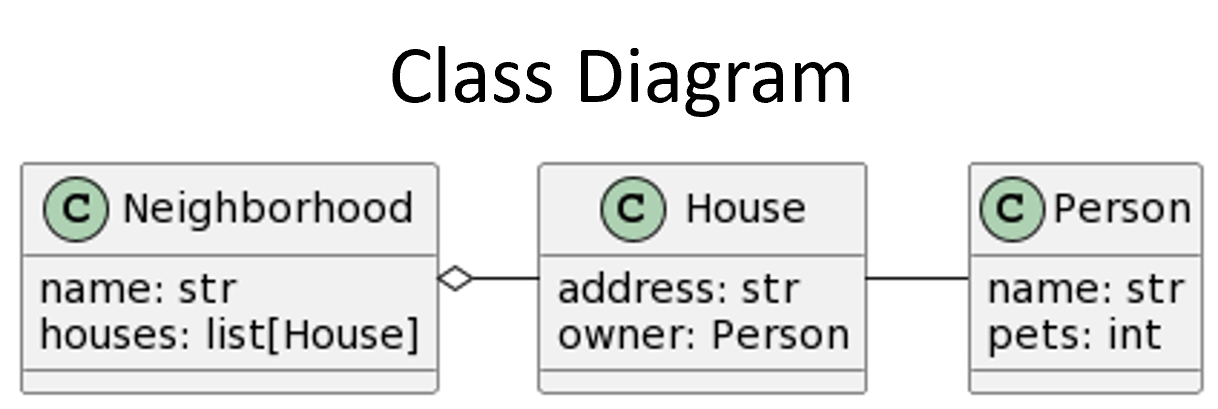
To quickly understand the structure of complex nested data, we can model the data in a class diagram. In the diagram, we draw each dataclass in its own box. Then, we connect the related dataclasses together with lines. If the relationship includes a list, we draw an empty diamond starting from the owning dataclass. There is a lot more to class diagrams than what we have shown here, but this should be enough to get us started.
Accessing Nested Data
- (Lists) Iteration with
forloops - (Lists) Indexing and subscripting
- (Dataclasses) Attribute access
As you process this complex nested data’s structure, you must stay aware of where you are.
This is like needing to navigate a maze.
However, you also must be aware of the tools at your disposal for accessing the data.
When working with a list layer, you can either iterate through the data with a for loop, or index specific elements if you only need one.
When working with a dataclass layer, you can only access attributes of the instance at that layer.
In the green_acres example from before, if we wanted to add up the number of pets across everyone in the neighborhood, we would need to do an attribute access, followed by iteration, followed by a pair of attribute accesses.
To summarize, the three kinds of operations we use for accessing heavily nested data are iteration with for loops, indexing and subscripting, and attribute access.
Do not confuse the operations for these types; you should not try to iterate through a dataclass with a for loop and you should not access list elements with attribute access.
Iterating in Code
from dataclasses import dataclass
from bakery import assert_equal

@dataclass
class Person:
    name: str
    pets: int

@dataclass
class House:
    address: str
    owner: Person

@dataclass
class Neighborhood:
    name: str
    houses: list[House]

def count_pets(neighborhood: Neighborhood) -> int:
    pets = 0
    houses = neighborhood.houses
    for house in houses:
        pets += house.owner.pets
    return pets

assert_equal(count_pets(Neighborhood("Green Acres", [
  House("4", Person("M", 1)), House("5", Person("J", 0)), House("6", Person("J", 5)),
])), 6)
Here is an example function that counts the number of pets in the neighborhood.
Notice that we have extracted the neighborhood.houses expression to a temporary variable first; we could have used the expression directly in the loop if we had wanted to (for house in neighborhood.houses).
We could also have broken up the house.owner.pets expression with some temporary variables (owner = house.owner followed by owner.pets).
And we could have made a helper function to help count the number of pets in an individual neighborhood.
Whether that is effective is partially a matter of opinion but also a matter of how complex the code is.
This function is not super complicated, so we did not bother breaking it up.
But what if we had a more complicated structure?
Layers of Nesting
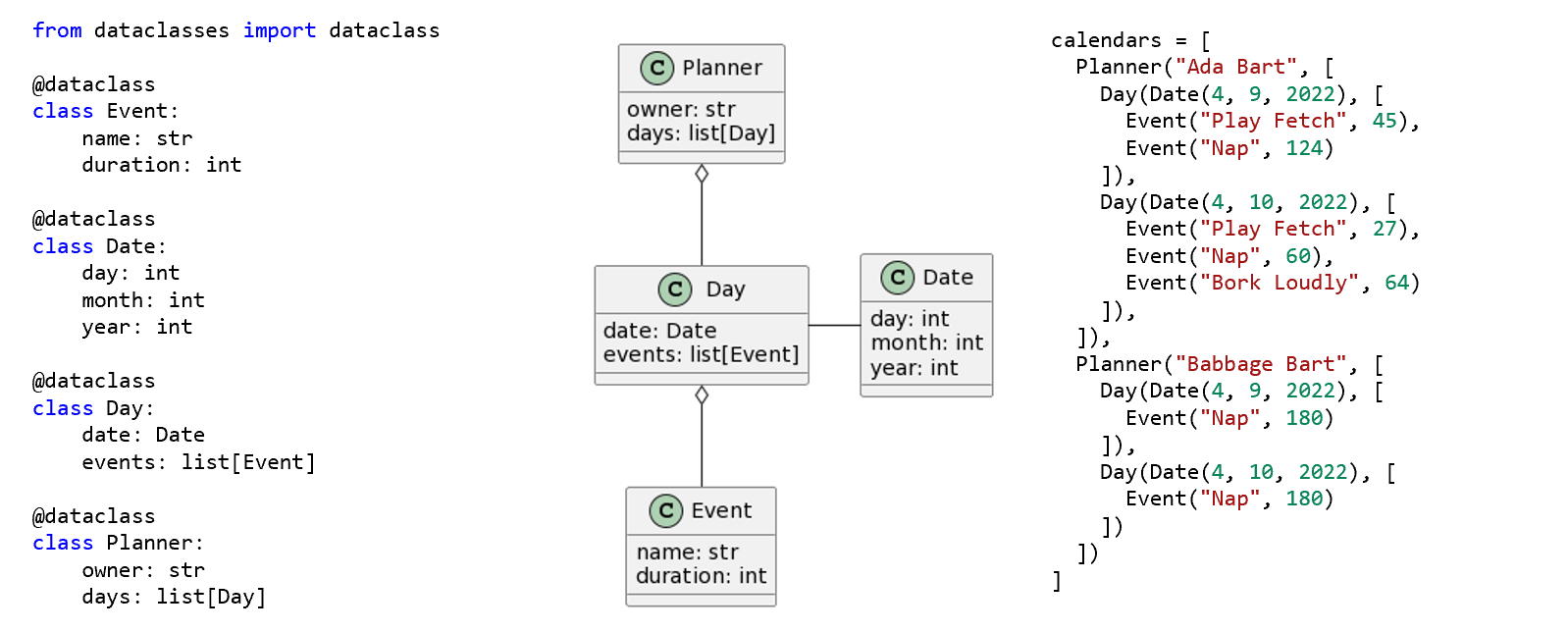
As previously mentioned, there are no limits to the levels of nesting you are allowed.
Here we see a Planner dataclass that has a list of Day dataclasses inside.
That Day class has not only a Date dataclass in one of its fields, but it also has a list of Event dataclass instances.
On the right-hand side, we have a list of Planner instances as an example of a large data structure.
Another Example Function
from dataclasses import dataclass
from bakery import assert_equal

@dataclass
class Event:
    name: str
    duration: int

@dataclass
class Date:
    day: int
    month: int
    year: int

@dataclass
class Day:
    date: Date
    events: list[Event]

@dataclass
class Planner:
    owner: str
    days: list[Day]

def total_average(planners: list[Planner]) -> float:
    total = 0
    for planner in planners:
        total += average_duration(planner)
    return total

def average_duration(planner: Planner) -> float:
    count, total = 0, 0
    for day in planner.days:
        for event in day.events:
            count += 1
            total += event.duration
    return total / count

assert_equal(total_average([Planner("Ada Bart", [Day(Date(4, 9, 23), [Event("Fetch", 45), Event("Nap", 124)]),
    Day(Date(4, 10, 23), [Event("Fetch", 27), Event("Nap", 60), Event("Bork", 64)])]),
  Planner("Babbage Bart", [Day(Date(4, 9, 23), [Event("Nap", 180)]), Day(Date(4, 10, 23), [Event("Nap", 180)])])
]), 244.0)
In this example, we define two functions, total_average and average_duration, with the goal of calculating the total average duration across multiple planners.
Since, this time, we had so many nested pieces of data, we found it quite helpful to break things up with helper functions.
A good rule of thumb is that you should avoid having for loops directly inside of each other unless you are working explicitly with a 2-dimensional list like we discussed in the previous chapter.
Technically, the average_duration function does not operate on a 2-dimensional list (there is a dataclass in between the two list layers), but the effect is almost the same in the end.
Further, we needed the extra count and total variables for the average_duration loops.
Keeping those variables in a helper function avoids collisions with the main total_average function.
The key to writing complex accesses is keeping track of the types. When we start dealing with truly nested data like this, we start relying more heavily on functional decomposition to help us manage the complexity.
Summary
- Integers, floats, Booleans, strings, and
Nonetypes are all primitive types. - Lists and types made from dataclasses are composite types, so they can all be nested arbitrary amounts inside of each other.
- Class diagrams can be used to define the relationships between heavily nested types. Each dataclass has its own box, with lines connected to other dataclasses that are referred to in the original dataclasses fields. If the reference is in a list, the line will have a white diamond.
- To process heavily nested data, you use
forloops and indexing/subscript to process the lists and attribute access to process the dataclasses. - Heavily nested data usually results in very complicated functions, so decomposing those functions into helper functions is usually very helpful in reducing the complexity.