Purpose
cakes_needed = 4
cups_sugar = cakes_needed * 2
eggs = cakes_needed * 4
cups_flour = cakes_needed * 3
ingredients = cups_sugar + eggs + cups_flour
print("You need", ingredients, "ingredients.")
Variables let us store and load information. In other words, we can “read from” and “write to” a variable with data. This lets us use data later. In the following example code, the variables are cups_sugar, eggs, and cups_flour.
Metaphor
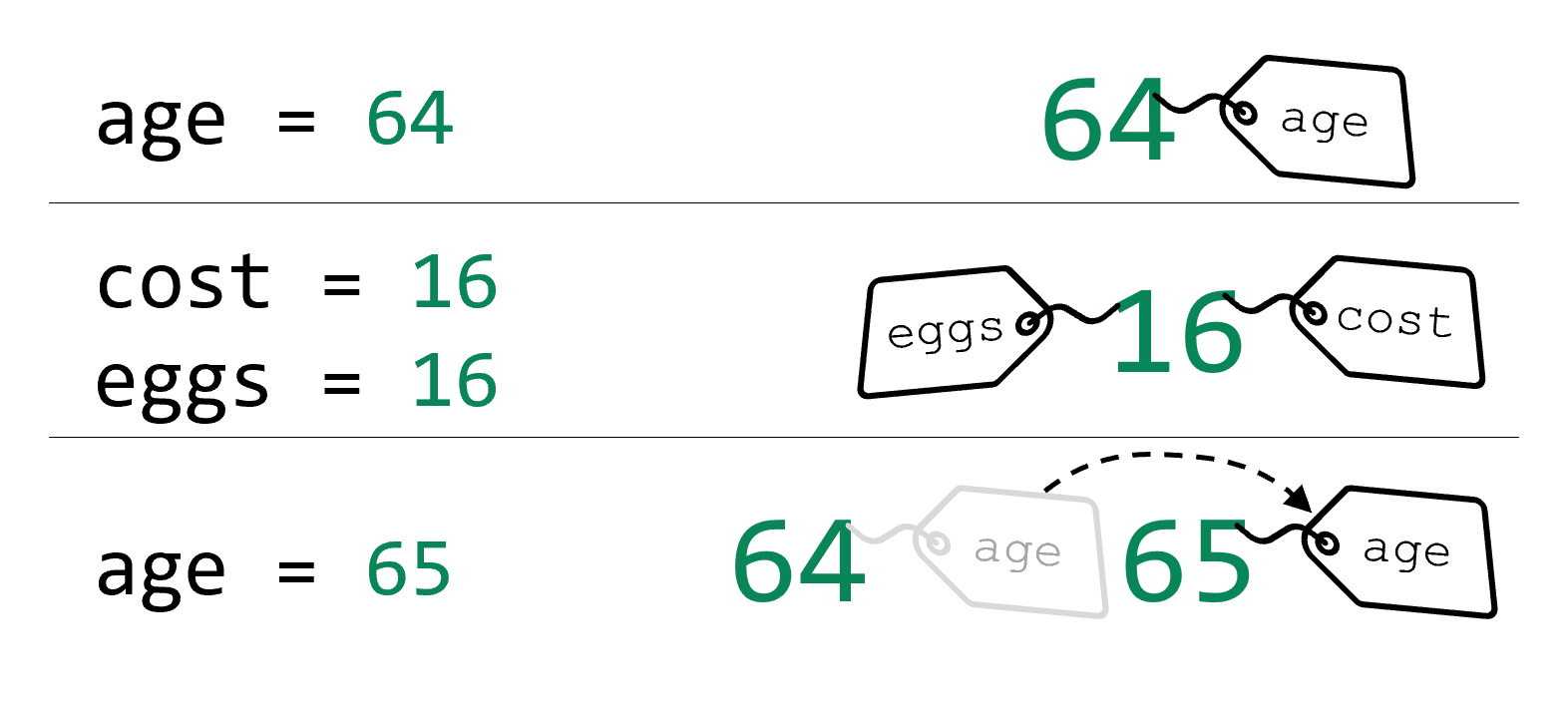
Think of a variable as a label that gets attached to a value. That value could be a number, a string, or any type of data. After the label is attached, we can find out what its value is later. The same value can have multiple labels attached. We can also reattach the label to a different value.
Variables vs. Data
# Printing literal
print(14 * 7)

# Write-and-read variable
age = 14 * 7
print(age)
Anywhere that you use literal data, you can replace it with a variable. In this example, we have extracted the mathematical expression to a variable. This variable can then be used in subsequent lines.
Different from Math
football_score = 0
print(football_score)
football_score = 10
print(football_score)
football_score = 27
print(football_score)
Variables in computing are very different from variables in math. In math, a variable is an unknown that we are solving for. In computing, we always know the value of a variable and we are able to manipulate the value if we want to. A variable changes over time — but only according to instructions that the programmer has written. That means, unlike in math, when you’re programming, you are allowed to change the value of a variable.
Names
# Is this temperature in celsius? Or fahrenheit? Who knows!
temperature = 20

print("The temperature is", temperature)
Variables are defined by their name. Names are crucial in programming and choosing them is an art. Names are best when they are accurate, meaningful, and concise. We use good variable names to communicate clearly — not just with other programmers, but with ourselves when we need to figure out code that we have written. Of course, computers do not understand variable names; their meaning only matters to humans.
Naming Rules
- Names can only have letters, numbers, and underscores.
- Names must begin with a letter or underscore.
There are two rules for naming variables in Python. First, names can only have letters, numbers, and underscores (_). Second, names must begin with a letter or underscore. You can use underscores to serve as spaces between words, since spaces are not allowed in variable names.
Naming Suggestions
- Clear: Understandable without explanation
- Concise: Not too short, not too long
- Correct: Name accurately reflects the value
- Consistent: Same style throughout the program
- Conventional: Matches the style of most other programmers
Although there are only two hard rules, we have five suggestions for good variable names. You might find it helpful to remember them as the Five Cs.
First, variable names should be clear. Someone looking at the variable name should understand its purpose without needing additional explanations.
Second, the name should be concise, meaning neither too long nor too short. A name like temperature_in_degrees_fahrenheit is very clear but very long and inconvenient to type. The name t is very short but totally unclear. Balancing clarity with conciseness is important. A clear and concise name might be temperature or even fahrenheit_temperature.
Third, the name should be correct. Although this may sound obvious, far too often programmers will use a variable that does not accurately describe the data it holds — and refuse to fix it! This makes debugging the code much more difficult.
The last two suggestions are that variable names should be consistent and conventional. Being consistent means having the same style throughout the program, while conventional means the same style as other programmers. When we say style, we mean like using certain abbreviations the same way throughout a program (for example, temp instead of temperature), or using underscores consistently instead of spaces (for example, some other programming languages would write footballScore instead of football_score). There are many other kinds of stylistic choices, but we’ll learn about them later.
Lazy Naming
x = 147
k = x * 2 + 4 - x
print(k)
Many novice programmers don’t understand the value of good variable names. They are eager and excited to write programs, willing to cut corners in their haste. Sometimes, this means they will choose variable names like x or k. What do those variable names mean? Who knows? Certainly not anyone coming to read the code later! Don’t be lazy when picking variable names. Yes, having to do more thinking while coding is unpleasant, but sometimes we have to do hard things.
Summary
- Variables are used to store values in a program for future use.
- Programming variables are a different concept from math variables, since we always know a variable’s value (although that value changes over the course of a program’s execution.)
- Variables have specific naming rules in Python:
- Names must start with a letter or underscore.
- Names must only contain letters, underscores, and digits.
- Choosing good variable names is really important, so you should make the names:
- Correct: Make sure the name is accurate to the purpose of the variable and not misleading.
- Clear: Make sure the name is understandable without further explanation.
- Concise: Make sure the name is neither too long nor too short.
- Consistent: Make sure that all variable names within a program are written in the same style
- Conventional: Make sure that variable names across programs generally follow the same patterns that other programmers use.
- Bad variable names make code harder to read, debug, and share.