More Testing
- Find problems earlier.
- Make it easier to change things later.
- Have more confidence in gluing together code.
Testing is a crucial part of software development. They help you identify errors in code, improve code quality, and ensure that your code behaves as expected as you make changes around the code. Often, you should write tests before you even begin writing a function, to make sure that you understand what the function should do. Of course, the reality is that many programmers skip testing entirely, leading to bugs and issues down the line. Most legacy codebases are not very well tested, making it difficult to change or refactor the code without introducing new bugs.
They say that the best time to plant a tree is twenty years ago. The second best time is now. Writing tests for existing code is a worthwhile process, and will help us identify bugs and make it easier to make changes down the line.
Testing for Coverage
from bakery import assert_equal

def reveal_letter(secret: str, guesses: list[str], index: int) -> str:
    if secret[index] in guesses:
        return secret[index]
    return "_"

# The first character IS in the guesses
assert_equal(reveal_letter("heat", ["h"], 0), "h")
# The second character is NOT in the guesses
assert_equal(reveal_letter("heat", ["h"], 1), "_")
A good starting point for writing tests is to at least make sure that your code has full code coverage. Recall that code coverage is a measure of how much of your code is executed while running your tests. The goal is to have as much of your code covered by tests as possible, ideally 100%. This does not ensure that your tests are thoroughly validating the behavior of your code, but it is a good first step.
In the reveal_letter function shown here, the if statement has two paths: one for when the letter is in the guesses, and one for when it is not.
Therefore, at the minimum, we can write a test for each path.
More thorough tests would check for situations like having an empty list of guesses, having multiple letters in the guesses, and for different possible indices.
We’d also want to consider whether it is worth testing the behavior when the index is out of bounds. Depending on how the function is used and documented, those inputs might be considered invalid, and the function could be modified to handle them more gracefully.
Branch Coverage
from bakery import assert_equal

def is_loss(wrong: int) -> bool:
    return wrong >= 6

assert_equal(is_loss(5), False)
assert_equal(is_loss(6), True)
assert_equal(is_loss(7), True)
A more subtle consideration of coverage is branch coverage, which ensures that all branches of conditional statements are tested.
In the is_loss function, there are two branches: one for when the wrong count is less than 6, and one for when it is 6 or greater.
To achieve branch coverage, we need to test both branches.
This example is meant to highlight that code branches because of conditional expressions, not because of if statements (although if statements are a common way to introduce conditional expressions, and allow more complex branching).
Valid Tests
from bakery import assert_equal
from string import ascii_letters

def check_if_valid_guess(current_guess: str, past_guesses: list[str]) -> bool:
    is_single_letter = not len(current_guess) > 1
    is_letter = current_guess in ascii_letters
    is_not_repeated = current_guess not in past_guesses
    return is_single_letter and is_letter and is_not_repeated

assert_equal(check_if_valid_guess("h", []), True)
assert_equal(check_if_valid_guess("H", []), False)
assert_equal(check_if_valid_guess("1", []), False)
assert_equal(check_if_valid_guess("hello", []), False)
assert_equal(check_if_valid_guess("oH", []), False)
assert_equal(check_if_valid_guess("!", []), False)
assert_equal(check_if_valid_guess("h", ["h"]), False)
assert_equal(check_if_valid_guess("h", ["x", "y", "h"]), False)
assert_equal(check_if_valid_guess("z", ["x", "y", "h"]), True)
A more complicated example of non-if branching is in the check_if_valid_guess function, which has three conditional expressions combined with and.
There are actually 2^3 = 8 possible outcomes for the combination of these conditions: all True, all False, the cases where only one of them is True, and the cases where two of them are True.
However, there are no if statements.
This leaves us with a few different ways of thinking about code coverage. A single test would technically execute every single code pathway, achieving 100% code coverage. We would only need two tests to achieve every possible outcome. A minimum of 8 tests would be needed to cover all the possible value combinations of the conditions. But all of that would still ignore that the individual conditional expressions all have their own interesting cases.
Here we have written 9 tests, sampling a large number of different scenarios that might occur in the game. You should be able to run them yourself. All of these tests are valid, but are they thorough enough?
Edge Cases
from bakery import assert_equal
from string import ascii_letters

def check_if_valid_guess(current_guess: str, past_guesses: list[str]) -> bool:
    is_single_letter = not len(current_guess) > 1
    is_letter = current_guess in ascii_letters
    is_not_repeated = current_guess not in past_guesses
    return is_single_letter and is_letter and is_not_repeated

# Edge case: empty guess
assert_equal(check_if_valid_guess("", []), False)

# ... copy over existing tests too!
When writing tests, it’s important to consider edge cases - scenarios that are not typical but could cause the application to behave unexpectedly.
For example, what happens if a user submits an empty guess?
The empty string is a valid input to the check_if_valid_guess function, even though it is not a valid guess.
If you run this implementation of the function, a very subtle bug is exposed: the empty string returns True!
The reason is that the empty string is not greater than a single character (it is zero characters), it is in the string of ASCII letters (because the empty string is in all strings), and it is not in the list of past guesses (because the list is empty).
The logic for is_single_letter needs to be modified, so that it explicitly checks that the string is just one character long, no more or less. An easy fix is to change the condition to len(current_guess) == 1.
Note that we did not copy over the existing tests. This does not mean that you would delete the other tests. As long as tests are valid, there is no reason to discard them. Always look towards adding new additional tests, not replacing existing ones.
Testing More Complex State
from drafter import *
from bakery import assert_equal

# ...

initial_state = State("", [], 0, 0, -1, 0)

after_index = index(initial_state).state
assert_equal(after_index, State("", [], 0, 0, -1, 0))

level_1 = next_level(after_index).state
assert_equal(level_1, State("heat", [], 0, 0, 0, 0))

first_guess = submit_guess(level_1, "x").state
assert_equal(first_guess, State("heat", ["x"], 1, 1, 0, 0))
Writing tests for pieces of the codebase will help debug smaller parts, but what about testing the entire application? This is where Integration Testing comes in. Integration testing focuses on verifying the interactions between different components of the application to ensure they work together as expected.
We can use our route functions to simulate actually playing the game.
At each step, we capture the state instead of the entire Page content by assigning the result of the route functions to temporary variables, along with some simple attribute access.
This allows us to give symbolic names to the different states in the game, and also allows us to reuse them between the assert_equal tests and the subsequent route function call.
We begin with the same initial state passed into the start_server call.
Then, we call the index, next_level, and submit_guess functions, testing the state at each step.
You can see from the second argument of assert_equal how the state evolves over time as we play the game.
Also note how we pass a second argument to the submit_guess function to simulate the user’s guess.
Testing Critical Points
close_to_heat = State("heat", ["h", "e", "a"], 3, 0, 0, 0)

won_level = submit_guess(close_to_heat, "t").state
# Score increases too
assert_equal(won_level, State("heat", ["h", "e", "a", "t"], 4, 0, 1, 1))

level_2 = next_level(won_level).state
assert_equal(level_2, State("dogs", [], 4, 0, 0, 1))
# FAILURE, predicted answer was
#    State("dogs", [], 4, 0, 1, 1)
# Computed answer was
#    State("dogs", ["h", "e", "a", "t"], 4, 0, 1, 1)
If you try to exhaustively model every possible state of the application, you may quickly find that the number of possible states is too large to test all of them. In these cases, it’s important to identify and test the most critical points in the application - the states that are most likely to cause issues or that are most important to the application’s functionality.
In this example, we show a test for the transition from level 1 to level 2.
This exposes a mistake in the game’s next_level logic, which is not properly resetting the guessed letters.
The correct test demonstrates that the guessed letters list should be empty, but if you ran our application at this point, you would see the shown message that the old letters were retained.
Drafter Tests
assert_equal(submit_guess(State('heat', [], 0, 0, 0), 'h'),
             Page(State('heat', ['h'], 0, 0, 0), [
                Header('Level 0'),
                "Word: h___",
                "Guesses so far: ",
                BulletedList(['h']),
                "Guess a letter:",
                TextBox('guess'),
                Button('Submit', 'submit_guess')
             ]))

# This also works!

guess_page = submit_guess(State('heat', [], 0, 0, 0), 'h')
assert_equal(guess_page.content[0], Header('Level 0'))
assert_equal(guess_page.content[1], "Word: h___")
assert_equal(guess_page.content[2], "Guesses so far: ")
assert_equal(guess_page.content[3], BulletedList(['h']))
assert_equal(guess_page.content[4], "Guess a letter:")
assert_equal(guess_page.content[5], TextBox('guess'))
assert_equal(guess_page.content[6], Button('Submit', 'submit_guess'))
Drafter doesn’t just support testing state, you can also test the entire Page object, including its content.
We saw previously how this could be a little tedious, since you end up writing a lot of boilerplate code to set up the expected Page content for each test.
You can apply a similar trick to accessing the Page content in your tests that we saw with our integration tests.
In the alternate version of the tests shown below, we captured the result of submit_guess and then check each element of the Page content against the expected values.
If you were not interested in testing certain visual aspects of the Page, you could simply omit those checks.
Writing tests for your Drafter routes is a great way to ensure that your application behaves as expected, without having to manually run your application every time you make a change. Although this can be a bit painful up front as you have to figure out what the expected State and Page Content should be for each route, the benefits in terms of catching bugs and ensuring correctness are well worth the effort.
Automatic Drafter Tests
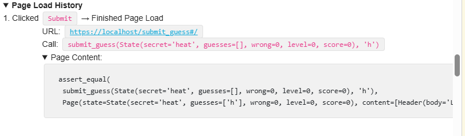
A very nifty feature of Drafter is that interacting with the application generates tests automatically.
If you scroll down to the Page Load History section of its debug area, then you will see all of the routes you have visited in the application so far (starting with index).
As you click new pages, the list of visited routes will update to reflect your navigation.
Even better, if you expand the Page Content section, then it will show you the exact content that was rendered for each route as a prewritten assert_equal test.
If you believe that the behavior is correct, then you can copy and paste this test into your test suite.
Or, if it is at least close, then you can use it as a starting point for your own tests.
A major downside of these automatically generated tests is that Drafter will be more verbose and include more implementation details than you might want in your test suite. Most of these details can be easily ignored, and you will eventually learn what is necessary to include in your tests and what can be left out. For now, you can mostly just ignore the extra output, and focus on the recognizable parts of the test code.
Brittle Tests
assert_equal(submit_guess(State('heat', [], 0, 0, 0), 'h'),
             Page(State('heat', ['h'], 0, 0, 0), [
                Header('Level 0'),
                "Word: h___",
                # What if you removed the colon?
                # All your tests would be invalid!
                "Guesses so far: ",
                BulletedList(['h']),
                "Guess a letter:",
                TextBox('guess'),
                Button('Submit', 'submit_guess')
             ]))
Automatic tests generated by Drafter can be a great starting point, but they can also be brittle.
If you make changes to your application that affect the Page content, then these tests may break, even if the overall behavior of the application is still correct.
This is because the tests are checking for specific content that may have changed, rather than checking for the overall functionality of the application.
When you have a test that is too brittle, it can be more of a hindrance than a help, since it will require you to update the test every time you make a change to the application, even if the change is not related to the functionality being tested.
Ideally, you want to write tests that are robust and flexible enough to accommodate changes in the application’s implementation, while still ensuring that the core functionality is correct. This often involves finding the right balance between testing specific details and testing overall behavior, and may require some trial and error to find the right level of abstraction for your tests.
Summary
- At the minimum, make sure you are achieving 100% code coverage.
- When dealing with conditions, consider all the possible outcomes.
- Never delete valid tests, just focus on adding more thorough tests.
- Test both the happy path and edge cases.
- Think critically about key parts of your application that might need more thorough testing.
- Drafter provides a powerful way to test your application’s state and behavior.
- Integration testing is where you test how different parts of your application work together.
- You can write tests for the entire
Pageobject, or for individualstateandcontentelements. - Drafter’s automatic test generation can save time by creating tests from your interactions, but may include unnecessary details.
- Be cautious of brittle tests that may break with minor changes to the application’s content, and strive for a balance between specificity and flexibility in your tests.