Optical character recognition, usually abbreviated to OCR, is the mechanical or electronic conversion of scanned or photographed images of typewritten or printed text into machine-encoded/computer-readable text. It is a common method of digitizing printed texts so that they can be electronically edited, searched, stored more compactly, displayed on-line, and used in machine processes such as machine translation, text-to-speech, key data extraction and text mining. OCR is a field of research in pattern recognition, artificial intelligence and computer vision.
In this exercise we work with text files of which the lines represent a number of handwritten characters. The manuscript is printed in a font that meets the following conditions:
all lines have the same length (including spaces)
equal handwritten characters are always displayed in the same way
different handwritten characters are never displayed in the same way
the representation of a handwritten character never contain empty columns
there are one or more blank columns between two successive handwritten characters
before the first and after the last hand-written character there are zero or more blank columns
An empty column is a column of the lines with handwritten text consisting only of spaces.
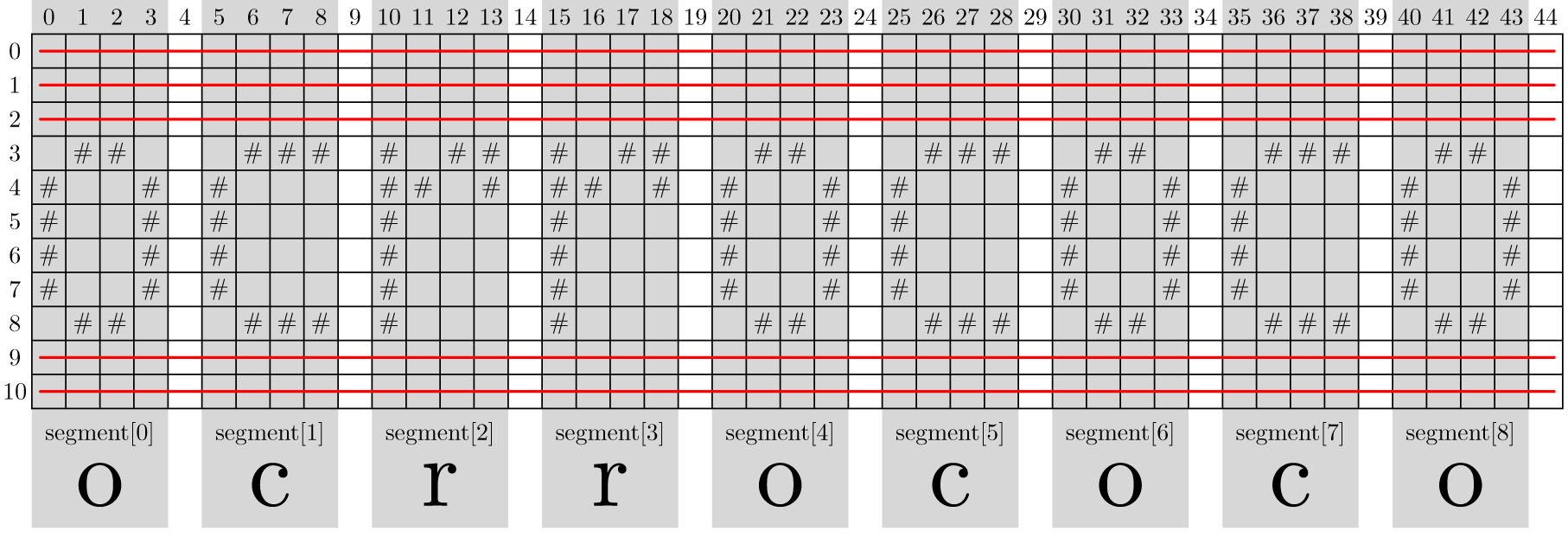
The following example displays the content of a text file that contains a handwritten version of the letters ocrrococo. Click here to view a graphical representation of the segmentation of the text file. These segments are indicated with a dark gray background, and the lines that are not included in the string representation of segments are crossed out with a red line.
 ##   ### # ## # ##  ##   ###  ##   ###  ##
#  # #    ## # ## # #  # #    #  # #    #  #
#  # #    #    #    #  # #    #  # #    #  #
#  # #    #    #    #  # #    #  # #    #  #
#  # #    #    #    #  # #    #  # #    #  #
 ##   ### #    #     ##   ###  ##   ###  ##
The challenge is to convert the contents of the text file to the corresponding series of ASCII characters. To do this, just follow these steps:
OCR often starts with segmenting handwritten text, where the handwriting is divided into individual handwritten characters (in this context referred to as segments). Write a function segmentation to which the location of a text file with handwritten text is to be passed as an argument. The function should return a list of all the segments that appear in the text file. A segment is formed by one or more consecutive non-empty columns which are enclosed between two blank columns. Also consecutive non-blank columns in front and at the end of the text file form a segment. A segment is represented as a string by putting all the rows of the segment after one another and separating them by newline characters. Rows in which all the characters in the original text file are spaces (not only within the segment, but the entire line) are not included in the string representation of the segment. It is the string representation of a segment that should be included in the list that is returned by the function.
Use segmentation to write a function OCR that can be used to convert a handwritten text to to the corresponding ASCII characters. The handwritten text is stored in a text file, of which the location must be passed to the function as an argument. The part of the file location for the first item is a word whose ASCII characters also form the initial characters of the handwritten text. The file ocr.txt yields than for example gives the word ocr. The remaining characters of the handwritten text also occur in the word. The function is required to return a string containing ASCII characters that correspond to the word that is composed of the remaining handwritten characters.
In the following example session we assume that the example file ocr.txt, sportmannen.txt and romanheld.txt are in the current directory.
>>> segment = segmentation('ocr.txt')
>>> segment[0]
' ## \\n#  #\\n#  #\\n#  #\\n#  #\\n ## '
>>> print(segment[0])
 ##
#  #
#  #
#  #
#  #
 ##
>>> print(segment[1])
 ###
#
#
#
#
 ###
>>> print(segment[2])
# ##
## #
#
#
#
#
>>> print(segment[3])
# ##
## #
#
#
#
#
>>> print(segment[-1])
 ##
#  #
#  #
#  #
#  #
 ##

>>> OCR('ocr.txt')
'rococo'
>>> OCR('sportmannen.txt')
'marmer'
>>> OCR('romanheld.txt')
'emerald'
Click on the links below to view a graphical representation of the segmentation of the text files. These segments are indicated with a dark gray background, and the lines that are not included in the string representation of segments crossed out with a red line.