Strings have several operators that can be used on them, just like integers or booleans. In fact, they have some special operators we haven’t seen before. We will learn about five kinds of operations that are valid on strings in Python:
- Addition
- Comparisons
- Membership
- Slicing
- Subscripting
- Indexing
We have already seen related ideas in math for the addition and comparison operators. Now we will also learn about the membership operator and slicing (which is divided into subscripting and indexing operations), which are brand new.
Addition
print("Hello " + "World")
# "Hello World"
Like numbers, you can add two strings together. This puts them side by side in a single new string. This is sometimes called “concatenation.” When adding two strings together you will need to add spaces within the quotation marks; Python will not automatically space the content you are bringing together. Notice in the example above, a space was added after Hello, but could also have been added before World instead.
Comparing strings
# String equality
print("Dog" == "Dog")
# String inequality
print("Dog" != "Cat")
# String ordering
print("Aardvark" < "Zoo")
print("Orange" <= "Apple")
You can test if two strings are equal (==), not equal (!=), or even compare them using less than (<) and greater than (>) operators. This determines which string comes first in the alphabet. Strings that start with “A” come before strings that start with “B,” and strings that start with “B” come before strings that start with “C.”
Membership in strings
# String membership
print("house" in "boathouse")
print("cow" in "cowabunga")
print("y" not in "axes")
print("xe" not in "axes")
There’s another test you can run on strings: the in operator. This simply checks whether the first string appears somewhere in the second. You can also use the not in operator to test the opposite.
Membership rules
# All strings contain the empty string
print("" in "all strings contain the empty string")

# Spaces are characters too
print(" " in "this string contains a space character")
print(" " not in "no_spaces_here")
You might find some of the rules for string membership a little surprising. Remember that symbols, whitespace characters (like the space " "), and digits are all valid characters to test for. The empty string is also a valid string to test and is contained in every string.
Variables in membership tests
# You can use variables containing string values too
word = "apple"
print(word in "applesauce")
print("p" in word)
print("w" not in word)
Keep in mind that you usually will not test if a string literal is inside of another string literal. Instead, you will usually use a variable holding a string value. Do not confuse the variable’s name with the value itself!
Slicing
message = "Hello world"
print(message[0])
Slicing is one of the more powerful and more complex features of strings. When we slice a string, we extract one or more characters from the string. If we only want to get a single character from a string, we call this indexing a string.
Indexing syntax
person_name = "Grace Hopper"
print(person_name[2])
We can index a string value in a variable by using square brackets. Notice the key components: on the left is the name of the variable or the string literal value. Next, we have an opening square bracket. Then, we have a number, which is called the index. Finally, we end with a closing square bracket.
Starting at 0
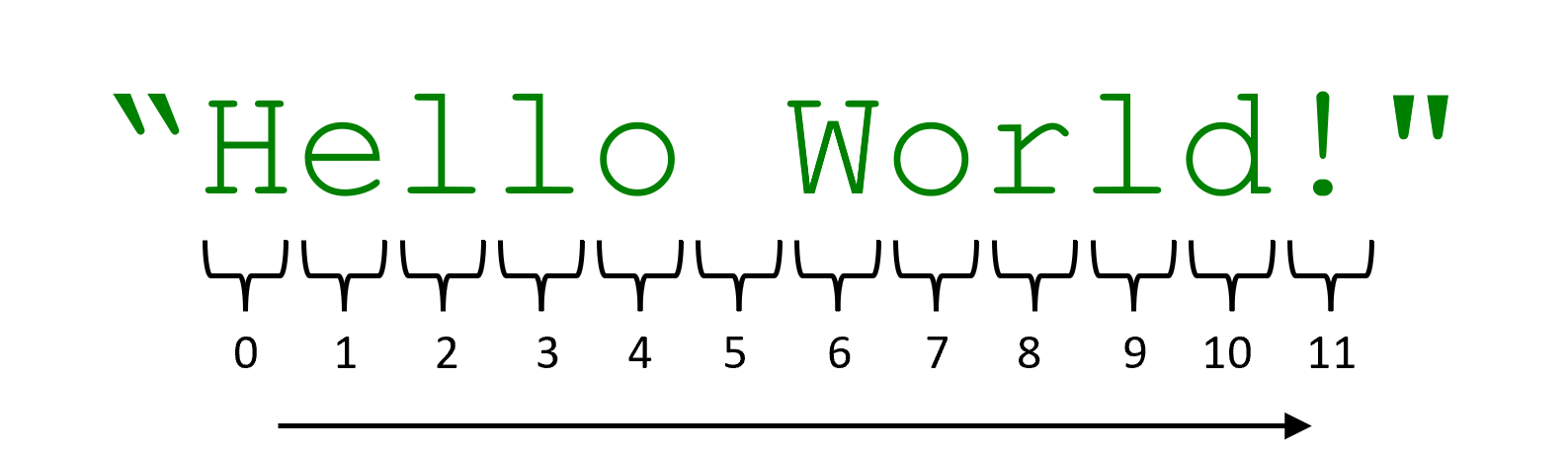
You may be wondering why the first example printed "H" and the second example printed "a". The number inside of the brackets is an “index” and numbers the position of each character in the string. Here’s a weird thing: computers start counting at 0, not 1. So if you want the first character from the string, you need to write 0 instead of 1. There are mathematical reasons why this ends up being more convenient, and it is common in most programming languages, so you should get used to it. Notice that when we are counting the indexes, this includes space characters — they are a part of the string and do take up space!
Subscripting multiple characters
message = "Hello world"
print(message[2:5])
It wouldn’t be too useful to only grab out one character at a time. So you can grab out more than one by using the subscript syntax: putting a pair of numbers separated by a colon inside the square brackets. The first number represents the starting position of the subscript, and the second number indicates the ending position of the subscript. So, this example prints all of the characters after the second character up to (and including) the fifth character ("llo").
Negative subscript indices
word = "hamster"

print(word[-1])
print(word[1:-1])
print(word[-3:])
print(word[:3])
If you use negative numbers in subscripts, you can work from the back of the string. If you use -1, you get the last character. You can combine positive and negative numbers in a range. To go all the way to the start or the end, simply leave that number out. In the example shown here, the first line indexes the last character ("r"). The second line subscripts all the characters after the first up to but not including the last character ("amste"). The third line subscripts the last three characters at the end of the string ("ter"). The fourth line subscripts the first three characters at the start of the string ("ham").
Figuring out subscripts
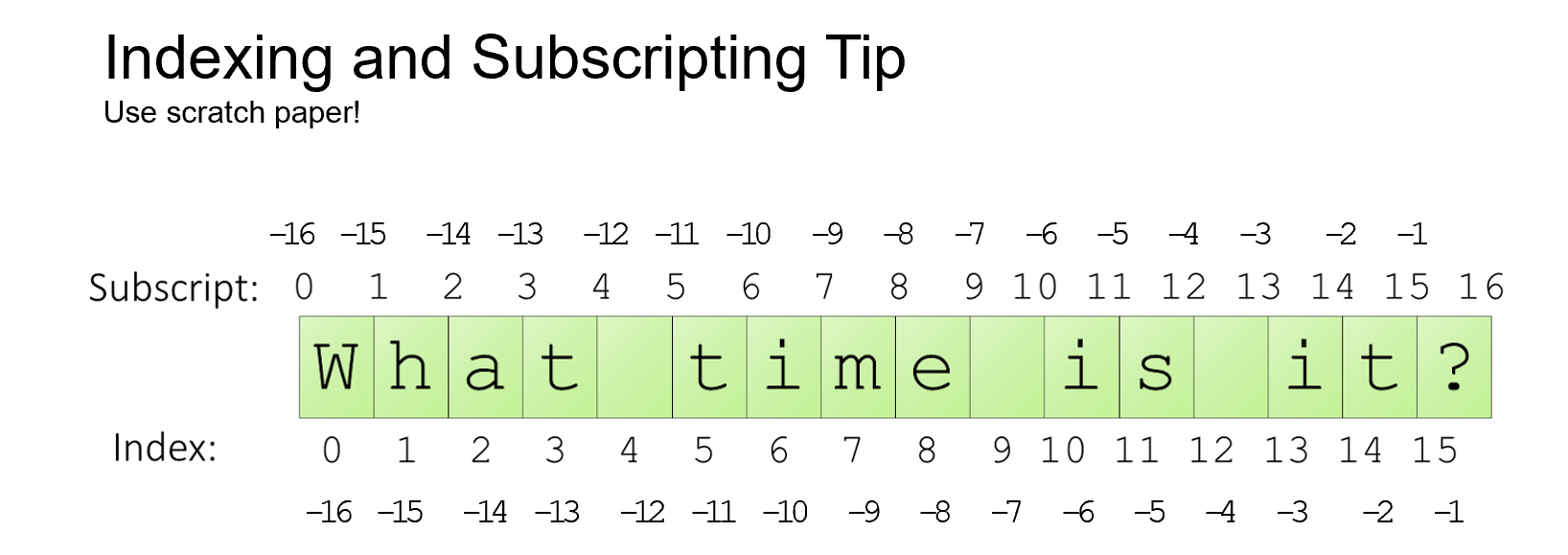
Figuring out subscripts can be quite tricky. If you try to stare at a string and count the indexes by hand, you are almost certainly going to make a mistake. Instead, take out a piece of paper and draw boxes around each character of the string. Then number the boxes. Put indexes directly below the boxes, and subscripts directly between the boxes. You can then quickly check what character a given index corresponds to, or what range of characters is sandwiched between two subscripts.
Summary
- Python has the following string operations:
- Addition (
+) to join two strings together into a new string. - Comparison (
<,>,<=,>=) to test the alphabetical order of two strings. - Membership test (
in) to test if one string is exactly contained inside of another. - Indexing to extract a single character from a specific position in a string.
- Subscripting to extract a sequence of characters from a specific range in a string.
- Addition (
- Subscripting and indexing are both forms of string slicing, which extracts characters from a string.
- Indexes start at 0 in Python.
- Subscripts come in pairs of start and ending positions in the string.
- Negative indices can be used to access elements starting from the end of the string (with -1 being the last character).
- Negative subscripts can be used to select elements from the back of the string.
- Missing subscripts can be used to represent the start and end of the string.
- When trying to evaluate string slices, write the string on paper with each character in a box.
- For indexing, put numbers directly below each box.
- For subscripting, put numbers between each box.