Lists
# List of integers
print([45, 55, 32])

# List of strings
print(["Apples", "Oranges", "Bananas"])

# List of booleans
print([True, False, True])

# Empty List
print([])
The next data structure we will learn about is the list type. A list is a sequence of values of the same type. For instance, you could have a list of numbers or a list of strings. You can even have a generic empty list. Because lists are composed of other values, we say they are also a composite data type.
Element Type
# list[int]
print([45, 55, 32])
Unlike dataclasses, a list is a type, much the same way that int (short for “integer”) is a type. However, the list will also have an element type, which is what the list is composed of. So, if you have a list of integers, its type is “list” and its element type is “integer.” For now, the only kind of list that will not have an element type is the empty list. Since there are no elements, there is no element type.
Defining a List
my_numbers = [45, 55, 32]

print(my_numbers)
We create lists using square brackets on their own. Each value that we want to put into the list is separated by commas. The square brackets are critical to making the value a list; without them, it is not a list.
Square Brackets
# Creating lists with square brackets
values = ["Hello", "World", "!"]

# Subscripting with square brackets
message = "Hello World!"
print(message[1])
We’ve seen square brackets used before when we were subscripting and indexing a string. Confusingly, Python ALSO uses square brackets for creating lists. You might struggle at first figuring out when you’re looking at slicing or list creation. The key is whether the square brackets come AFTER an expression - that means slicing. If the square brackets are on their own, you have a list.
Empty Lists
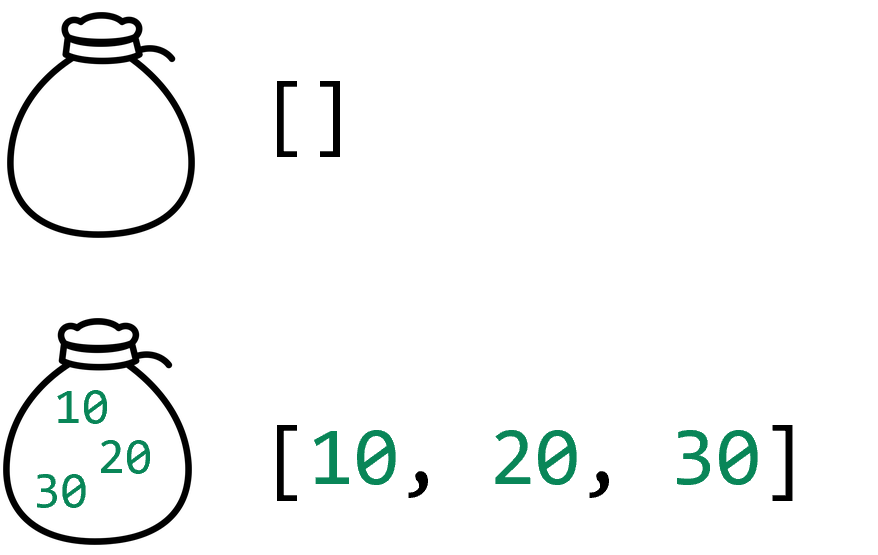
A pair of square brackets with nothing between them creates an empty list. An empty list is like an empty bag: you may not have anything in the bag, but you still have the bag itself. Empty lists do not have an element type until you put something in the list.
Truthiness of Lists
my_money = []
if my_money:
    print("I have some money!")
else:
    print("I have no money.")

your_money = [10, 10, 20, 1, 1]
if your_money:
    print("You have some money!")
else:
    print("You have no money.")
When used as a conditional, a list value evaluates to True unless the list is empty. This matches the truthiness rules for strings. Using the truthiness of lists can be very convenient when writing conditional expressions involving lists. If you want to test if the list is not empty, you just write the name of the variable holding the list.
Printing Lists
names = ["Alice", "Bob", "Carol"]
print(names)
# ['Alice', 'Bob', 'Carol']
When you print a list, you will notice that the square brackets are printed too. In fact, Python prints each value of the list as if that value were a literal value. Notice that the strings have quotes around them now!
We usually only want to print the entire list value when we are debugging code and want to inspect the value of the list. We will learn other ways to print out the contents of a list so that we can avoid having extra characters.
The Box Model
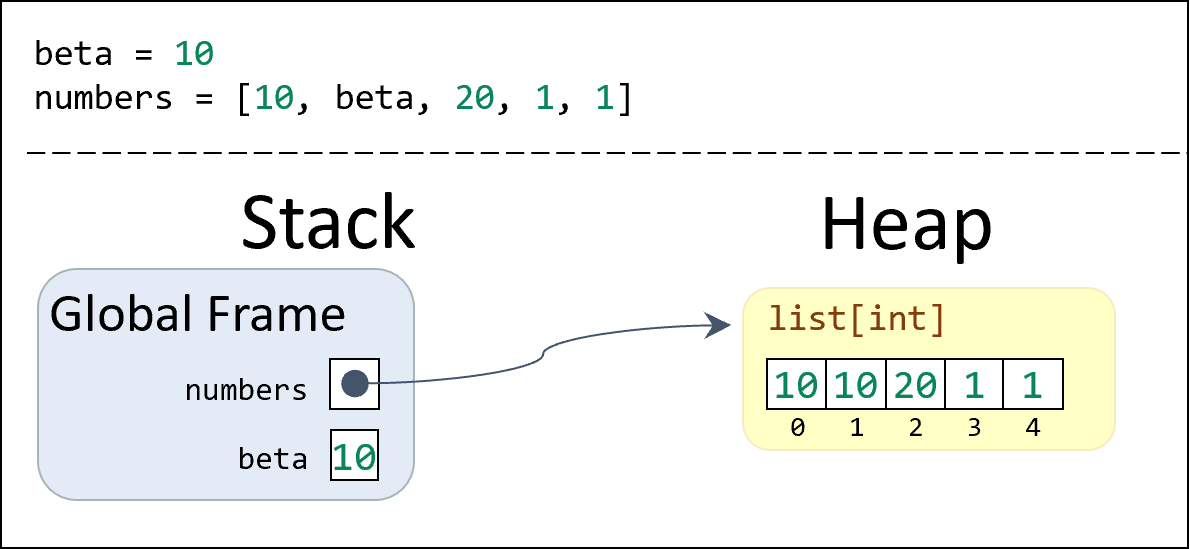
Lists are often shown in diagrams as a row of boxes to help us visualize the data. Each box will have a value inside. The boxes may also have numbers below them, showing the indices of the values starting from zero (just like string indexing). When we store lists inside of variables, we can visualize the data using a stack/heap diagram.
Notice that we draw an arrow from the variable to the list value; when a list is assigned to a variable, we say that the variable points to the given list. Like dataclasses, this is more complex than when we only had primitive values in stack frames where the value was placed directly next to the variable. However, because the list values are kept on the heap, the lists are allowed to grow and shrink in size as needed. But it becomes critical to keep track of the references between the two locations.
List Type
# Function that consumes a list of integers
def add_numbers(numbers: list[int]) -> int:
    pass

# Function that consumes a list of strings
def join_strings(texts: list[str]) -> str:
    pass

# Function that makes a generic list
def make_list() -> list:
    pass
When you define a function, you need to specify the types of the parameters and the return value. If the function consumes a list and you don’t know the element type of the list, you can just use the list type like we would str (string) or int (integer). The left function consumes a list and produces an integer. But if we do know the element type, we include the element type, wrapped in square brackets, after the word list. Following are some examples; we do not know how to implement these functions yet, but they demonstrate how the function headers can be written.
Terminology: Lists Are Not Arrays

Some people use the word array to describe lists. These are slightly different concepts. Basically, an array is like a list, but arrays have a limited size and work at a much lower level of your computer. Python does support arrays, but they are very rarely used (they require an import, like dataclasses do). You are likely to use arrays in other languages the way that you use lists in Python, so it is not surprising that people use the terms interchangeably. Don’t be thrown off if someone refers to a list as an “array,” but don’t use that word yourself! Be aware that they are a different data structure.
Lists in Drafter
from drafter import *

@dataclass
class State:
    items: list[str]

@route
def index(state: State) -> Page:
    return Page(state, [
      Header("Grocery List"),
      "Need to pick up the following",
      BulletedList(state.items)
    ])


start_server(State(["Eggs", "Milk", "Bread"]))
Lists are a really helpful data structure in Drafter. First of all, it is common to return a list of page content instead of a single component (as we have previously been doing with the Div component). Second, some components can natively display lists, like the BulletedList, NumberedList, and Table components.
In this example, we render a grocery list using a BulletedList component. The entire content is actually a list of components, instead of using the Div tag. The end result is largely the same, but using a list is slightly shorter and more convenient.
Testing Lists in Drafter
from drafter import *

@dataclass
class State:
    player1_health: int
    player2_health: int

@route
def index(state: State) -> Page:
    return Page(state, [
        Header("Player Health"),
        "Player 1: " + str(state.player1_health),
        "Player 2: " + str(state.player2_health)
    ])

# Full Test
assert_equal(index(State(100, 50)).content, [
    Header("Player Health"),
    "Player 1: 100",
    "Player 2: 50"
])
# Test whether list has content anywhere
content = index(State(100, 50)).content
assert_equal("Player 1: 100" in content, True)
# Test second item in list
assert_equal(content[1], "Player 1: 100")
Drafter Page objects have a content field, which is usually actually a list of components and strings. The content will be laid out vertically on the page.
When we write tests for Drafter applications, we can check the content of the page by accessing the content field of the Page instance returned by a route function. This allows us to write tests that check the content of the page without having to check the entire structure of the Page instance, which would be more difficult to write and maintain.
In this example, we are checking the content of the page returned by the index route function. First, we do a full test that checks the entire content list. Then, we do a test that checks whether a specific string is in the content list. Finally, we do a test that checks the second item in the content list. All three of these tests are valid ways to check the content of the page, and they demonstrate the flexibility of testing lists in Drafter. Note that the first one will give more complete debugging information if the test fails, but it is also more brittle to changes in the content list. The second and third tests are more robust to changes in the content list, but they may not give as much debugging information if the test fails. They also might be brittle if the content list changes significantly; for example, the third test would fail if the order of the items in the list changed (or cause an error if the list became shorter than 2 items), even if the content was still correct.
Summary
- Lists are a composite data structure that can hold many values of the same type.
- All the values inside of a list should be the same type, which is known as the “element type” of the list.
- List literals are created using square brackets but should not be confused for square brackets used for slicing strings.
- The truthiness of a list is based on whether the list is empty (
False) or not empty (True). - Functions can consume or produce lists, with the parameter and return types being written like
list[int],list[str], or in the case of a generic list, justlist. - Like dataclasses, lists live on the heap, which allows them to grow and shrink to hold any number of elements. We draw arrows from the variable on the stack to the list value on the heap to show the reference relationship.
- Although a related concept, the term “array” is not the same as the term “list”.
- Drafter
Pageobjects can accept a list of components as their content, and some Drafter components also accept lists (e.g.,BulletedList,NumberedList,Table).