Nesting Dataclasses
from dataclasses import dataclass

@dataclass
class Address:
    city: str
    state: str

@dataclass
class Person:
    name: str
    work: Address
    home: Address

ada = Person("Ada", Address("Newark", "DE"),
             Address("Elkton", "MD"))
print(ada)
Just like how dataclasses can be nested inside lists, dataclasses can be nested inside other dataclasses.
This introduces extra complexity but can help organize large complex objects and increase reusability.
In the following example, the Person class depends on an Address class for two of its fields.
This allows us to cleanly separate the parts of an address from the parts of a Person, both in our minds and in our code.
When you print out the entire object, you can see that ada has two different addresses inside.
Order of Definitions
from dataclasses import dataclass

@dataclass
class Person:
    name: str
    work: Address
    home: Address

@dataclass
class Address:
    city: str
    state: str

ada = Person("Ada", Address("Newark", "DE"),
             Address("Elkton", "MD"))
print(ada)
The order in which you define dataclasses matters.
If you try running the following code, you will get an error on the second line of the definition of the Person class.
That definition is expecting the Address class to already exist, so a NameError occurs instead.
The dataclasses must be defined before they can be referenced, at least in Python.
Nested Access
from dataclasses import dataclass

@dataclass
class Address:
    city: str
    state: str

@dataclass
class Person:
    name: str
    work: Address

ada = Person("Ada", Address("Newark", "DE"))
print(ada.work.state)
When you have multiple levels of nested data classes, you still use attribute access to get data inside of the classes. However, you will have to chain the accesses together to get to the desired level. The leftmost part is the name of the variable, and then the name of each attribute is written after a period. Be sure not to use the attribute’s type!
Visualization
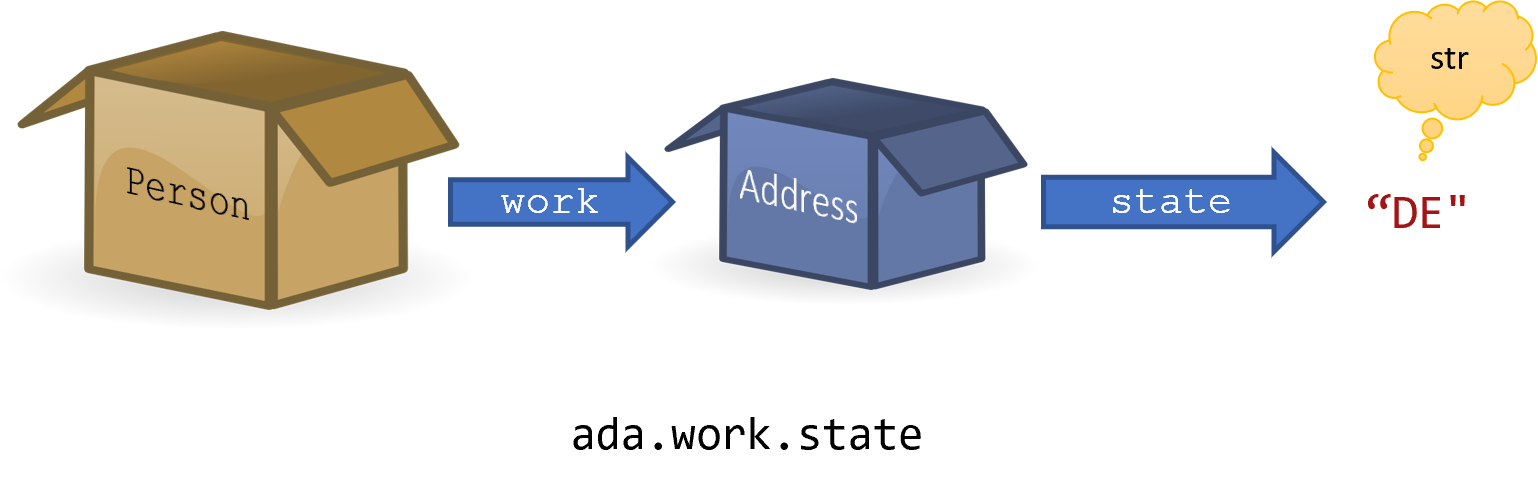
Imagine opening a box and finding another box inside, and then opening that box to find the value you are looking for. Each level of nested dataclass means another box.
Temporary Variables to Unpack Nested Data
from dataclasses import dataclass

@dataclass
class Address:
    city: str
    state: str

@dataclass
class Person:
    name: str
    work: Address

ada = Person("Ada", Address("Newark", "DE"))
job = ada.work  # Introduced a temporary!
ada_state = job.state
print(ada_state)
A temporary variable can help alleviate some of the ugliness of heavily nested classes. Assigning one part of the chained attribute access to a new variable allows you to name that expression and reuse it later. This is especially helpful if you are going to need to use the value stored inside multiple times.
Stack/Heap Diagram of Instances
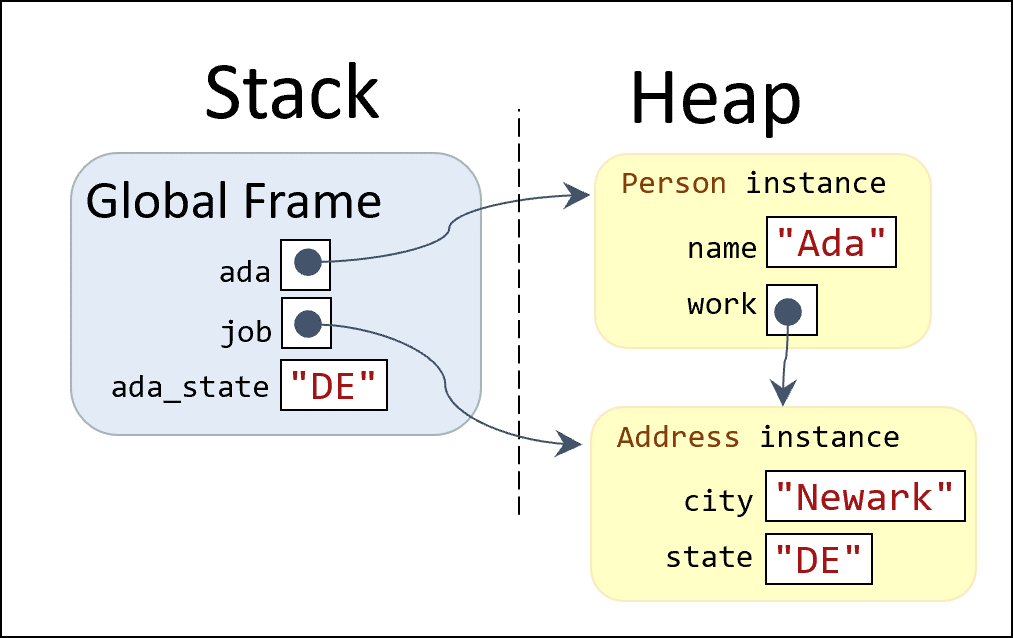
A stack/heap diagram can help explain the relationship between the variables and the instances.
The ada variable points to the Person instance, which in turn has a work field that points to the Address instance.
The job temporary variable also points to the same Address instance.
The ada_state temporary variable got its value from the job.state attribute access, but the rules for primitive types like strings and integers are a little different in terms of references.
Mutating Nested Data
from dataclasses import dataclass
@dataclass
class Address:
    city: str
    state: str
@dataclass
class Person:
    name: str
    work: Address

# Original values
ada = Person("Ada", Address("Newark", "DE"))
job = ada.work
ada_city = job.city
print("Nested access: ", ada.work.city)
print("Direct access: ", job.city)
print("Local variable: ", ada_city)
# Attribute access updates attributes
ada.work.city = "Wilmington"
print("Nested access: ", ada.work.city)
print("Direct access: ", job.city)
print("Local variable: ", ada_city)
# Variable access does not
job = Address("Baltimore", "MD")
print("Nested access: ", ada.work.city)
print("Direct access: ", job.city)
print("Local variable: ", ada_city)
Any changes made to the fields of job (such as changing the value of job.city) would also update ada’s work instance, since they point to the same object on the heap.
The same is true for ada.work.city if the job.city attribute is updated.
However, the ada_city temporary variable does not share a connection with the job.city or ada.work.city references.
Attribute access can modify the value of fields on the heap, but variable updates do not modify those fields.
When we update the job variable to point to a new value, that had no impact on the ada.work field at all.
Instead, the job variable points to a new value on the heap.
The ada_city variable is also unaffected because that variable holds a primitive value on the stack.
Visualizing Mutation
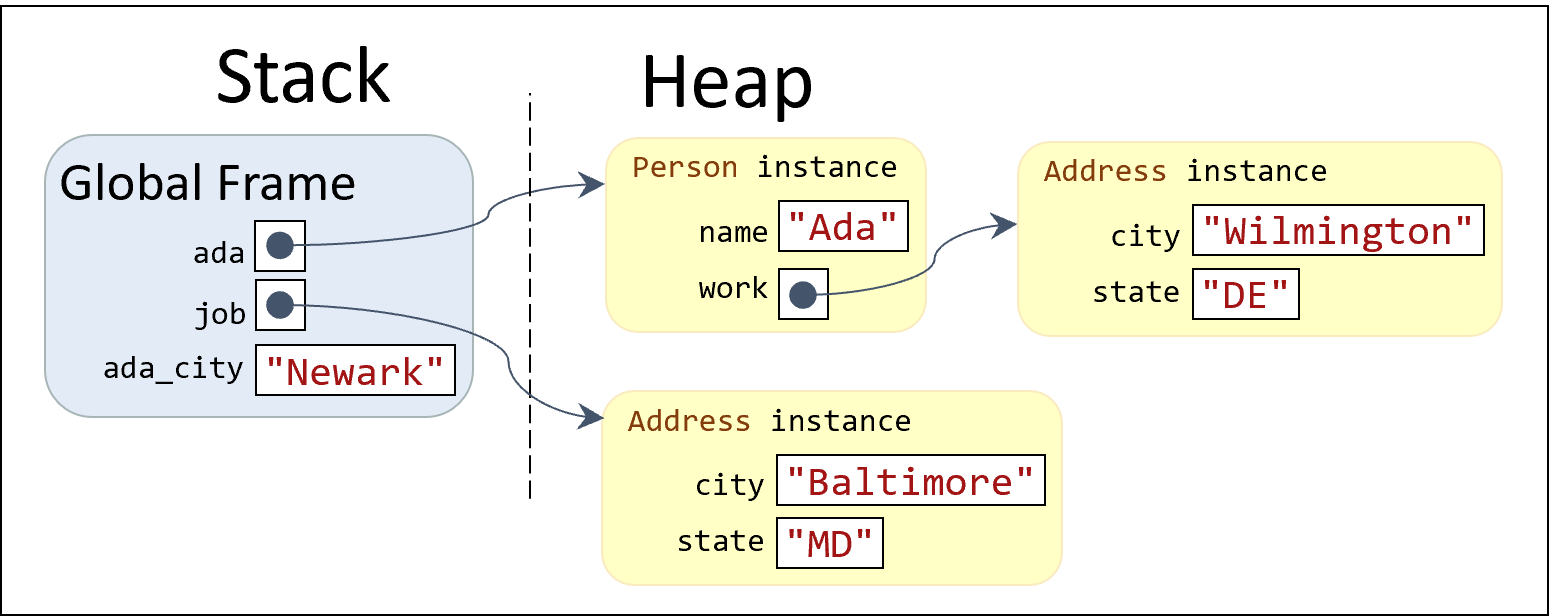
The following Stack/Heap diagram clarifies the new relationships.
The ada variable points to the Ada instance, still.
But the job variable points to a completely different Address instance.
Even if that new instance had the same values as the original Address, the two instances would still be separated.
Notice how the ada_city variable has a different value from either instance’s city field.
Lists in Dataclasses
from dataclasses import dataclass

@dataclass
class Emails:
    user: str
    messages: list[str]

inbox = Emails("adabart", ["HELP!", "Department News",
                           "Hello World"])


print(inbox.messages[1])
As you might have guessed by now, lists can also be nested inside of dataclasses. Lists are just another type, after all, so using them inside of a dataclass is not a big deal. The only part that might feel strange is how you access individual elements of the list. Notice how we must combine the attribute access syntax with the list indexing syntax. All the same rules and operations apply that we have learned so far, they might just look a little funny at first.
How Much Nesting?
from dataclasses import dataclass

# Not good nesting - adds nothing of value!
@dataclass
class Name:
    full_name: str

@dataclass
class Person:
    name: Name

ada_bart = Person(Name("Ada"))
print(ada_bart)
When you are designing your dataclasses, you should reflect on how much nesting you want. Breaking up complex dataclasses into smaller pieces can help make your code reusable and reduce your cognitive load. However, you also must do more levels of attribute access, and it can be difficult to remember where things are. You need to learn to work with the brain that you have and find an appropriate level of depth for the classes.
In this example, we see a Person class that has a name field with a corresponding Name class, rather than being directly a str.
This makes no sense since the Name class only ends up with one field.
But, it might make sense if we were going to add some other fields like first_name, last_name, and nickname to the Name field.
Then we could reuse that structure across other classes that need complex names.
Summary
- Instances of dataclasses can be nested inside of other dataclasses.
- To access values in nested dataclasses, attribute access can be chained together.
- If one dataclass has fields of another type of dataclass, then the dataclasses must be defined in order.
- To reduce the amount of attribute chaining, you can use temporary variables to store references to the nested data.
- Updating variables will not affect the original values of the attributes; only attribute access will update the value stored in fields of a dataclass. Instead, the variables will simply point to new references.
- Lists can also be stored in the fields of dataclasses.
- Dataclasses should only be nested inside of other dataclasses when the extra organization makes the code easier to read and think about, since there is a small extra layer of complexity when accessing nested data.
- However, breaking up complex data into multiple dataclasses can make it much easier to reason about an individual piece of data, so is often worth doing.