Doing Things Multiple Times
costs = [100, 25, 25, 50, 10]

# Without FOR loops
print(costs[0])
print(costs[1])
print(costs[2])
print(costs[3])
print(costs[4])

# With FOR loops!
for a_cost in costs:
    print(a_cost)
The program shown here prints out a list of numbers — each number on its own line—in two different ways.
In the first way, we had to write a print statement 5 times, once for each number.
In the second way, however, we only had to write a pair of statements by using a for loop.
The for loop is an amazingly useful tool that lets us perform an action on each element of a list.
For Loop Syntax
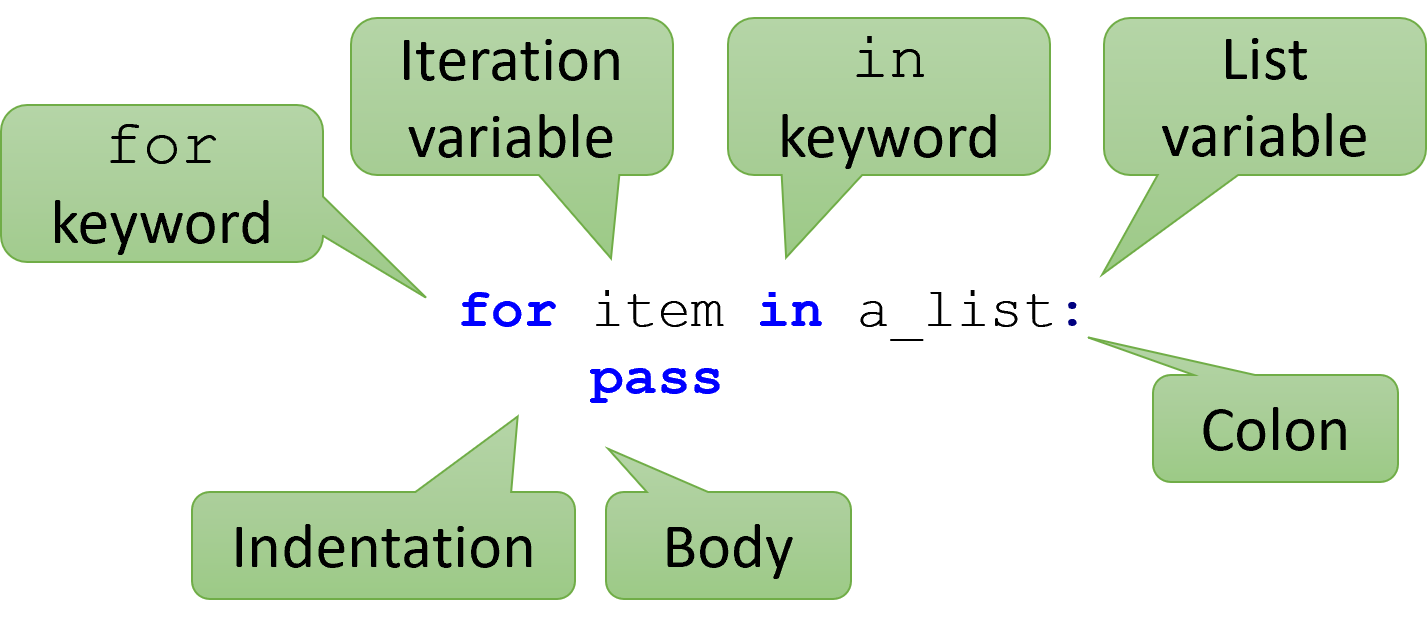
Using the previous example, this is how we write a FOR loop in more detail:
First, we write the word for.
Then we make a new variable named the “iteration variable”.
We’ll come back to this later.
Next, we write the word in.
Then, we put the list variable or value that we want to iterate over.
After that, we need to put a colon (:).
Finally, we put statements inside the body of the loop, indented with 4 spaces.
The first line of the for loop (the parts before the body) is called the loop header.
The diagram shown labels all the parts.
The Iteration List
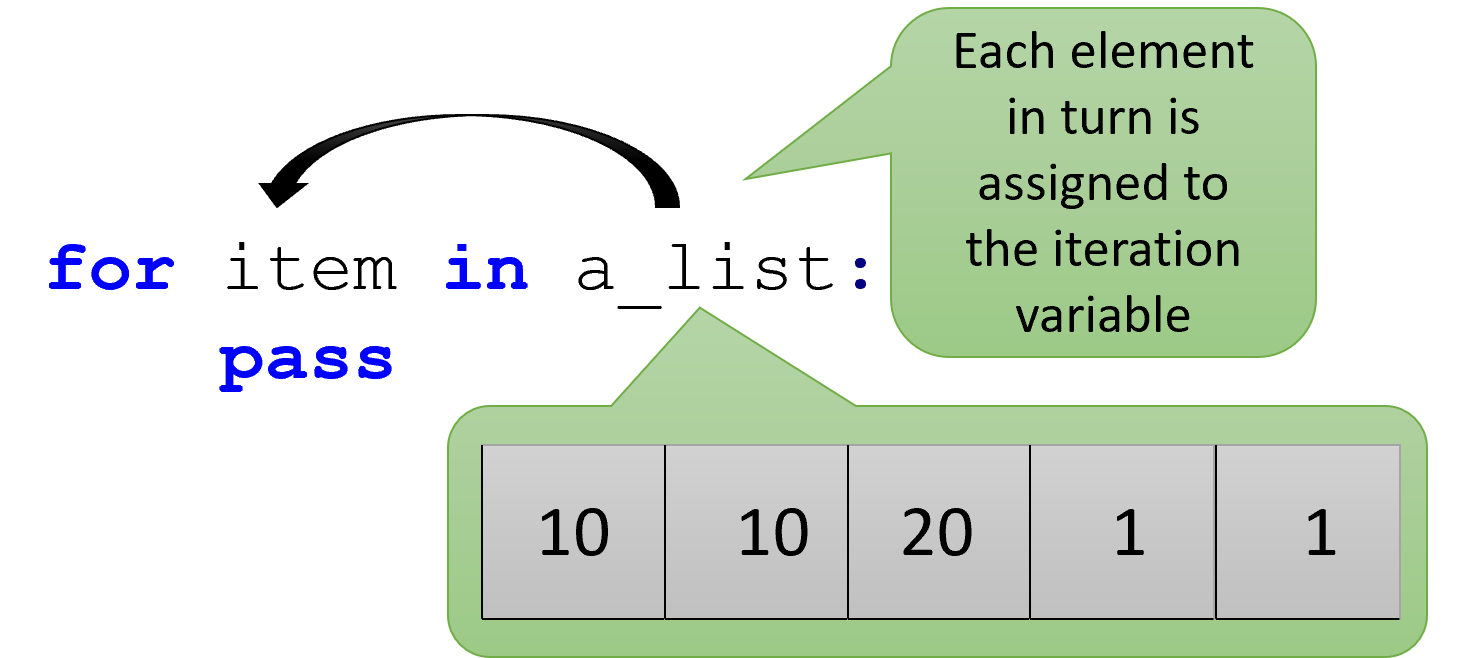
A crucial element of any for loop is the iteration list.
This is the data that we want to iterate over.
When the loop executes, each item of the list will be assigned to the iteration variable in turn.
It doesn’t matter if the list has no items, ten items, or a thousand items; Python will still process each one in turn.
The Iteration Variable
for a_temperature in temperatures:
    pass

for a_book in books:
    pass

for a_name in names:
    pass

for a_fruit in fruits:
    pass
One of the hardest things to understand about for loops is the iteration variable.
The iteration variable represents the generalized version of each item in the list.
If you have a list of temperatures, it is “a temperature”.
If you have a list of books, it is “a book”.
By performing operations on this generalized version of a list item, you can work on the entire list while only having to think about one element at a time.
The iteration variable is sometimes also referred to as the iteration target.
Here are two critical facts to remember about the iteration variable.
First, the iteration variable is created by the for loop when it executes.
Second, the type of the iteration variable is the same type as the element type of the list.
These are some examples of for loops with well-named iteration variables.
The Body
prices = [10, 20, 15]

for a_price in prices:
    adjusted = a_price * .9
    print(adjusted)
# Body ends
Just like an if statement, we can put statements inside of a for loop.
Each statement is indented with four spaces, and each statement will be executed one by one, from top to bottom.
The first unindented line marks the end of the body, just like with functions and if statements.
However, unlike those other bodies, these statements will be repeated again and again, once for each element of the list.
The Flow of a For Loop
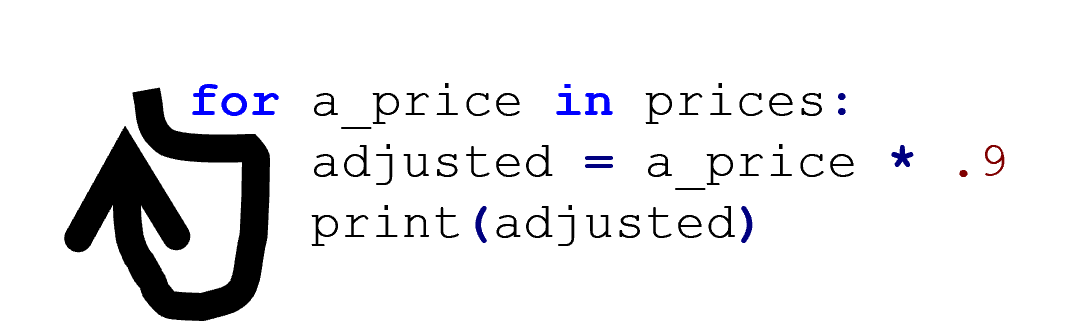
Previously, we said that a program was like a river, running from the top to the bottom. If statements made the stream split into two directions. For loops also make the stream split, but one of the new streams will move back up. This is the crucial idea, and it’s why we call it a loop. The program will LOOP until each element of the list has been assigned to the iteration variable.
The Scope of a For Loop
numbers = [1, 5, 2]
message = "The number is"
for number in numbers:
    print(message, number)
print("The last number was", number)
Unlike functions, for loops do not have their own scope.
Variables defined outside of a for loop can be used inside the loop body.
The iteration variable can be used after the loop has finished.
Nothing special must be done with regards to scope with loops.
Tracing a For Loop
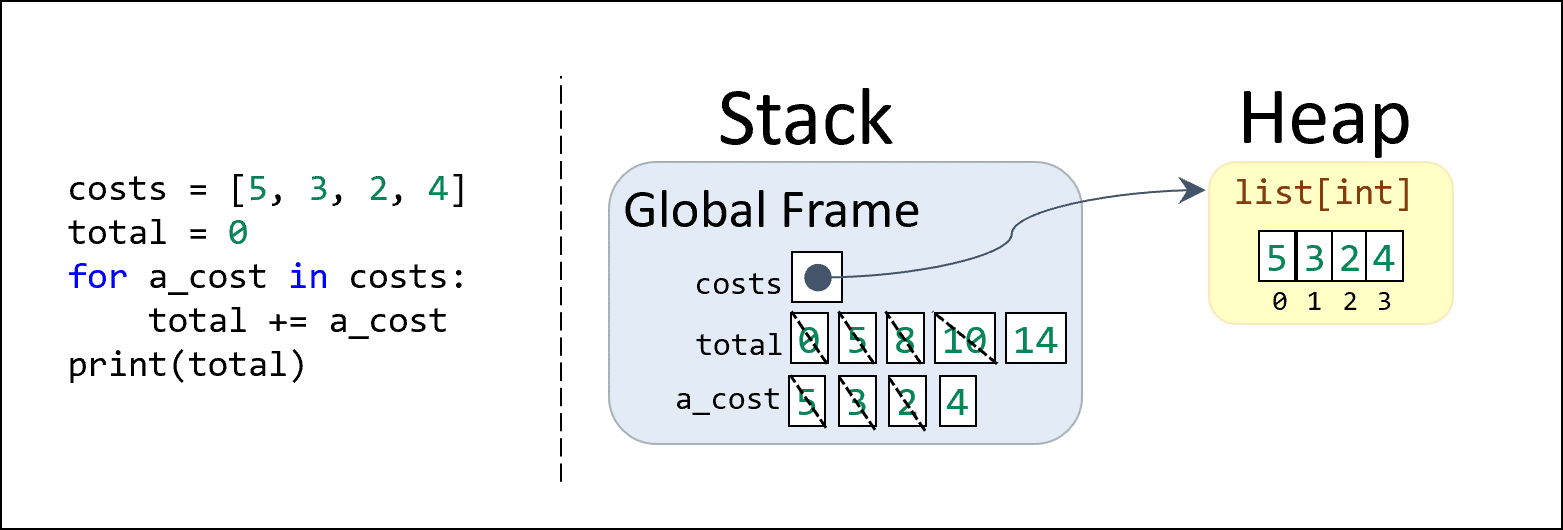
Let’s look at a loop in practice.
The following Stack/Heap diagram shows an iteration over a list, adding each number to a running sum which is finally printed in the end.
The crossed-out boxes in the stack indicate how the values stored in the total and a_cost variables change over time.
The total variable was initially set to 0 before the loop began.
Then, the fourth line (the loop body) is executed 4 times, once for each element of the list.
At the start of each loop iteration, the a_cost iteration variable is updated to reflect the value of the next element of the list (starting with 5, then moving on to 3, then 2, and finally 4 on the last iteration).
Inside the loop, the total variable is updated by taking the current value of total and adding the current value of a_cost.
So, the value changes from 0 to 5 to 8 to 10 and then finally 14.
After the loop is over, all three variables are still in scope (since for loops do not have scope).
Therefore, the final value of total is 14 and the final value of a_cost is 4.
If you are having trouble understanding how the code changes over time, you should consider using a debugger that lets you step through the code one line at a time. A debugger also lets you see the value of each variable at each step. Visually, the current line of code will seem to “jump upwards” to revisit the start of the loop, once for each element of the list.
Summary
- A
forloop allows you to repeat a body of statements once for each element of a list. - A
forloop has two major parts: the header and the body of statements. - The header of the loop has two keywords (
forandin) along with the iteration list and the iteration variable. - During each iteration of the loop, each element of the iteration list will be assigned to the iteration target, one at a time.
- The iteration target is a new variable created by the
forloop whose type will be based on the element type of the iteration list. - The body of the
forloop has one or more statements which will be executed repeatedly during the loop. - After each loop iteration, while there are still more elements to process, the execution will jump back to the start of the loop body and assign the next value of the iteration list to the iteration target.
- Although a
forloop has a body, it does not have a separate scope: variables created inside the loop are available after the loop ends. - Tracing a
forloop is tricky, but a stack/heap diagram can show how the values of the variables change over each iteration.