Questioning a Program
- Is the program correct?
- Is the program readable?
- Is the program fast?
Effective computer scientists try to make the best programs they can, and to do so they must ask reflective, critical questions about those programs. Although there are many kinds of questions to ask, the three most important criteria to ask about are: correctness, readability, and speed.
Criteria 1: Correctness
- Correctness: Whether the program provides the appropriate output for all expected inputs.
Correctness is essential.
An incorrect program will not solve the problem it sets out to solve, and therefore is not useful.
In the context of coding, a problem is defined as the specification of the expected outputs for given inputs.
This is very similar to how we define functions and unit tests.
For example, a coding problem might ask you to “define a function that consumes a list of integers and produces their sum” or “define a function that consumes a string and determines how often the character "X" appears.” Unit tests can be used to determine if a program is incorrect, which is why we have spent so much time learning how to test programs.
Criteria 2: Readability
- Readability: How understandable a program is for humans.
Readability is also very important. Programs usually end up being used for a long time, often longer than they are originally expected to last. Programs created today might be used and extended for decades to come. This is especially true for the massive programs that large teams of developers create together, like web browsers or office applications. These programs will invariably have problems that need to be debugged, new features that must be added, and updates that will need to be made down the road. If a program is not understandable, then the program will be difficult to improve and a lot of time will be wasted in the future. Poor variable names, unnecessarily long functions, and poor decomposition can seriously impede progress.
Criteria 3: Speed
- Speed: How long a program takes to run.
Our final question was “how long does the program take to run?”, which is sometimes known as the time complexity or efficiency of a program. This question is very important, but usually comes after the first two questions are answered. A fast program that doesn’t work is not very useful, after all. Still, programs need to be fast enough to accomplish their goal and to respond to users’ needs. There is no single answer as to how fast a program needs to be—the only answer is “fast enough to get the job done.” A lot of time is wasted by programmers trying to speed up a program when speed was not actually a problem. That time that could have been spent improving correctness, making the program more readable, or working on other problems. However, before we can decide if a program is fast enough, we must have a way to determine how long a program takes to run.
The Length of a Program
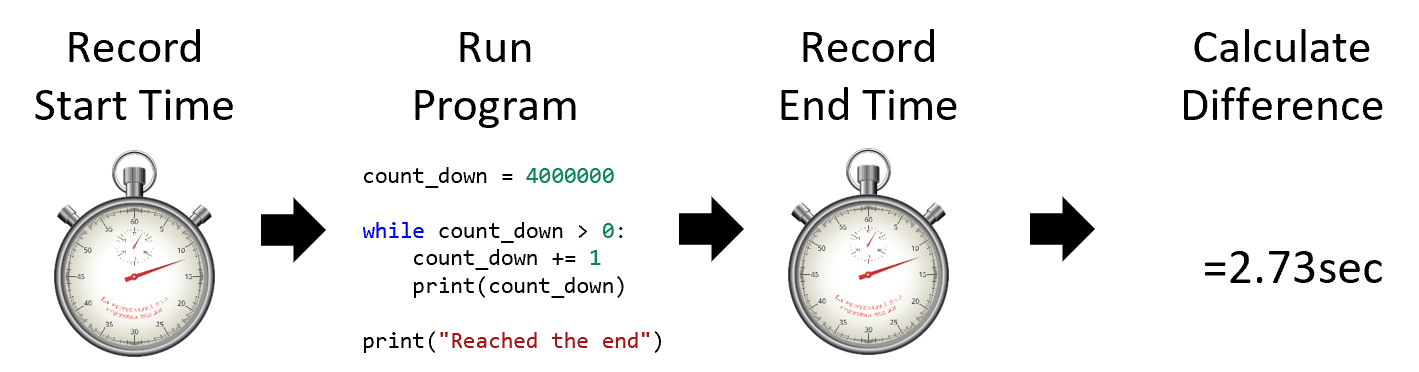
There are several obvious ways to measure the length of a program.
An incorrect way would be to measure the number of lines of code.
With while and for loops, we have seen how even just a few lines of code can do an awful lot of work.
Relying on the number of lines of code as a measure of the length of a program is too limited.
An alternative approach that is much more helpful is to measure the amount of time the program takes to execute. Imagine starting a watch when the program begins and then stopping the watch when it ends. You take the difference between the two times, and that’s the length of the program. This is sometimes called the wall clock time. This is more accurate but the downside is that we must sit and measure our running programs to understand how long they take.
Bigger and Bigger Data
- Empty list (zero elements, tiny)
- A list with one number (small)
- Ten number list (still small)
- One hundred elements (a little bigger)
- A million elements (big)
- A trillion elements (very big!)
- …
Programs are useful because they can be given different inputs each time the program is run and they will deliver the appropriate outputs. With functions, for example, we can change the arguments as long as they still match the general type of parameters we specified. Integers can have higher numbers, strings can have more characters, and lists can have more elements. These different sizes of values reflect the size of the input. Sometimes, the size of the input can have an impact on how long the program takes to execute. If we are adding up the elements of a list, then having more elements to add will take more time. In other words, the time of the program often has a relationship with the size of the input to the program.
Time as an Equation
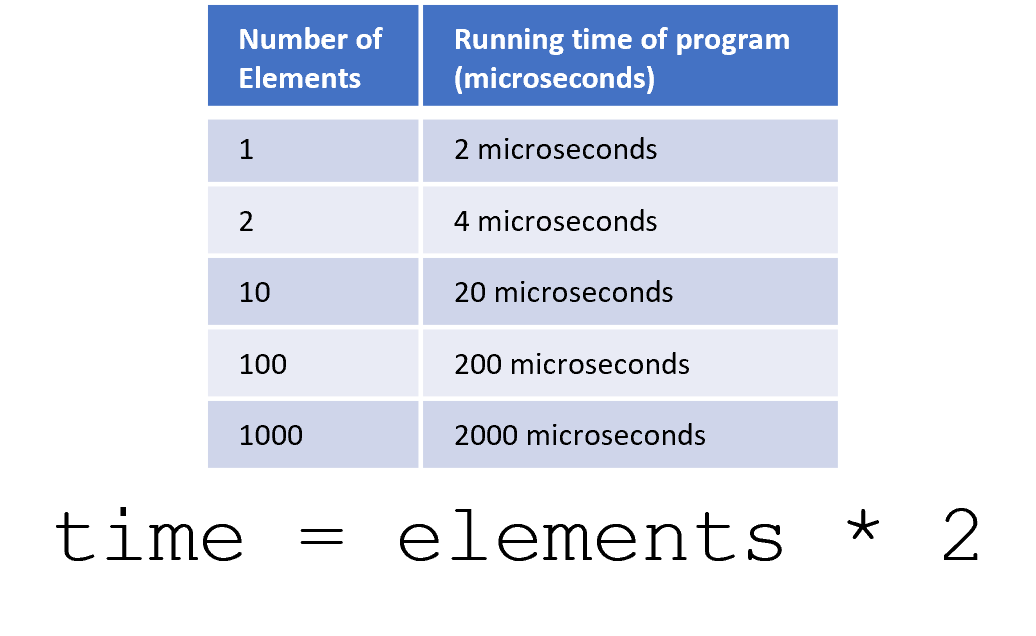
A mathematical function establishes a relationship between one set of values and another set of values, somewhat like a programming function. This mathematical function, or equation, can be determined by analyzing the trend over a bunch of example inputs and outputs. In the table, we match the number of elements with the running time of the program that we measured. Careful analysis reveals that in this case, the relationship is that every new element takes 2 additional microseconds of work. This is a time function and can help you make predictions about how your program would run for different sizes of input.
Of course, in the real world, the trends are rarely so nice and neat. How many datapoints do you need to accurately predict the future? That is a very difficult question to answer. Any time you think you see a trend, the next data point might sink your hypothesis. Ideally, you would gather as much data as possible. Unfortunately, that is still very time consuming.
An Estimate
- Random-Access Machine (RAM) Model: Estimate execution time based on common operations
Measuring the number of lines in a program is easy but very inaccurate. Measuring the time taken with a watch is accurate but could take a long time. If computer scientists had to sit and wait to check the runtime of every program they wrote, they would never get anything done. One approach that acts as a middle path is to make an estimate of the time by tracing the program—but with a simplified model of execution. Computer scientists have developed an approach called the Random-Access Machine Model that does exactly this.
The RAM Model
- Assignment: One step
- Printing: One step
- Math/Logic Expression: One step
ifstatement: One stepforloop: n stepswhileloop: Varies- Function call: Varies
In the RAM Model, most simple actions such as assignment or printing take a single step.
In fact, all math and logic expressions take a single step, too, even if there are many operations inside of the expression.
However, for and while loops are more complicated, as are function calls.
The for loop is not usually so bad, since it usually means that we just must do one additional step for each element of the input.
But with while loops and function calls, we cannot easily predict the time of the program.
This gets even more complicated when we start nesting functions inside of functions or loops inside of loops.
By counting the number of steps using this model, though, we can get an estimate of the program time without waiting around and can figure out a relatively accurate possible mathematical relationship.
Although the RAM Model could be used to try and make exact time functions that precisely capture the number of steps in a program, computer scientists are usually fine with a rough estimate of the relationship.
Common Math Relationships
- Constant: Input size does not affect runtime (simple math, accessing attribute in class)
- Linear: Every additional input value leads to a constant amount of extra time (summing a list, filtering a list)
- Quadratic: Every additional input value leads to a linear amount of extra time (nested list iteration)
In general, we will start off with three basic relationships. There are many other kinds of relationships, one for each possible line you could see on a graph. But for now, we want you to master these three.
The first is a constant relationship, which is when there is no relationship at all between the size of the input and how long the program takes to run. This is common for simple mathematics, accessing attributes in classes, and the actual step of starting a function call.
The next relationship is linear, where every additional input requires another single unit of time. This happens easily with list operations, such as summing or filtering a list. Linear relationships take more time than constant but are usually still useful for most input sizes.
The last relationship we’ll talk about here is quadratic, where the input size increasing means linearly increasing the time required for every element. We see this when we are iterating through a square two-dimensional list. Each time we increase the size by one, we are really adding an entire row of elements—not just a single element. Quadratic growth can get out of hand quite quickly and is usually not a good situation to be in. Ideally, our programs would be constant or linear time, but that is rarely the case for most interesting programs. Some problems inherently require quadratic time or possibly even larger relationships.
A Linear Example
from bakery import assert_equal


def summate(values: str) -> int:
    """ Add up all the numbers """
    numbers = values.split(",")
    total = 0
    for number in numbers:
        total = total + int(number)
    return total

# 1 number, 1 iteration
assert_equal(summate("5"), 5)
# 3 numbers, 3 iterations
assert_equal(summate("1,2,3"), 6)
# 5 numbers, 5 iterations
assert_equal(summate("2,2,2,2,2"), 10)

# N numbers, N iterations
values = input("Enter comma-separated numbers:")
print(summate(values))
Let’s study some programs with different time relationships.
In this first example, the function summate will take in a comma-separated string of numbers and add the numbers together.
For the three test cases, we pass string literals and know exactly how many iterations there will be: one iteration for each number.
For the final call at the bottom, we do not know exactly how many numbers the user will enter, so we do not know how many iterations there will be.
It might be a few elements, or it might be a tremendous number of elements.
Either way, that for loop is going to have to execute another assignment statement for each element that we have in the list.
So, in the end, we’ll do a linear amount of work based on the input given by the user.
A Quadratic Example
from bakery import assert_equal


def count_pairs_10(values: str) -> int:
    """ Count pairs that add up to 10 """
    numbers = values.split(",")
    pairs = 0
    for number in numbers:
        for other_number in numbers:
            if int(number) + int(other_number) == 10:
                pairs = pairs + 1
    return pairs

# 1 number, 1 iteration
assert_equal(count_pairs_10("3"), 0)
# 3 numbers, 9 iterations
assert_equal(count_pairs_10("1,4,6"), 2)
# 5 numbers, 25 iterations
assert_equal(count_pairs_10("1,4,6,8,9"), 4)
# N numbers, N*N iterations
values = input("Enter comma-separated numbers:")
print(count_pairs_10(values))
In the next example, the function count_pairs_10 also takes in a string of comma-separated numbers.
Instead of just adding them up, the function uses a nested pair of for loops to iterate through each possible pair of numbers.
If the two numbers added together equal 10, then the pairs variable is incremented.
Each number is eventually compared to every other number.
As an example, consider the test case "1,4,6":
In the first iteration, the number 1 is compared against 1, 4, and 6 (but none equal 10).
On the second iteration, the number 4 is compared against 1, 4, and 6 (and 4+6 make 10).
On the third iteration, the number 6 is compared against 1, 4, and 6 (and 6+4 make 10).
So, after the nine total iterations (3*3), the result is 2.
The relationship between the number of elements in the string and the number of iterations is quadratic (a number raised to the power of two).
Specifically, for n elements, there will be n*n iterations (n**2).
Key Points about Time Complexity
- Input size relates to program time.
- Basic relationships are constant, linear, and quadratic.
- The RAM Model can be used to estimate relationships.
- Wall clock can be used to statistically determine relationships.
We are merely scratching the surface of the concept of time complexity, and you will see this concept many more times on your journey to become a computer scientist. There are also many more time relationships besides constant, linear, and quadratic. For now, focus on understanding how different input sizes can lead to different runtimes. Get a handle on the relative sizes of the different relationships. You can use the RAM model to estimate those relationships based on what the code does. And when in doubt, try running the program with different sizes and measure the speed to estimate the relationship yourself.
Summary
- The three primary criteria to evaluate a program are:
- Correctness: Does the program return the correct value given a certain input?
- Readability: Is the program understandable to a human?
- Speed: How fast does the program take to execute?
- Program speed is not necessarily related to the number of lines in the program but instead what the lines of code do.
- A wall clock can be used to measure the execution time of a program.
- Input size can be related to how long a program takes to execute.
- Three basic time relationships are constant, linear, and quadratic (in descending order of speed).
- The RAM Model can be used to estimate the relationship between the input size and the number of steps that the program will take to execute.