Doing Stuff with Lists
- Indexing
- Subscripting
- Equality Test
- Membership Test
- Appending
- Popping
Lists are very similar to strings, and many of the operations you can do on a string you can do on a list. In particular, the slicing and membership tests are quite similar. Equality comparisons are also similar, although order comparisons do not work. Lists are also able to be mutated, unlike strings, leading to the appending and popping methods.
Indexing a List
names = ["Alice", "Bob", "Carol"]
# Second element
print(names[1])   # Bob

numbers = [10, 20, 30, 40]
# First element
print(numbers[0])    # 10

# Last element
print(numbers[-1])   # 40

# List creation AND indexing
print([2][0])
Much like strings, you can use square brackets to access a specific element of the list. Notice that the syntax is the same, including the fact that we start counting from zero and can use negative numbers to access elements from the back. Do not be confused by the square brackets here - when they are first, they are list creation. When they are second, they are list indexing.
Subscripting a List
names = ["Alice", "Bob", "Carol"]
# Second until end
print(names[1:])
# ["Bob", "Carol"]

numbers = [10, 20, 30, 40]
# Second until fourth
print(numbers[1:3])
# [20, 30]

# Second to last until end
print(numbers[-1:])
# [40]
Much like strings, you can use a colon and square brackets to access a range of elements from a list. The rules are the same as for strings: the first number is the starting index, and the second element is the ending index. If you skip the first number, it will assume you want to start from the beginning. If you skip the second number, it will assume you want to stop at the end. And again, negative numbers work just as well.
Numbered Box Approach
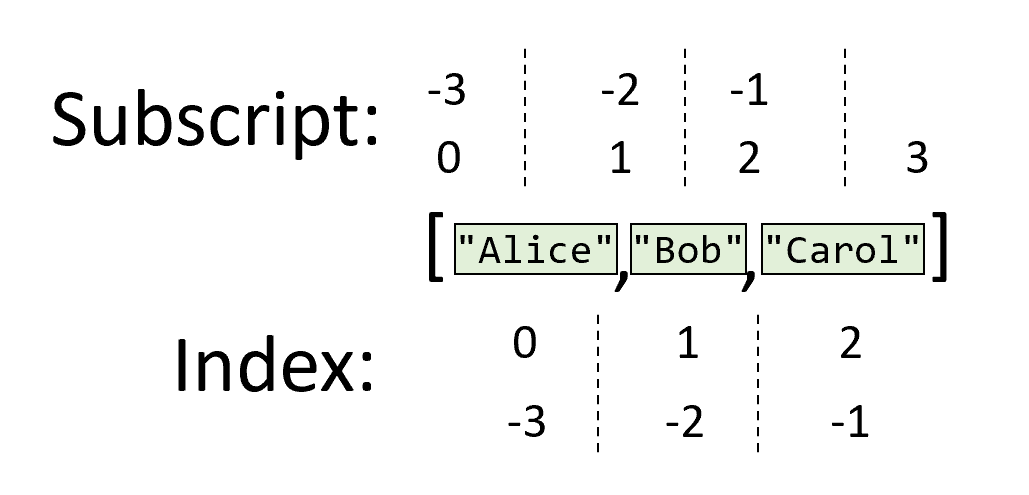
Remember, if you are struggling to calculate an index or subscript, write down the elements in boxes with numbers below for indexing or between for subscripting.
List Equality
points = [10, 30, 20]
alt_points = [10, 30, 20]
ordered = [10, 20, 30]
text_points = ["10", "20", "30"]

print(points == alt_points)
# True

print(points != ordered)
# True

print(points != text_points)
# True

# print(points < 5)
# Error
You can test if two lists are equal using the == operator. This will only produce true if both lists have the exact same elements in the exact same order. The != operator can be used to test if the two lists are not equivalent. However, you cannot use the order comparison operators (<, >, <=, and >=) with lists.
List Membership
names = ["Alice", "Bob", "Carol"]

print("Carol" in names)
# True

print("Ellie" in names)
# False

print("Car" in names)
# False

print("David" not in names)
# True
Much like strings, you can ask if a list has a specific value in it. The in operator has a list on the right, and then any kind of value or variable on the left. There is also a not in operator to determine the inverse. Note that the operator matches exactly. In the example code shown here, the string "Car" does not match "Carol" because it’s not an exact match.
Appending to a List
colors = ["red", "blue", "green"]

colors.append("cyan")

print(colors)
# ['red', 'blue', 'green', 'cyan']

# This will cause an error!
print(colors + 'yellow')
You cannot add elements to a list using the + operator. Instead, you must call a method of the list, called append. The word “Append” means “add to the end”. Append lets you add one thing to the end of the list. The append method returns None, so be careful not to assign it back to the variable.
Technically, you can combine two lists using the + operator, but we will avoid this syntax since it produces a new list instead of updating the old list. Frequently, we find that beginners will mistakenly create a new list when they wanted to update an existing one, and keeping track of the new lists can be quite difficult.
Pop from a List
colors = ["red", "blue", "green"]

last_color = colors.pop()

print(colors)
# ['red', 'blue']
print(last_color)
# green

# This will cause an error!
print(colors - 'blue')
You can also remove one thing from the end of the list using the “pop” method. You will not need to do this too often in this course, because removing things from a list can be a little tricky. Just remember, you cannot remove items from a list with subtraction (-).
Summary
- You can use square brackets to slice a list:
- A single index will give you a single value from the list.
- A pair of subscripts will give you a list of elements from the list.
- You can test if two lists are equal (
==) or not equal (!=) using the equality operators. - You cannot use the order comparison operators with lists (
<,>,>=,<=). - You can test if a value is inside of a list using the membership operator (
in). - You can use the
popmethod to remove elements from the ends of lists and theappendmethod to add elements to the end of a list.