Learning goals
- Explain what the
draw_rectangle()function does.- Use its position, size, and color information.
- Draw a filled rectangle with the turtle.
Flag drawings often use rectangles. A function lets you draw one rectangle, then use it again with different sizes and colors.
What information does the function need?
The function below takes four required values and one optional value:
def draw_rectangle(x0, y0, width, height, color="lightgray"):
x0 and y0 give the rectangle’s top-left position. width and height set its size. The optional color sets its fill color. If you leave it out, the rectangle is light gray.
How does the function draw?
Here is the full function:
import turtle as otto


def draw_rectangle(x0, y0, width, height, color="lightgray"):
    otto.penup()
    otto.goto(x0, y0)
    otto.pendown()
    otto.color("black", color)
    otto.begin_fill()
    for _ in range(2):
        otto.forward(width)
        otto.right(90)
        otto.forward(height)
        otto.right(90)
    otto.end_fill()
The turtle lifts its pen before moving to (x0, y0). This stops it drawing a line from its old position.
The turtle starts facing right. From the top-left corner, it draws the top edge first. It then turns right and draws a side.
The for loop repeats these steps twice. That draws all four sides. begin_fill() starts filling the shape. end_fill() finishes the shape and fills it.
color("black", color) sets the outline to black and the inside to the chosen color.
How do you use the function?
After the definition above, call the function with a starting point, size, and color:
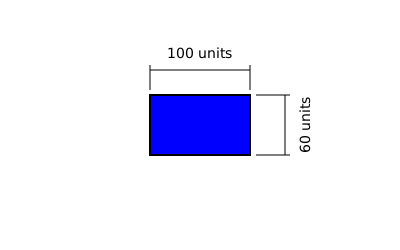
draw_rectangle(-50, 30, 100, 60, "blue")
This draws a blue rectangle with a black outline. Its top-left corner is (-50, 30). It is 100 units wide and 60 units high.
To use the function in a program, put its definition before the function call.
Summary
draw_rectangle(x0, y0, width, height, color)
| Part | What it does |
|---|---|
x0, y0 |
Set the rectangle’s top-left position. |
width |
Sets how wide the rectangle is. |
height |
Sets how tall the rectangle is. |
color |
Sets the fill color. It defaults to "lightgray". |
penup() |
Moves to the starting point without drawing a line. |
begin_fill() and end_fill() |
Fill the finished rectangle. |