Defining Recursion
- Recursion: A process in which the result of each repetition is dependent upon the result of the next repetition.
- If you still don’t understand, go see the definition of recursion.
Recursion is another approach to looping, where each repetition is dependent upon the result of the next repetition. By solving the next version of a problem, which will be smaller than the current problem, you can solve the current problem. The trick is that at some point, you must solve a version of the problem that is so small that the problem is trivial. At that point, you stop the repetition and “unwind” the result back.
Recursion in Code
def add_numbers(current_number: int) -> int:
    # Branch
    if current_number <= 0:
        # Base case
        return 0
    # Recursive case
    next_value = add_numbers(current_number-1)
    # Combine
    return current_number + next_value

print(add_numbers(10))
Recursion is a powerful idiom in code for solving certain kinds of problems.
The key part of recursive code is a function that calls itself in its own definition.
The following add_numbers function calls itself on the sixth line of its own body.
This may seem impossible since it would imply that the function will just keep calling itself repeatedly or that the function would execute before it’s finished being defined.
You must understand two things.
First, successful recursion always requires an if statement or other kind of loop to terminate correctly.
Second, function definitions happen before function calls, and the body of the function is NOT executed during the definition.
If things still seem murky, don’t worry, because we’re going to look at recursion quite a few ways before we’re done.
Recursive Art
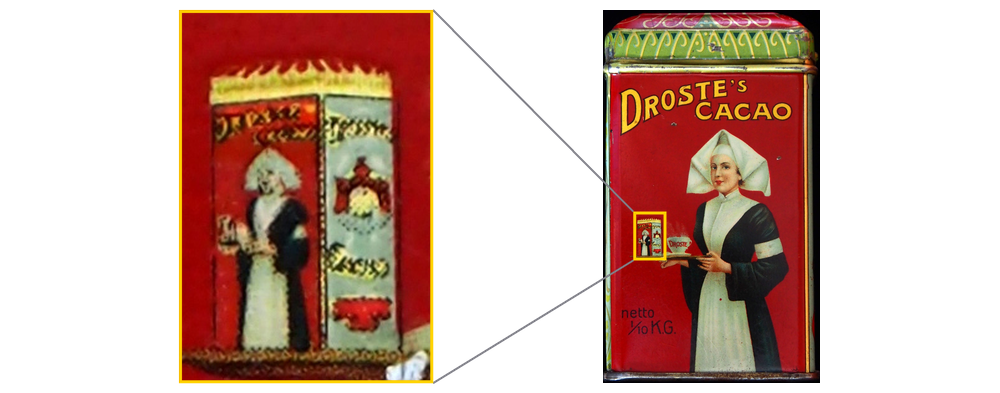
Recursion sometimes demonstrated in art, as represented in the drawing on the left of a pair of hands drawing another picture of the same scene. In the smaller picture being drawn are a smaller pair of the same hands drawing a smaller version of the same picture. That smaller picture contains yet another pair of smaller hands drawing an even smaller version of the picture, and so on and so on. Additionally, we see the painting on the right: an artist draws a painting, and then another artist draws a painting of the original artist holding their painting. Then, another artist draws a painting of the second artist holding the original artist’s painting. The images get smaller and smaller but eventually terminate at some finite size. At least, as far as we can see.
Recursive Work
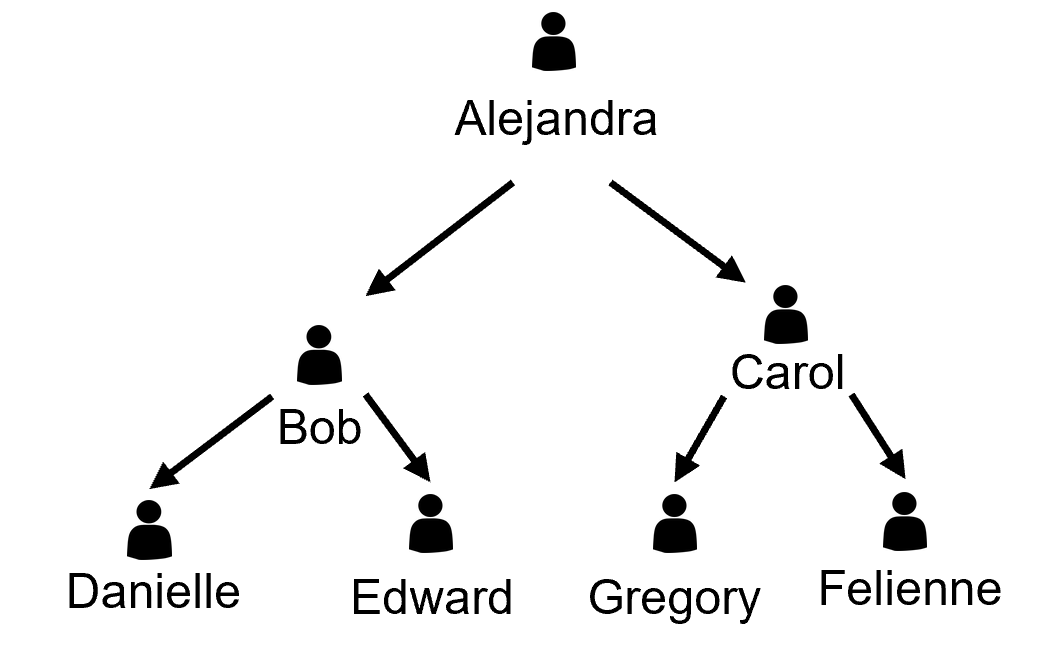
Now let us consider an alternative scenario where we are hiring someone to complete a job. We hire Alejandra, who in turn hires two subcontractors Bob and Carol to do the work. Bob then hires two sub-subcontractors, Danielle and Edward. Meanwhile, Carol hires two sub-subcontractors of her own, Gregory and Felienne. Eventually, we reach a level where folks get the job done. When they finish, they report back to their bosses, who in turn report back to Alejandra. By carefully breaking down the work, each individual job is quite small although we have a lot of employees.
Tree Vocabulary
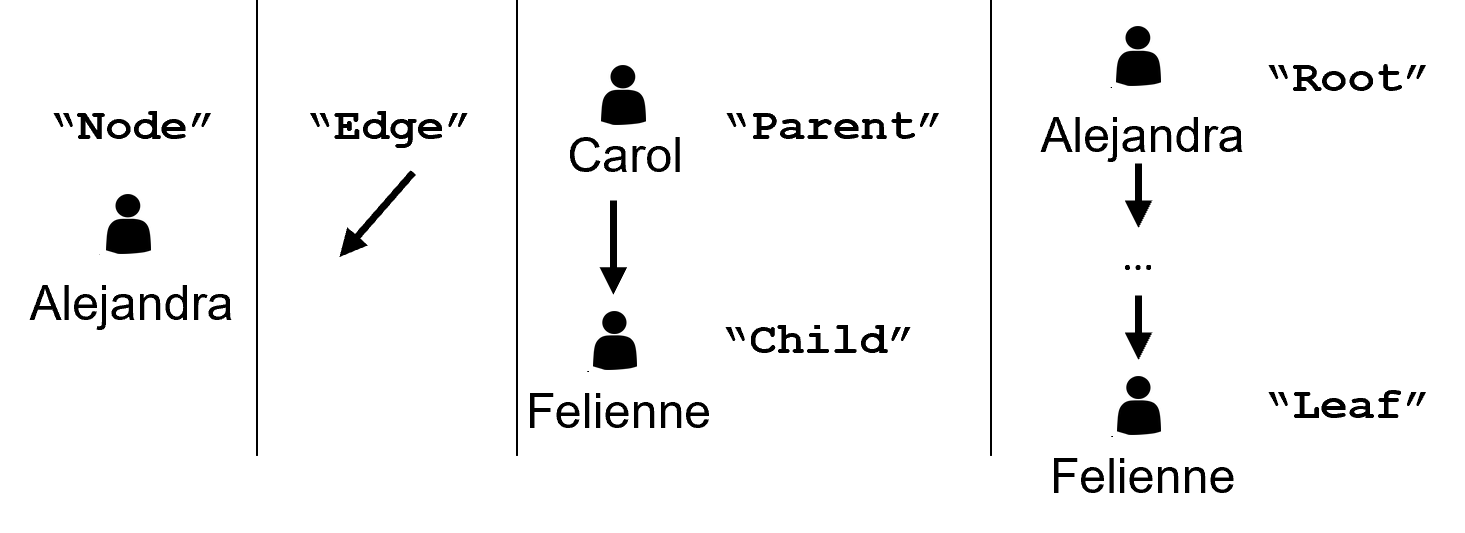
In coding, this type of structure is called a tree, where the structure repeats itself as you go downwards. Trees are composed of individual nodes, and each node has zero or more edges below it. These edges connect parent nodes to their child nodes. The nodes at the bottom of the tree without any children of their own are called leaf nodes. The node at the very top is called the root node.
Trees in Python
from dataclasses import dataclass

@dataclass
class Tree:
    pass

EMPTY = Tree()

@dataclass
class BinaryTree(Tree):   # <-- Note (Tree) part!
    value: int
    left: Tree
    right: Tree
There are many ways to represent trees in Python, but we will start with one that uses dataclasses.
First, we define a dataclass without any fields named Tree.
That dataclass is used to create a special Tree instance stored in a constant named EMPTY, which will represent an empty tree with no children.
Notice that we call the constructor without any arguments since there is no data stored in the empty basic Tree.
Then comes the more important and interesting definition for a BinaryTree.
The word binary here refers to how all our trees will have exactly two children, represented by the left and right fields of the BinaryTree dataclass.
The third field is the actual data for an individual node in the tree, which we will call value.
Finally, we want to draw your particular attention to the parenthetical Tree in the header of the BinaryTree class definition.
This extra code is critical to making the structure work via inheritance.
Non-recursive Inheritance
from dataclasses import dataclass

@dataclass
class Media:
    name: str

@dataclass
class Movie(Media):
    duration: int
    frames_per_second: float

@dataclass
class Book(Media):
    pages: int
    hardcover: bool

print(Book("Wizard of Oz", 272, True))
print(Movie("Wizard of Oz", 112, 30.0))
Inheritance has nothing to do with recursion.
Inheritance is a powerful feature of classes that allows us to reuse fields and functionality between related dataclasses.
This is also useful for describing related types of objects.
In this example, since we put Media inside parentheses in the headers of both Movie and Book, we have established an inheritance relationship.
That means that all books are media, and all movies are also media.
At the same time, books are not movies, and movies are not books.
But since these two classes share the name field in common, we have that field in the Media class, making it available in both of the classes indirectly.
We could now define functions that consume lists of Media and use their name field, which means that we could have a list that contains both books and movies.
Even though we previously said that lists could not contain more than one type, those two types are unified by the Media type via inheritance.
This will be critical in letting us create functions that consume Trees, which can be BinaryTrees with two children and EMPTY trees with zero children.
Instances of Trees
from dataclasses import dataclass

@dataclass
class Tree:
    pass

@dataclass
class BinaryTree(Tree):
    value: int
    left: Tree
    right: Tree
EMPTY = Tree()

one_tree = BinaryTree(9, EMPTY, EMPTY)
three_tree = BinaryTree(4, BinaryTree(5, EMPTY, EMPTY),
                           BinaryTree(7, EMPTY, EMPTY))
print(EMPTY)
print(one_tree)
print(three_tree)
Coming back to our definition of a Tree, it may help to look at an example.
In the code shown here, we end up creating three variables to hold Tree instances.
The first is the EMPTY variable which we will always create and which holds an empty, boring Tree instance with nothing inside.
The next variable is a more interesting example named one_tree, which holds an instance of the BinaryTree dataclass.
Recall that the BinaryTree class inherits from Tree, which means that one_tree is also a Tree, just like EMPTY.
To create an instance of a BinaryTree, we need a value and two other Tree instances.
We store the value 9 in this tree (which becomes the root value), and then use the EMPTY instance for the left and right children.
This represents a binary tree with only one node, which is simultaneously the root and the leaf.
The last variable, three_tree, is even more interesting, since it represents a binary tree with three nodes.
The root node holds the value 4 and has two children.
The left child’s value is 5 and the right child’s value is 7.
All the children’s children are EMPTY trees.
Longer Example
# Example definition of a Tree of strings
from dataclasses import dataclass

@dataclass
class Tree:
    pass

@dataclass
class BinaryTree(Tree):
    name: str
    left: Tree
    right: Tree

EMPTY = Tree()

organization = BinaryTree("Alejandra",
    BinaryTree("Bob", BinaryTree("Danielle", EMPTY, EMPTY),
                      BinaryTree("Edward", EMPTY, EMPTY)),
    BinaryTree("Carol", BinaryTree("Gregory", EMPTY, EMPTY),
                        BinaryTree("Felienne", EMPTY, EMPTY)))
print(organization)
Now let’s return to the employee and subcontractor example from before.
This time, we modified our BinaryTree definition slightly, replacing the value integer field with a name string field.
The organization variable holds a BinaryTree with the name “Alejandra”, which has two children.
The first child has the value “Bob” and two more BinaryTree in its children, with the values “Danielle” and “Edward.” Going back up a level, the second child of Alejandra was “Carol,” with her two children “Gregory” and “Felienne.” Although the structure may be a little hard to read, this is all one giant binary tree with seven nodes.
Now, you may be wondering why we use the EMPTY tree as children of the leaf nodes.
First, you must remember that we must pass a Tree in for the left and right when making new BinaryTree instances.
That means we must use either a BinaryTree (which would have two of its own children) or the empty Tree instance (which has no children.) We’ll see how this makes our lives easier when we start writing functions that operate on trees.
Recursive Functions
from dataclasses import dataclass

@dataclass
class Tree:
    pass

@dataclass
class BinaryTree(Tree):
    name: str
    left: Tree
    right: Tree

EMPTY = Tree()

def count_people(tree: Tree) -> int:
    if tree == EMPTY:
        return 0
    left_value = count_people(tree.left)
    right_value = count_people(tree.right)
    return 1 + left_value + right_value

print(count_people(BinaryTree("Alejandra", EMPTY, EMPTY)))
Here is an example recursive function that consumes a Tree containing people.
In the very first line of the function, we begin by checking if the tree parameter is the EMPTY tree.
If we are ever given the EMPTY tree, we return 0 since there are no people in an empty tree.
Otherwise, we proceed onward with the body of the function.
If we are not in the empty tree; that means we are currently looking at a tree with at least one person and possibly two children in the left and right.
To determine the number of people in those two branches of the tree, we can reuse the count_people function that we are currently defining.
We count the number of people on the left and store the result in a variable, then we do the same for the right.
After both sides have been counted, we combine those results with 1, representing the person in this node of the tree, and return the result.
Template
def function_name(tree: Tree) -> ___:
    # Branch
    if tree == EMPTY:
        # Base case
        return ___
    # Recursive case: recursive calls with simplification
    left_side = function_name(tree.left)
    right_side = function_name(tree.right)
    # Combination
    return tree.___ ??? left_side ??? right_side
Generally, the format of a recursive function always has four parts.
First, there must be a conditional branch using an if statement at the beginning, to determine if we are dealing with the EMPTY tree or a BinaryTree.
If the tree is EMPTY, then we are in the base case and can immediately return whatever basic value makes sense for this case, usually zero or the empty string.
However, if the tree we are given is not EMPTY, then it must be a BinaryTree, which means we will need to check its fields.
We call this the recursive case and this is usually where people tend to get confused.
Two things must happen inside the recursive case: a recursive call with simplification and the combination of the results.
The “recursive call” is when the function we are defining is called right in its own body.
The “simplification” refers to how the arguments to that recursive call should be a simpler version of the original parameter.
In our code, that means we use tree.left and tree.right, as opposed to using tree, since those will eventually be the simplest value possible, our EMPTY tree.
From a type perspective, this is perfectly valid: those two fields are both Trees, and we know our recursive function takes in a Tree.
Are they EMPTY trees or BinaryTree objects? We do not know, and we don’t even care.
The recursive function that we call will handle them either way and return the appropriate result.
We just have to trust that it will work out and continue defining the rest of our function.
When the recursive function calls are done, we store their result in two variables: left_side and right_side.
We combine these two variables along with the actual value field from the current tree instance.
The underscore indicates how this attribute may vary from problem to problem, and the question marks indicate how the combination operator may not always be addition.
The result of the combination is returned, finishing the recursion.
Let us examine at least one more example.
Another Example Function
from dataclasses import dataclass

@dataclass
class Tree:
    pass

@dataclass
class BinaryTree(Tree):
    name: str
    left: Tree
    right: Tree

EMPTY = Tree()

def render_people(tree: Tree) -> str:
    if tree == EMPTY:
        return ""
    left_value = render_people(tree.left)
    right_value = render_people(tree.right)
    return tree.name + ", " + left_value + right_value

print(render_people(BinaryTree("Alejandra",
    BinaryTree("Bob", BinaryTree("Danielle", EMPTY, EMPTY),
                      BinaryTree("Edward", EMPTY, EMPTY)),
    BinaryTree("Carol", BinaryTree("Gregory", EMPTY, EMPTY),
                        BinaryTree("Felienne", EMPTY, EMPTY)))))
This longer example finally demonstrates running a recursive function on the entire organization that we defined before.
Notice the changes to our recursive function.
First, we are now returning a string value in the case of an EMPTY tree, specifically the empty string.
Second, in the combination step, we are using the tree.name along with a comma.
Since this function gets called on each BinaryTree, every person ends up having their name followed by a comma.
Tracing through this code in a debugger will help you understand the precise and delicate set of calls occurring.
Summary
- Recursion is when something is made up of parts that resemble the whole thing:
- Recursive data structures are when a bigger structure is made up of smaller structures of the same type.
- Recursive functions are when the function’s definition calls the function being defined.
- To eventually terminate, a recursive function must have a:
- Conditional branch: A conditional that checks if this function call should follow the base case or the recursive case.
- Base case: Determines whether the function has reached the end of the data and should return some kind of basic value.
- Recursive case with simplification: Call the function being defined, but the argument must be “simpler” (smaller) than the original argument passed in so that the new function invocation will eventually reach the base case.
- Combination: The results of the recursive call(s) should be combined with the current value and returned.
- Recursion solves problems by repeatedly dividing the work into smaller pieces that are more easily solved and then combining those pieces back together into a final solution.
- A common recursive data structure is a tree, where elements (nodes) are connected to other nodes via edges in a parent-child relationship. The top of the tree is known as the “root” node, while the nodes at the very bottom are the “leaf” nodes.
- A specific kind of tree is the binary tree, where every node has 0-2 children.
- Trees can be implemented in Python in a variety of ways.
- Inheritance is a feature of classes that allows the classes to share fields and behavior. When a class inherits from another class, the child class is the same type as the parent and includes the parent’s fields in addition to the child’s own fields.
- One specific way to implement a tree in Python is to use inheritance and dataclasses.
- Create an empty base dataclass for a
Treethat has no attributes. - Create an instance of the
Treein a constant namedEMPTY. - Create another dataclass
BinaryTreethat inherits fromTreewhile providing three new fields: theleftandrightchildren (bothTreeinstances) and thevaluefield (which holds the actual data of a node.)
- Create an empty base dataclass for a
- The fact that the
BinaryTreefields reference theTreetype is what makes these dataclasses recursive. - Recursive functions naturally operate over recursive structures like trees.