Scope and Values
- Variables inside a function cannot be used outside.
- Variables outside a function should not be used inside.
- Function return values, not variables.
Previously, we learned about scope: the idea that variables inside a function cannot be used outside of the function, and variables outside a function should not be used inside the function. Further, we learned that functions do not consume or return variables; instead they consume and return values. These ideas are critical in understanding how data flows through a program. The goal as a programmer is to isolate variables to regions of the program, so that those regions are easier to think about without having to keep the entire program in your mind all at once.
Data Flow
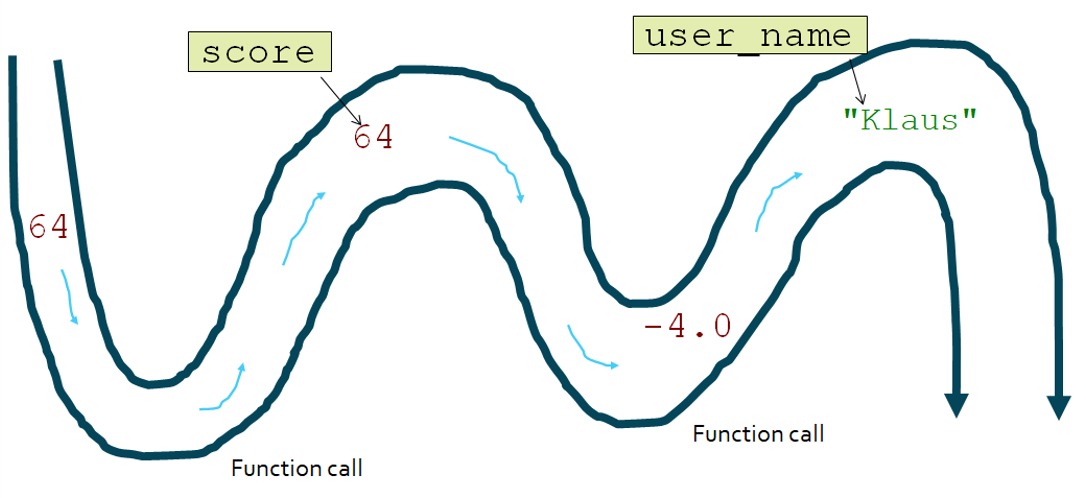
You can think of a program as a flowing, twisting river. Regular execution makes the river flow south, but functions disrupt this flow. Along the way, values are carried by the current. At times, we give these values names by using variables, but it is the values that flow through the program, not the variables.
Substitution
def add(left, right):
    return left + right

5 + add(3, 4)
# 5 + add(3, 4)
# 5 + 7
# 12
When you call a function, each parameter is assigned the value of a relevant argument.
When you return from a function, the function call is substituted for the returned value.
These are the only tools we should use in Python to move data around a program.
This is just like what happens when you use an operator like plus or minus.
Even though we do not see the substitution visually, it still happens.
The comments in the code above trace out those substitution steps by hand; press Run and then try wrapping the expression in print(...) yourself to see the final value.
Stack Frames
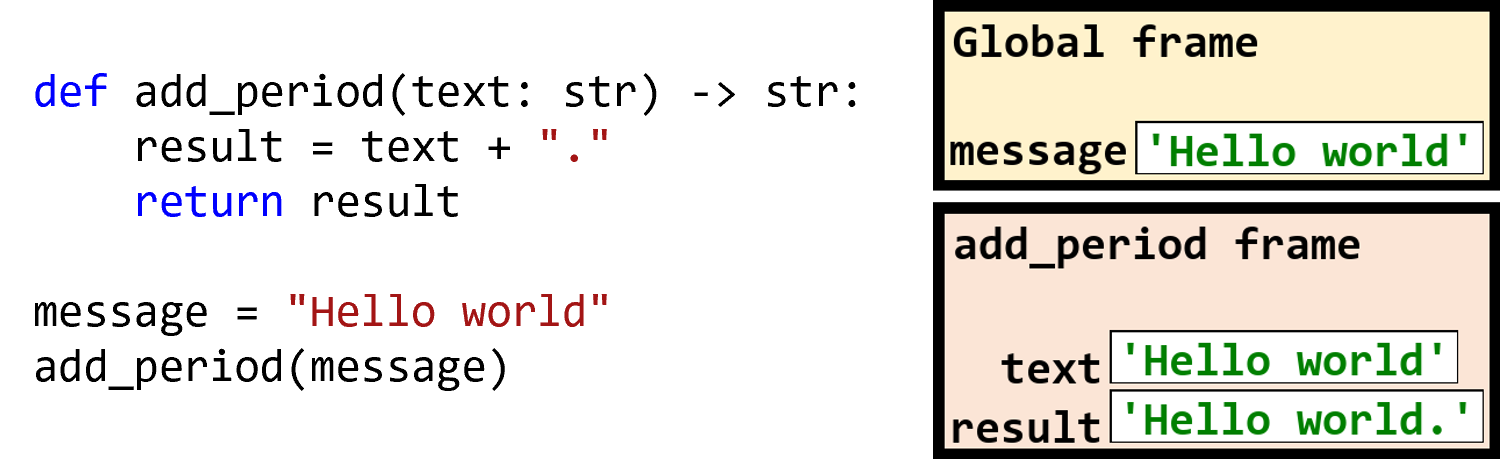
Each time we call a function, we say that its local variables are inside their own scope.
We will also call this scope the frame, and it can be used to show the current variables and their values.
Notice that the global frame is separate from the local frame.
The frames shown here are from if we stopped the program right before the return statement got executed.
After the return statement is executed, we would cross out the add_period stack frame, to indicate that the function’s scope has ended.
Data between Functions
def calculate_grade(raw, weight):
    grade = 10 * (weight+raw) ** .5
    return grade

def make_grade_message(grade):
    return "Your grade was:" + str(grade)

raw = 45
weight = 5
grade = calculate_grade(raw, weight)
message = make_grade_message(grade)
print(message)
To move data from one function to another, you cannot just look at the two functions.
You must also look at where the functions were called.
The returned value of one function should be fed into the next function.
In the code shown, the variables defined inside calculate_grade are distinct from the variables outside of the function.
In fact, it is only the last four lines that actually move values between functions.
Without using return values and arguments, we cannot move data between functions.
Functions Calling Functions
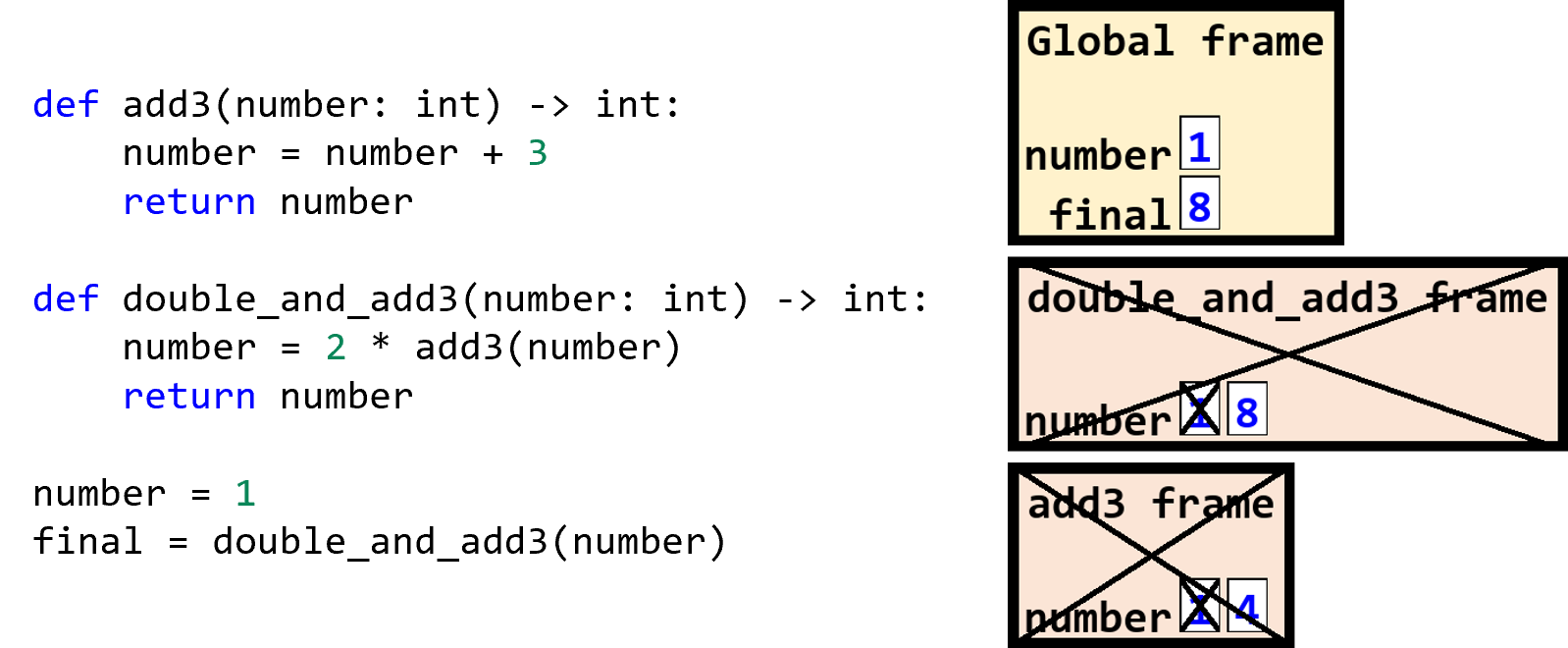
Things get even more complicated when functions call other functions, but this happens all the time.
We are used to calling built-in functions, but we can call our own functions too.
When we call a function inside another function, we stack the new function call’s frame below the current frame, with the bottom frame being the current scope.
When a function call ends, we remove that bottom stack and return to the one above it.
Each function call’s frame is separate from all other frames, even if they come from the same function or have variables with the same name.
In the stack frames shown here, you can see that the number variable has different values in the different scopes, at the end of the program.
You can also see how some scopes have expired, resulting in their call frames being crossed out.
Their data is no longer available.
Remember, even though each of the number variables have the same name, they are separate variables in their own frames and can have completely different values at any point during the program.
The global number variable only ever has the value 1 and keeps that value over the course of the program.
The double_and_add3 frame’s number variable initially has the value 1 but eventually ends up with the value 8 before the scope ends.
The add3 frame’s number variable initially has the value 1 but then takes on the value 4 before the scope ends.
Decomposition
- Decomposition: the process of breaking a large, complex problem into smaller, more manageable parts
One of the most valuable benefits of using functions is decomposition. Decomposition is the process of breaking a large, complex problem into smaller, more manageable parts. Each part can be solved independently, and then the solutions can be combined to solve the original problem. This makes it easier to understand, develop, and maintain code.
Functions are the smallest atomic units of code that can be composed together to build more complex functionality, much like how building blocks can be combined to create larger structures. The syntactic mechanism for composing functions is functions calling other functions within their definitions.
Example of Decomposition
def format_phone_number(raw: str) -> str:
    return format_us_phone(strip_separators(raw))

def strip_separators(phone_number: str) -> str:
    """ Remove whitespace and separators """
    without_dashes = phone_number.replace("-", "")
    return without_dashes.replace(" ", "")

def format_us_phone(digits: str) -> str:
    """ Format 10 digits as a US phone number """
    area = digits[0:3]
    first = digits[3:6]
    last = digits[6:10]
    return "(" + area + ") " + first + "-" + last

print(format_phone_number("123- 456- 7890"))
# Output: (123) 456-7890
In this example, we can see how decomposition allows us to break down the problem of formatting a phone number into smaller, more manageable functions.
The format_phone_number function needs to take in phone numbers and return them in a standard format.
This means that we have to remove any whitespace and separators, and then format the digits as a US phone number.
It’s easier to tackle this problem in two distinct parts, first stripping the separators and then formatting the digits; once you’ve removed the extra characters, you can safely assume that there are 10 digits and extract them accordingly.
Therefore, the decomposed version first calls the strip_separators function to clean up the input, and then passes its result to the format_us_phone function, before returning that final result.
Now, you could definitely do this all in one function, and that wouldn’t necessarily be wrong. But as you start working on more and more complex programs, you need to keep an eye out for places where breaking down the program into smaller parts will make things easier. Each of these parts can be developed and tested independently, which can lead to more robust and maintainable code. As your programs start reaching dozens and hundreds of lines of code, you’ll find that having a clear structure with well-defined functions will make it much easier to understand and modify your code. It’s up to the programmer to decide when to break down a problem (and functions) into smaller parts.
Summary
- There are three rules to keep in mind about scopes:
- Variables inside a function cannot be used outside.
- Variables outside a function should not be used inside.
- Functions return values, not variables.
- Functions do not take in variables and cannot return variables. Instead, they take in values and assign them to parameters and return values.
- If a value is returned by a function, it should be passed into another function, assigned to a variable, or otherwise used. Without being used, a value will be tossed away by Python.
- Nested function calls are executed from the innermost call to the outermost.
- Parameter names have no relationship to variables used as arguments, even if they are the same.
- Functions can call other functions in their definitions.
- Stack diagrams can help trace the value of variables over time and across functions.
- Each time a function is called, a new frame (representing the function’s scope) is added to a stack of frames. Variables that live in that scope are said to be in that frame.
- When a function returns or otherwise ends, the function call’s frame is removed from the stack frames.