Nesting
age = 22
cost = 45

if age > 21:
    if cost < 10:
        print("Buy")
    else:
        print("Too expensive")
else:
    print("Too young")
A program is made up of a sequence of statements, known as a body. We sometimes refer to bodies as a block or chunk of code. With if statements and function definitions, we have ways of putting a smaller body inside of the main global body. But now, we will see that we can also put if statements inside of if statements and functions. We call this “nesting” the bodies inside of each other. As you develop more complex programs, you will do a lot of nesting.
Branches
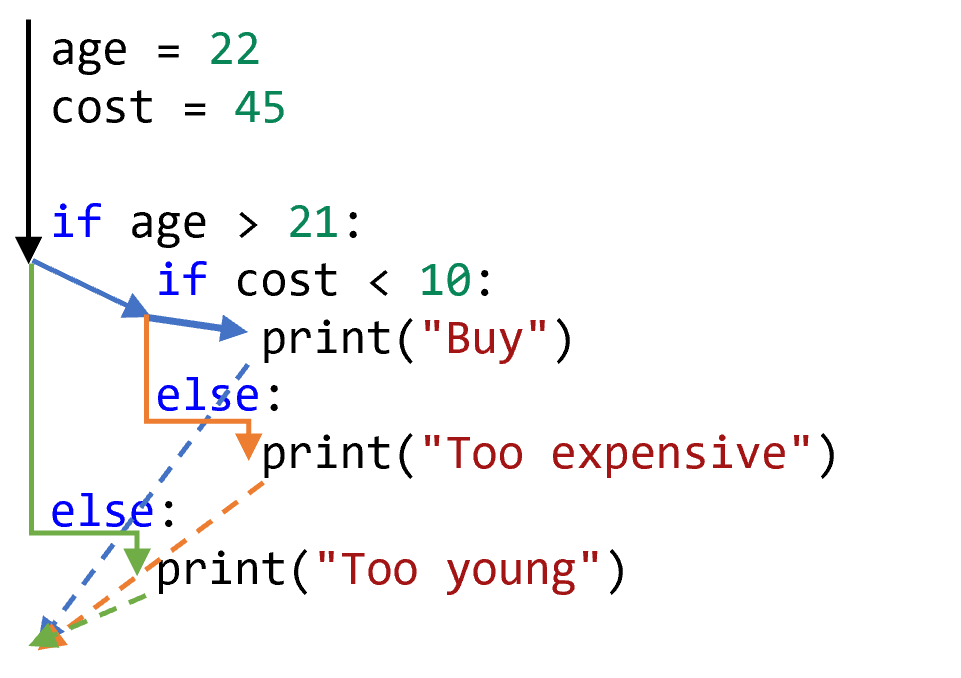
The code shown here has 3 branches. The outer if statement has two branches. The inner if statement is on the True path of the outer if and has two branches of its own. The else body does not have any further branches. That means there are three branches in total. The reason that there are three branches is because the first branch is divided into two parts. In other words, each new if only adds one new branch to the existing number of branches. The following diagram overlays the paths of the branches.
Number of Spaces
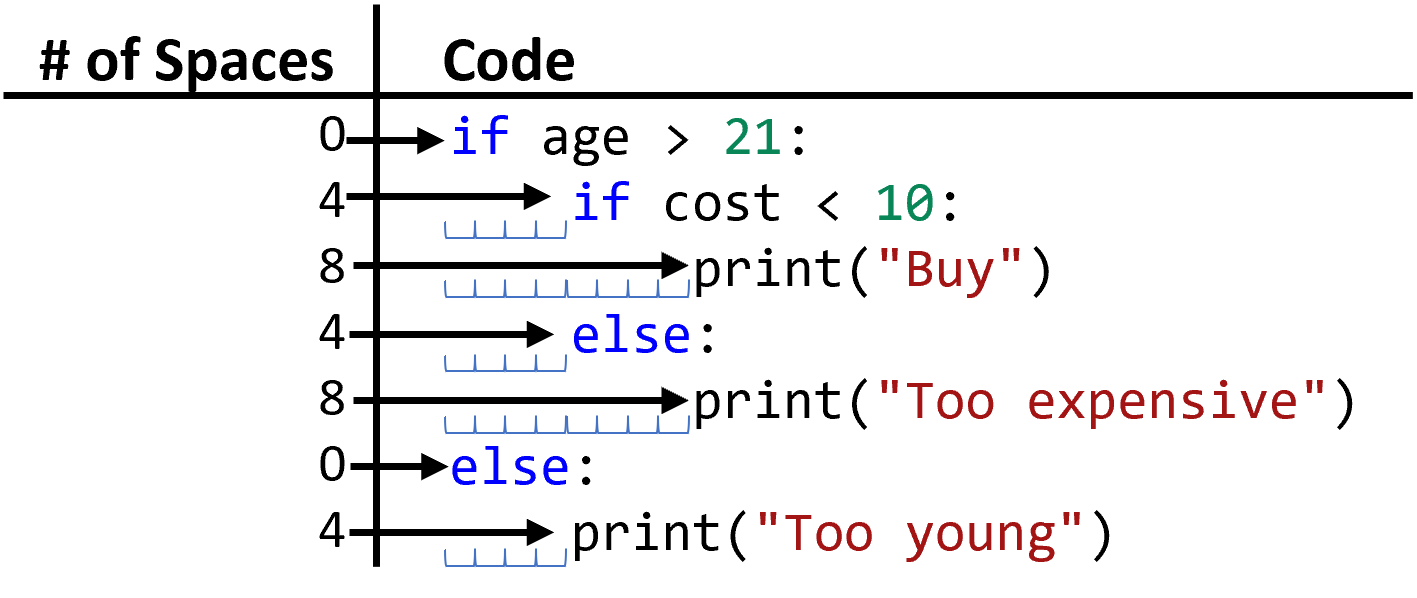
Every time you nest a block of statements inside another block, the body of the block gets indented another 4 spaces. Note the Python code on the right side of the diagram and the numbers on the left. Each level of nesting increases the number of space characters by 4. These are called the whitespace rules, and they can be confusing, but they are consistent. The amount of whitespace controls what code is in what body.
If and Functions
from bakery import assert_equal

def adjust_price(price: float, age: int) -> float:
    if age > 60:
        return price * .8
    else:
        return price

assert_equal(adjust_price(5.75, 63), 4.60)
assert_equal(adjust_price(5.75, 45), 5.75)
You can put if statements inside of functions. In fact, this is both common and useful. Remember the whitespace rules when this occurs. Each nested block is indented another 4 spaces. In the following function adjust_price, the first line of the body is indented four spaces, but the second line of the body is indented 8 spaces. The first line after the body of the function is not indented: in fact, that’s what makes it the first line AFTER the body, that it’s not indented.
What Goes Inside?
cost = int(input("What is the cost?"))

# One line in body
if cost > 5:
    discount = 1
price = 2

# Two lines in body
if cost > 5:
    discount = 2
    price = 3
It can be difficult to know if a line of code belongs inside or outside of a block. You must think critically about what you are trying to do with the if block. Remember: statements inside the if block are executed only if its conditional evaluates to True. In the code shown here, the first assignment of the price variable is AFTER the if statement’s body, while the second assignment is INSIDE of the if statement. That means the first assignment will always be executed, but the second assignment may or may not be executed depending on the value of cost.
Elif Block
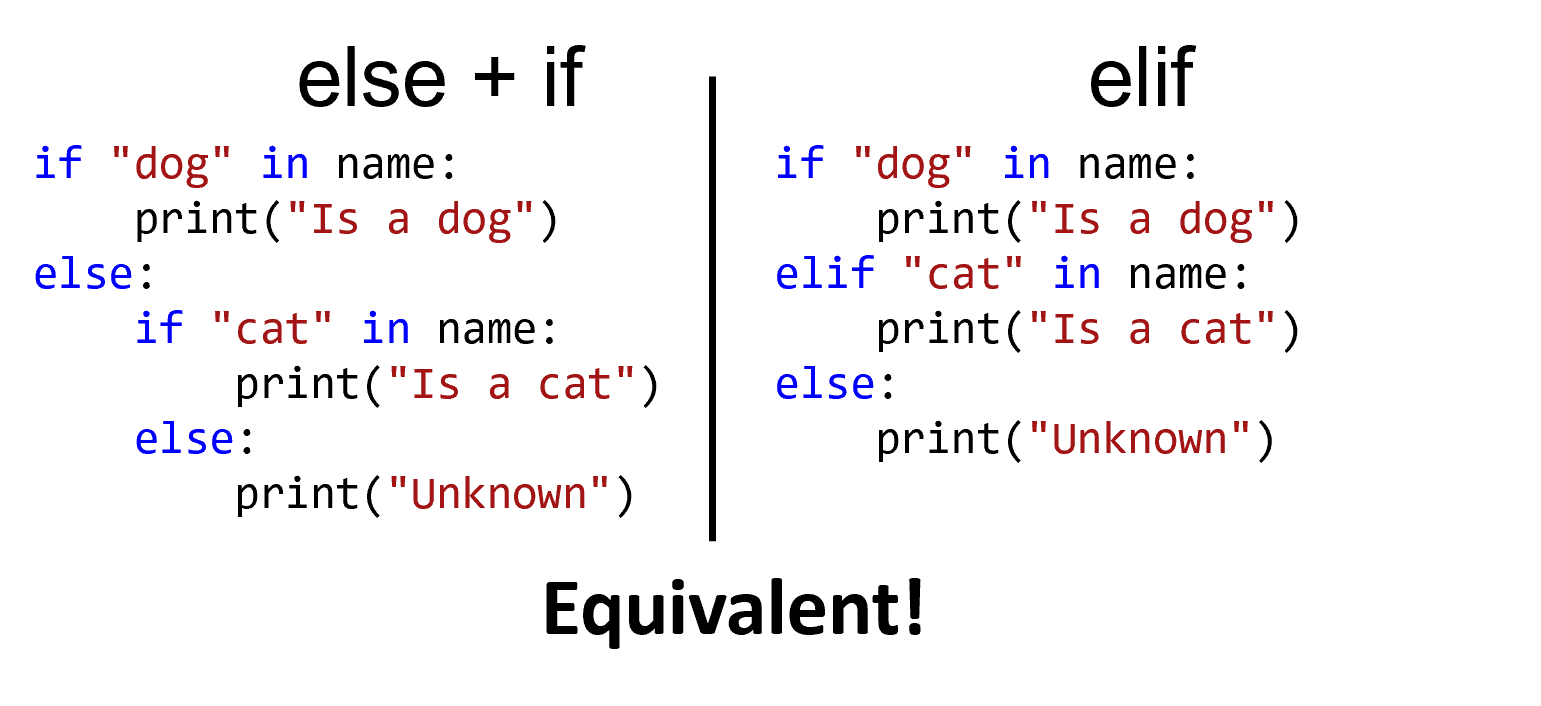
In addition to the if and else blocks, there is a third type: elif. The elif is exactly equivalent to an else block with an if statement inside. Although they do not offer any new power, they are sometimes more convenient to write.
Two Ifs vs Elif
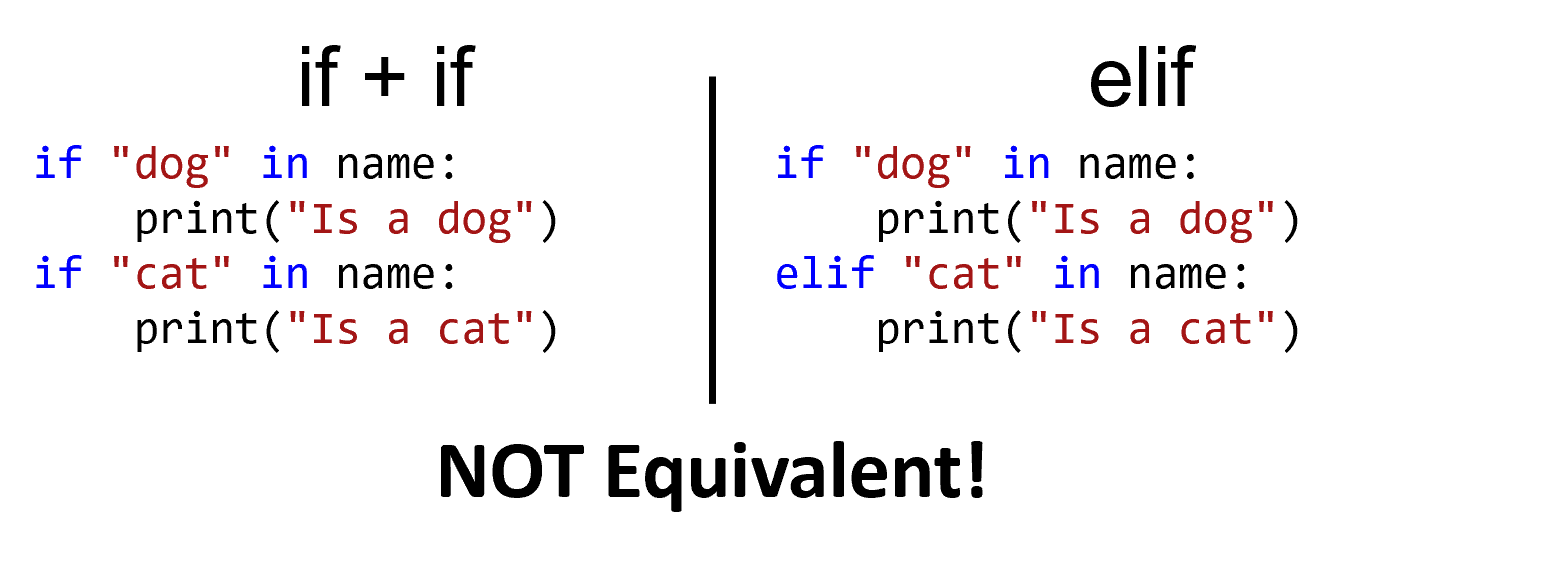
The following two pieces of code may look similar, but they are quite different. The code on the left has two if statements, and both will always be evaluated and potentially executed. The code on the right has an elif statement, and the second condition will only be evaluated if the first one evaluates to false.
Unnecessary If
def check_senior(age: int) -> bool:
    # This `if` statement is unnecessary!
    if age > 60:
        return True
    else:
        return False

# Exactly equivalent to
def check_senior(age: int) -> bool:
    return age > 60
Two kinds of mistakes are very common with if statements. The first common mistake is using an if statement when a conditional expression is fine on its own. For example, consider the following function definition that returns True if the parameter is greater than 60, or otherwise returns False. The conditional expression already evaluates to either True or False, so it was unnecessary to use an if statement. Instead, you can directly return the result of the conditional expression, as demonstrated in the second part of the example. You do not need to use if statements if you are just returning True and False!
Unnecessary Test
def check_toddler(age: int):
    # The `== True` part is redundant!
    return (age >= 5) == True

def check_toddler(age: int):
    # Much better!
    return age >= 5
A second common mistake is to test if a boolean expression is equal to True. Although the following expression age >= 5 == True makes sense in English, it is redundant in Python. age >= 5 already evaluates to either True or False. If you compare a boolean value to True, then the result is the same boolean value. Nothing is accomplished; you have simply made your code more complex. It’s just like adding zero, or multiplying by one, or adding the empty string to a string. Literally nothing happens. True would become True, and False would become False.
Summary
- An
ifstatement can be nested inside of anifstatement, allowing for more complex control flow. - An
ifstatement can also be nested inside of a function definition. - Each time you nest a body inside of another body, you increase the indentation of the resulting body by four spaces.
- Each
ifstatement introduces a new branch in the code, regardless of whether there is anelsebody. - An
elifbody can be added after anifor existingelifstatement. Anelifis used to introduce another branch in the code with a separate condition. The body of theelifwill only be executed if the priorifandelifstatements did not execute. - Chained
ifstatements are not equivalent toelifstatements. However,elifstatements are equivalent toelsestatements that have anifstatement inside their body. - Special care must be taken to determine if a statement belongs before, after, or inside of a body, which is determined by the amount of indentation.
- If a function returns a boolean value, an
ifstatement is often unnecessary compared to just directly returning the conditional. - If a conditional expression tests whether a value is equal to the boolean literal value
True, that test can often be removed since it has no effect on the outcome of the conditional.