Another Kind of Iteration
while condition:
    pass
for loops allow us to iterate through each element of a list.
They are the most common form of iteration in Python.
However, there is another kind of iteration that is useful called while loops.
These loops allow us to iterate until any kind of condition that we want is met.
Syntax
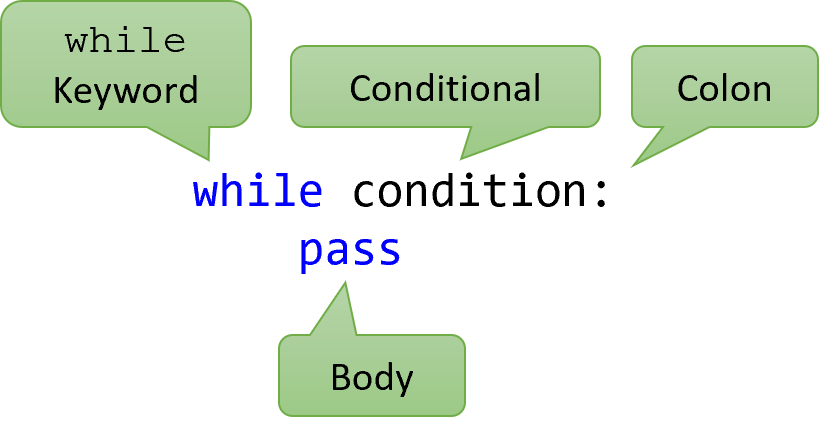
This diagram explains the pieces of a while loop.
Notice how the syntax for a while loop is like that of an if statement.
We have the word while, followed by a condition, ending with a colon.
Then, we can have any number of statements inside the body.
Remember that this body, like a FOR loop or an IF statement, is indented with 4 spaces.
A Simple Example
count_down = 4

while count_down > 0:
    count_down -= 1
    print(count_down)

print("Reached the end")
In this runnable example, you can see initialization before the loop, the condition of the loop, the body of the loop, and then output after the loop is complete.
Most while loops need some kind of variable that is defined before the loop, used in the conditional, and updated inside the loop.
Otherwise, the loop will continue forever.
In this example, we are repeatedly decreasing the count_down variable, printing its value each time, until the variable’s value is less than or equal to zero.
Like IF Statements
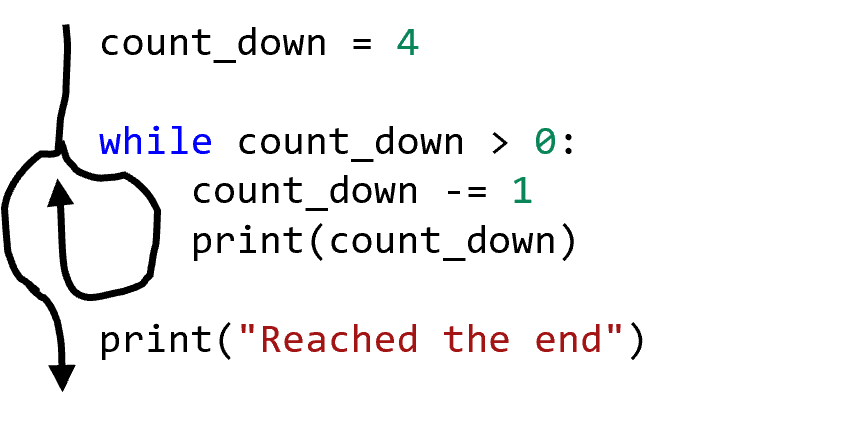
while loops are actually very similar to if statements.
However, instead of executing once or none, they will execute repeatedly until the condition is false.
Note that a loop won’t end until the condition evaluates to false; even if the condition would be false during the loop body, the loop can’t end until the end of the body (when the condition is checked again.)
Tracing the Flow
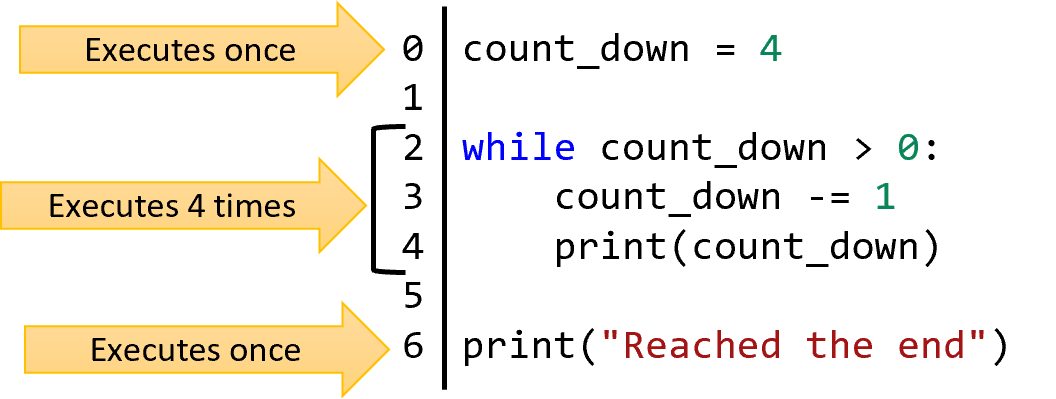
When a while loop is executed, the program follows a similar looping behavior as a for loop.
In the previous example, we can see that behavior in a while loop to count down from 4.
The program tests the condition, and if it is true, it moves through each statement in the body.
Then, it returns to the top and tests the condition again.
If it is still true, it repeats the previous loop.
Otherwise, if the condition is ever false, before the body is executed the first time, the program skips to the end of the while body.
Again, remember that the condition is only checked at the start of a new iteration of the loop—never during the middle of the loop’s body’s execution.
Looping Forever
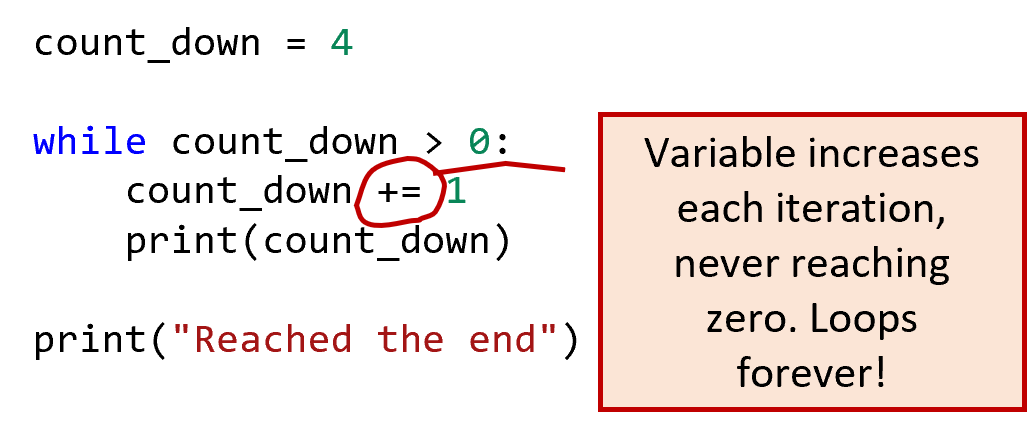
A tricky thing about WHILE loops is that it is easy to loop forever by accident.
Consider the incorrect code here.
Because the variable count_down is only ever increasing, it will never reach zero and the loop will never end.
What happens when code loops forever? Eventually, the system might try to stop the execution. However, depending on the loop, the system might freeze up instead, which makes it very hard to fix the mistake. The system might also run out of memory, which can cause the environment to crash. Infinite loops are a very serious kind of problem.
Unnecessary While Loops
# While loop version
index = 0
while index < 10:
    index += 1
    print(index)

# For loop version
for index in range(1, 11):
    print(index)
A major advantage of for Loops instead of while Loops is that they terminate based on a list, so they are very unlikely to loop forever.
When possible, you should probably use a for loop instead of a while loop.
As an example, consider the counting code shown here.
That same code can be efficiently replaced with a for loop that calls the range function to achieve the same effect.
Unexecuted While Loops
count_down = 0
while count_down:
    count_down -= 1

print(count_down)
Another common mistake with a while loop is choosing a condition that is initially false.
Since while loops begin by checking their condition, having a False value means the loop will never execute.
Most of the time, this indicates that you made a mistake since you usually want the loop to execute at least once.
Power of While
- For loops: A safe way to iterate a limited number of times over a list or range.
- While loops: A powerful way to iterate an infinite number of times so long as a condition is true.
So why would you want to have while loops if for loops are so convenient and safe? The tradeoff is that while loops can handle more forms of loops.
Because a while loop can work with an arbitrary condition, it is not limited to the length of a list or a known range of numbers.
While a for loop is a kind of finite iteration, a while loop can potentially last infinitely and iterate in other ways.
Although there are advanced techniques to make for loops more powerful, the reality is that many kinds of problems are more naturally solved with a while than with a for loop.
That said, the real power lies in knowing when to use one or the other.
If all you need to do is go through a list or a range of numbers, stick with for loops.
In the next section, we will learn other uses for while loops.
Summary
- A
whileloop is another control structure that allows you to repeat a body of code multiple times. - The body of the
whileloop will be repeatedly executed as long as the conditional of thewhileloop is true. - The conditional of the
whileloop is checked at the start of each iteration but not during the execution of the body—only once the body is finished. - A
whileloop can execute zero times (if the conditional is initially false) and infinite times (if the conditional never becomes false.) - All
forloops can be replaced by an equivalentwhileloop, but not allwhileloops can be replaced by aforloop. - However, usually, if you can replace a
whileloop with aforloop, that is preferable; aforloop is a safer form of iteration that has fewer opportunities to loop forever or incorrectly.