Stepping
Previously we have seen how tracing through code can be used to debug errors. This is especially helpful in large codebases, for us to understand how the application works. In this chapter, we are going to step through an entire execution of the program. As we do so, we will gain a deeper understanding of its flow and identify potential issues.
Drafter is not an easy library to trace, because it is a graphical application. Therefore, you may find it easier to skip using your environments’ stepping tools and instead rely on print statements or tracing by hand to understand the flow. Recall that print statements can be placed at key points in your code to output the values of variables and the flow of execution.
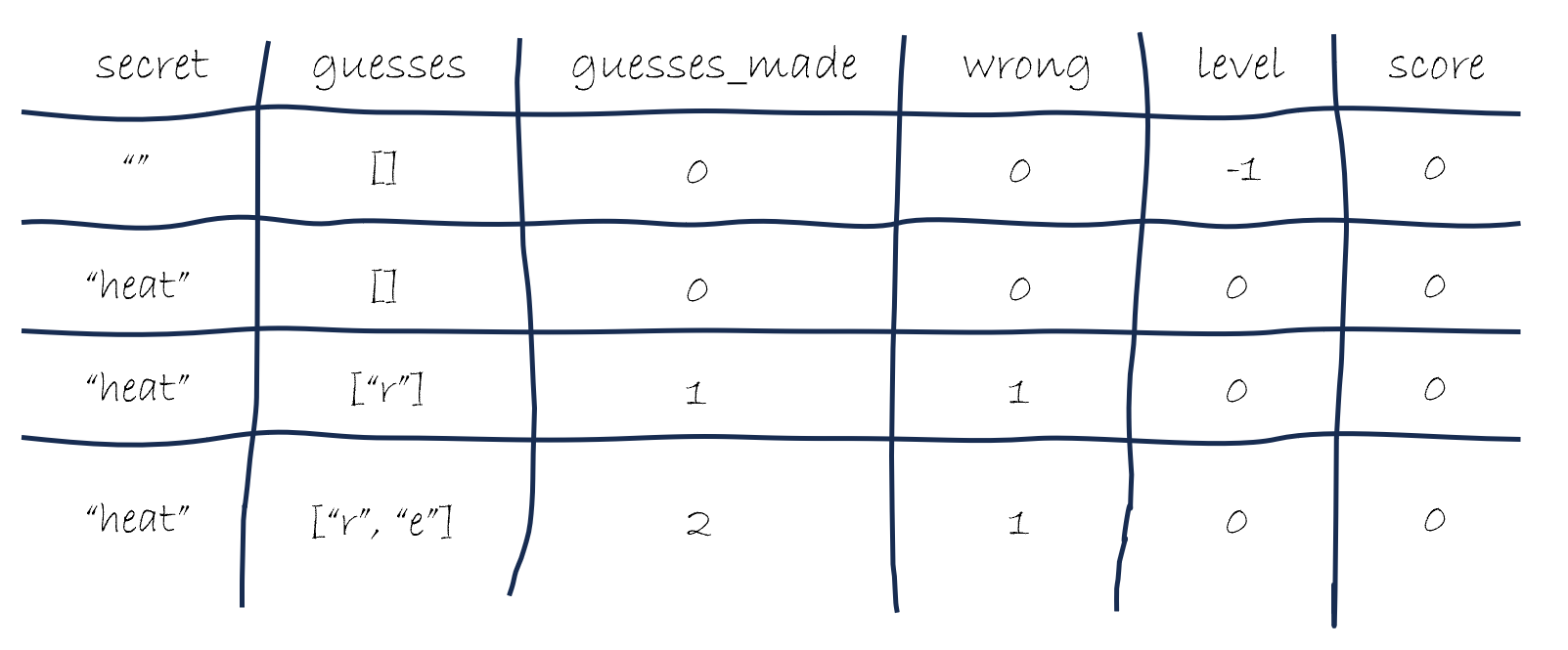
You should also not ignore the value of taking out a piece of paper and writing down the values of key variables at each step. You can take advantage of the consistent, structured nature of the program’s state to help you keep track of everything in a table. We call this a Trace Table. The diagram shown here is one way that you can draw a trace table, with each attribute as a column, and each row representing a new version of the state. Another common style is to use two columns and have a row for each attribute and its value, and then cross out old values as they change and write in new ones to the right. We strongly recommend you try tracing through this application with a piece of paper on hand.
Getting Started
start_server(State("", [], 0, 0, -1, 0))

# Is turned into...

index(State("", [], 0, 0, -1, 0))

# To return...

Page(State("", [], 0, 0, -1, 0), [
    Header("Guess the Word"),
    "Level: -1",
    Button("Start", "next_level")
])
To help you see what tracing can look like, we’re going to walk through the initial execution of the program step by step.
The program begins by importing modules, defining the functions and State, and calling the start_server function with the initial state.
This last line is the start of the interesting execution flow of the program.
Drafter will take the passed in State object and pass it to the index function.
Execution jumps to that function, where the State object is used to generate the initial page.
The logic of the index function is pretty straightforward, generating a Page object with the same state and a header, some text, and a button as the content.
The only option for the player is to click the “Start” button to proceed to the next level, which will take the current state (the same that we started with) and pass it to the next_level function.
First Level
# The next_level function
@route
def next_level(state: State) -> Page:
    state.level += 1
    state.secret = choose_word(state.level)
    state.wrong = 0
    if is_game_over(state.level):
        return game_end(state)
    return play_level(state)

# Current state and call - Is not literally in the code!
next_level(State("", [], 0, 0, -1, 0))
In the code here, we are showing what the next_level function does with the current state when it is called. Note that although this function definition is taken from the source code, the call here is fictional - it is not actually present in the source code at all. Instead, we are merely illustrating how the function would be used in practice, behind the scenes.
The next_level function begins by increasing the level attribute by 1, choosing a secret word for the new level, and resetting the wrong attempts counter.
The first and last of those steps are easy, but in between the execution will jump to the choose_word function to select a new word for the player to guess (passing in the current level, which is now 0).
choose_word function
def choose_word(level: int) -> str:
    levels = ["heat", "dogs", "jazz"]
    return levels[level]

# Example of what current call looks like (not literally in code)
choose_word(0)
The choose_word function is relatively simple. A 3-element list is created, and then the function returns the element at the specified index (the current level) from that list.
Since the current level is 0, the function will return the first element of the list, which is "heat".
Resuming next_level
def next_level(state: State) -> Page:
    # ...
    if is_game_over(state.level):
        return game_end(state)
    return play_level(state)

def is_game_over(level: int) -> bool:
    return level > 4

# Current state:
State("heat", [], 0, 0, 0, 0)
We return to next_level from where we left off with choose_word, finish updating the secret and wrong attributes, and then have an if statement to check if the game is over, passing in the current level.
At the bottom of this code, we show what the current state looks like after all those updates: the first attribute is now "heat" and the level is 0.
This means that we will be passing 0 into the is_game_over function.
The check there is very simple: it just sees if the level is greater than 4.
Since 0 is not greater than 4, the game is not over, and we will continue to the next level, skipping over the call to game_end.
Now it is time to execute the play_level function, with the latest state.
Calling play_level
@route
def play_level(state: State) -> Page:
    so_far = reveal(state.secret, state.guesses)
    return Page(
        state,
        [
            Header("Level " + str(state.level)),
            "Word: " + so_far,
            "Guesses so far: ",
            BulletedList(state.guesses),
            "Guess a letter:",
            TextBox("guess"),
            Button("Submit", "submit_guess"),
        ],
    )

# Current State
State("heat", [], 0, 0, 0, 0)
The first step of the play_level function is to call the reveal function with the current secret and guesses, so execution will need to jump there.
Calling reveal
def reveal(secret: str, guesses: list[str]) -> str:
    if secret[0] in guesses:
        c0 = secret[0]
    else:
        c0 = "_"
    if secret[1] in guesses:
        c1 = secret[1]
    else:
        c1 = "_"
    if secret[2] in guesses:
        c2 = secret[1]
    else:
        c2 = "_"
    if secret[3] in guesses:
        c3 = secret[3]
    else:
        c3 = "_"
    return c0 + c1 + c2 + c3

# Example call
reveal("heat", [])
The reveal function is very long and complicated, compared to other functions in our program.
Just looking at it, there is a lot of repeated structural code that has a lot of similarities.
As we will see, it is a good candidate for refactoring with a helper function.
For now, we will faithfully execute the logic using the arguments "heat" and [].
The first check asks if the first letter of the secret word, which is "h", is in the list of guesses. Since the list of guesses is empty, this check will fail, and c0 will be set to "_". The same logic applies to each of the following checks (for the letters "e", "a", and "t"), and they will all result in "_" being assigned to each of the corresponding variables (c1, c2, and c3).
At the end of the function, we return the concatenation of all the variables, which will be "____".
This string is stored in the variable so_far back in the play_level function.
Returning from play_level
# Current state and variables
state = State("heat", [], 0, 0, 0, 0)
so_far = "____"
# Return value of play_level
Page(
    State("heat", [], 0, 0, 0, 0),
    [
        Header("Level 0"),
        "Word: ____",
        "Guesses so far: ",
        BulletedList([]),
        "Guess a letter:",
        TextBox("guess"),
        Button("Submit", "submit_guess"),
    ],
)
The play_level function returns a Page object that represents the current state of the game at the beginning of level 0. The word to guess is hidden, and the player has not made any guesses yet. The UI elements include headers, text boxes, and buttons for user interaction.
The user must enter a single letter guess into the text box and submit it to make a guess, which executes the submit_guess function with the current state and the guessed letter (in a parameter named guess).
Calling submit_guess
@route
def submit_guess(state: State, guess: str) -> Page:
    guess = format_guess(guess)
    if not check_if_valid_guess(guess, state.guesses):
        return play_level(state)

    state.guesses.append(guess)
    if not in_secret(state.secret, guess):
        state.wrong += 1

    if is_win(state.secret, state.guesses):
        return win_level(state)

    if is_loss(state.wrong):
        return lose_level(state)

    return play_level(state)
Things get a bit tricky when we get to the submit_guess function, because it needs to handle a variety of cases depending on the user’s input and the current state of the game.
This is a good time to read through the entire high-level function, before we start analyzing each individual function call.
First, the user’s guess is formatted using the format_guess function, which ensures that it is lowercase and stripped of any extra whitespace.
Then, we check if it is a valid guess, and if not then we call the play_level function to make the player guess again.
If the guess was valid, we append it to our guesses so far.
If the guess not in the secret word, we need to increment the wrong guess counter.
Then we check if the player has won or lost the game, and return the appropriate page.
Otherwise, we return to the play level with the updated state and have them continue guessing.
Although the submit_guess function is complicated and has a lot going on, each part of its logic is broken down into helper functions.
These functions can be tested individually to ensure that they work correctly in isolation.
Then, we can also write tests for the entire route to ensure that we have them working together.
We will do so in a few lessons from here, but first we will look at some other aspects of the code.
Summary
- Stepping through the code carefully is a valuable debugging technique.
- Consider using a debugger to step through your code and inspect variables at each stage.
- You can also use print statements to output the values of key variables at key steps.
- For more complicated code, consider writing down the values of key variables at each step to help you understand what is happening, in a Trace Table.