Exploring Large Programs
- Warning: Bugs Ahead!
In the previous lesson, we tried running a simple word guessing game. Eventually, we will see the real source code for this game. But first, we’re going to take a look at an initial attempt to implement this game. Unfortunately, this initial attempt will be incorrect.
Don’t Panic
- Do not panic
- Breathe
- Take breaks
- Get adequate sleep
- Stay hydrated and nourished
- Stay organized
- Ask for help
We are about to show you a very large program. It may look overwhelming at first, but we will break it down together. In this chapter, we are going to explore a lot of strategies that can make it much easier to tackle a new codebase. But first, you must learn to manage your own emotions.
Software Development, like any creative engineering task, can be stressful. It’s important to take breaks, ask for help, and remember that it’s okay to feel overwhelmed. As you get more experience, you’ll develop your own strategies for managing stress and staying productive. At the minimum, you should aim to make sure you are well-rested, hydrated, and nourished. Trying to read complicated code on an empty stomach will make things much harder. You also need to know when to take a walk and clear your mind. Of course, you should not do so immediately, or you’ll never get anything done. But pay attention to your body and mind, and take breaks when you need them.
Finally, know when and how to ask for help. You should always be focused on learning and finding resources that will explain things, not just answer questions for you. You should always spend at least a little time trying to solve the problem on your own before asking for help, but do not hesitate to reach out when you are truly stuck. Novices often hesitate to ask for help, fearing it may make them look incompetent. However, seeking assistance is a vital part of the learning process. Even professional software engineers seek help. Doing so correctly is absolutely key.
Once you are ready, take a look at the code below.
The Incorrect Guessing Game
Drafter isn’t installed on Dodona, so this is shown as plain code rather than something you can run here.
"""
Word Guessing Game
Version: Incorrect 1.0.0
Author: acbart
Published: August 17, 2025
"""

from bakery import assert_equal
from string import printable
from drafter import *
from random import choice
from dataclasses import dataclass


def choose_word(level: int) -> str:
    levels = ["heat", "dogs", "jazz"]
    return levels[level]


def reveal(secret: str, guesses: list[str]) -> str:
    if secret[0] in guesses:
        c0 = secret[0]
    else:
        c0 = "_"
    if secret[1] in guesses:
        c1 = secret[1]
    else:
        c1 = "_"
    if secret[2] in guesses:
        c2 = secret[1]
    else:
        c2 = "_"
    if secret[3] in guesses:
        c3 = secret[3]
    else:
        c3 = "_"
    return c0 + c1 + c2 + c3


assert_equal(reveal("heat", ["h"]), "h___")


def is_win(secret: str, guesses: list[str]) -> bool:
    if secret[0] not in guesses:
        return False
    if secret[1] not in guesses:
        return False
    if secret[2] not in guesses:
        return False
    if secret[3] not in guesses:
        return False
    return True


def is_valid_word(word: str) -> bool:
    first = word[0] in printable
    second = word[1] in printable
    third = word[2] in printable
    fourth = word[3] in printable
    return len(word) == 4 and first and second and third and fourth


def is_loss(wrong: int) -> bool:
    return wrong >= 6


def in_secret(secret: str, character: str) -> bool:
    return character in secret


def format_guess(guess: str) -> str:
    return guess.lower().strip()


def check_if_valid_guess(guess1: str, guess2: list[str]) -> bool:
    """
    Check if the user's letter guess is valid.

    Args:
        guess1 (str): The first guess, should be a single letter.
        guess2 (list[str]): The list of previous guesses.

    Returns:
        bool: True if the guess is valid, False otherwise.
    """
    return not len(guess1) > 1 and guess1 in printable and guess2 not in guess1


def is_game_over(level: int) -> bool:
    return level > 4


#### Drafter UI


@dataclass
class State:
    secret: str
    guesses: list[str]
    guesses_made: int
    wrong: int
    level: int
    score: int


@route
def index(state: State) -> Page:
    return Page(
        state,
        [
            Header("Guess the Word"),
            "Level: " + str(state.level),
            Button("Start", "next_level"),
        ],
    )


@route
def next_level(state: State) -> Page:
    state.level += 1
    state.secret = choose_word(state.level)
    state.wrong = 0
    if is_game_over(state.level):
        return game_end(state)
    return play_level(state)


@route
def play_level(state: State) -> Page:
    so_far = reveal(state.secret, state.guesses)
    return Page(
        state,
        [
            Header("Level " + str(state.level)),
            "Word: " + so_far,
            "Guesses so far: ",
            BulletedList(state.guesses),
            "Guess a letter:",
            TextBox("guess"),
            Button("Submit", "submit_guess"),
        ],
    )


@route
def submit_guess(state: State, guess: str) -> Page:
    guess = format_guess(guess)
    if not check_if_valid_guess(guess, state.guesses):
        return play_level(state)

    state.guesses.append(guess)
    if not in_secret(state.secret, guess):
        state.wrong += 1

    if is_win(state.secret, state.guesses):
        return win_level(state)

    if is_loss(state.wrong):
        return lose_level(state)

    return play_level(state)


@route
def win_level(state: State) -> Page:
    state.score += state.level
    return Page(
        state,
        [
            Header("You Win!"),
            "The word was: " + state.secret,
            Button("Play Again", "next_level"),
        ],
    )


@route
def lose_level(state: State) -> Page:
    return Page(
        state,
        [
            Header("You Lost!"),
            "The word was: " + state.secret,
            Button("Play Again", "next_level"),
        ],
    )


@route
def game_end(state: State) -> Page:
    return Page(
        state,
        [
            Header("Game Over"),
            "The word was: " + state.secret,
            "Your final score is: " + str(state.score),
        ],
    )


start_server(State("", [], 0, 0, -1, 0))
Here is the incorrect version of the guessing game. If you try to run this game, it will not immediately crash. However, there are several issues with the code that will prevent it from working as intended. If you try to play the game, you will encounter an error very early on.
Please do take a moment to read over the code, and think about how you might approach it. You might immediately see some issues with the code, such as missing or incorrect logic. Feel free to try fixing it on your own. When you are ready, however, we will go through several strategies that you can use to explore and understand the code more deeply.
Top-Down or Bottom-Up?
- Top-Down: Start with the big picture and break it down into smaller parts.
- Bottom-Up: Start with the details and build up to the big picture.
There are two general directions you can take when exploring a codebase. First is top-down, where you find the main starting point of the application, and then work your way down into the details. This can help you understand how the different parts of the program fit together.
On the other hand, bottom-up exploration involves starting with the details and building up to the big picture. This can be useful when you need to understand specific functions or components before seeing how they fit into the overall program.
Mechanically, this is the difference between reading through all the function definitions first (bottom-up) versus reading through the main program flow first (top-down). However, there is no one-size-fits-all approach. Depending on the codebase and your familiarity with it, you may find one method more effective than the other. You might also switch between the two approaches as needed. You could explore the top-level program logic first, and then start looking around at specific functions and bounce around a little.
In general, when exploring a new program (especially one that you suspect is not correct), we suggest starting with the top-level logic. Identify which, if any, functions are responsible for the main flow of the program. This might help you determine that some functions are not even used.
The Top Level Logic
- Imports
- Function definitions
- State dataclass
- Route function definitions
start_serverfunction call
Walking through the code from top-to-bottom, we look at what happens at the top level.
First, we import the necessary modules and functions.
Then, we define quite a few functions that make up the game logic.
We also define a State dataclass to keep track of the game state.
In the second half, we define a bunch of functions using the @route decorator from the Drafter library, to make our user interface.
Finally, at the end of the file, we start the server with an initial state.
It is only at the very end that the program really “begins”, which is often a source of confusion.
Technically, the execution starts from the very first line of the file, but the main game logic doesn’t kick in until the server is started.
Everything before that point is just setup and definitions for things that will happen later.
After that point, the index function will be executed by Drafter and the application will flow from there.
Let’s take a closer look at the functions defined in the code.
Listing the Functions
- Routes:
- index
- next_level
- play_level
- submit_guess
- win_level
- lose_level
- game_end
- Helper Functions:
- choose_word
- reveal
- is_win
- is_valid_word
- is_loss
- in_secret
- format_guess
- check_if_valid_guess
- is_game_over
We’ve identified all the functions in the codebase and categorized them into routes and helper functions. This implementation has a whopping 16 functions. 7 of those are route functions, and the remaining 9 are helper functions. This may seem like a lot, but it is actually a relatively small program. Still, to make sense of the program’s flow, we need to understand how these functions interact with each other.
The Flow of the Functions
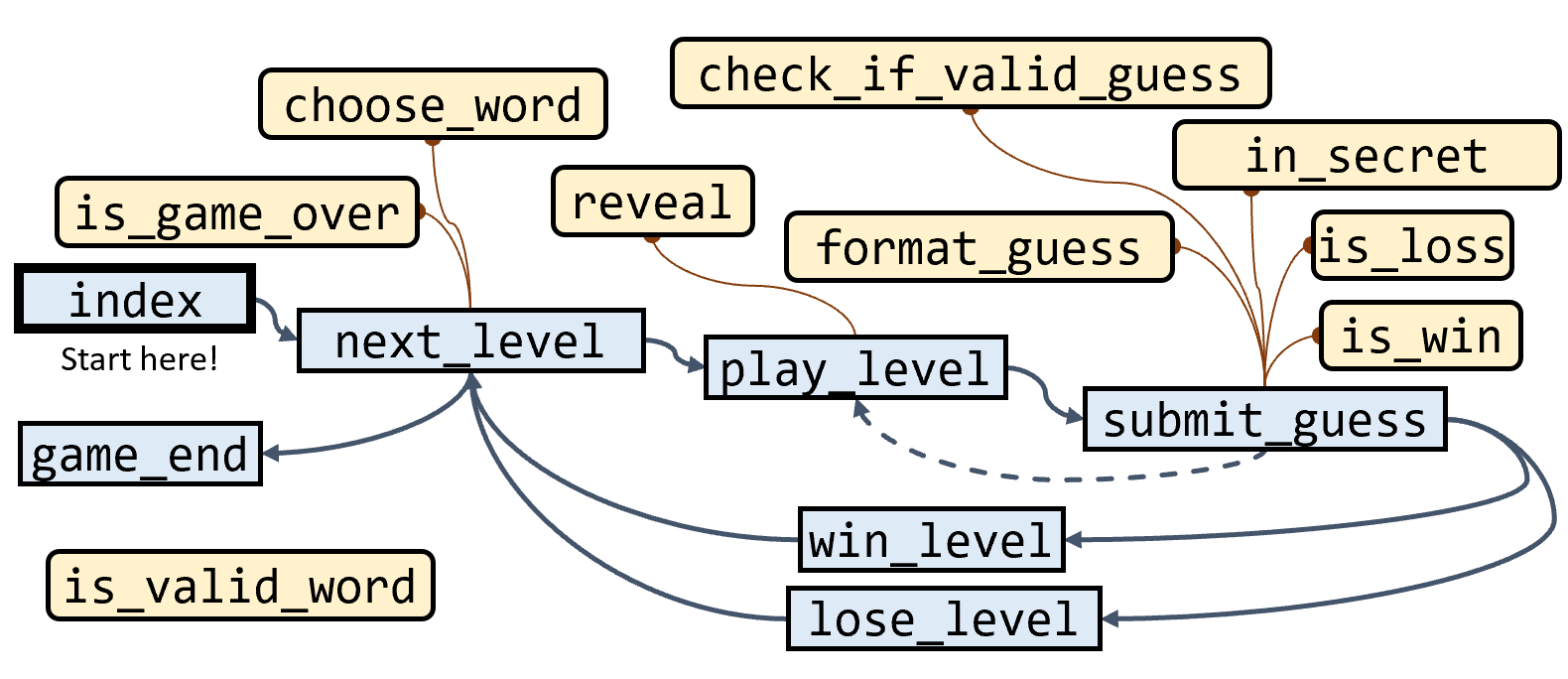
Using our list of functions, we can inspect each function further to see which other functions it calls. We use this information to construct a pictorial representation of the function calls. This is known as a “Call Graph”, or a “Flow Diagram”, since it shows the flow of function calls.
The first real call in our program is Drafter’s start_server, which will load the index page. Therefore, our diagram starts from the (heavily bolded) index function.
Technically, the routes are not called directly in our code, but when they are linked with buttons in the user interface, Drafter takes care of calling the appropriate route functions based on user interactions.
So the first connection from index is to the next_level function, which is called when the user progresses to the next level.
That function has a button that connects to play_level and also has logic to connect to game_end, but also uses two helper functions: choose_word and is_game_over.
The play_level function uses the reveal helper function, and then has a link to the submit_guess function.
The submit_guess function is one of the most complicated functions in the game, just from looking at the call graph. It has 5 helper functions and links to 3 other routes (win_level, lose_level, and play_level).
Two of those routes (win_level and lose_level) are connect back to the next_level.
Those are all of the functions that are reachable through function calls and links.
A major insight in this diagram is that the is_valid_word function is never actually called.
The function may have been useful at one point, but it has since been replaced by other logic in the application.
We can safely ignore that function as we dive deeper into exploring this codebase.
Looking at the State
@dataclass
class State:
    secret: str
    guesses: list[str]
    guesses_made: int
    wrong: int
    level: int
    score: int
As we explore the flow of control through the application, we also need to consider the state of the application at any given time.
In a Drafter application in particular, there is inevitably a dataclass named State. This class is used to keep track of the current state of the application.
Sometimes, the State will be quite complicated and incorporate additional dataclasses.
Fortunately, for this game, the State is relatively simple and only contains a few fields.
Not every application will make its state management this explicit, so you must be prepared to think critically at every level of the application.
Further, we cannot assume that the State will be used correctly.
We already know this application has some issues with state management, as evidenced by the presence of unused functions and potential inconsistencies in the game logic.
Indeed, we will eventually see that at least one of these state fields is unused!
Summary
- You can read through a program either top-down or bottom-up.
- In a top-down approach, you start with the high-level structure and break it down into smaller components.
- In a bottom-up approach, you start with the details and build up to the larger structure.
- Both approaches have their merits, and the best choice depends on the specific program and your goals as a reader.
- As you read through a program, pay attention to the flow of control and the state of the application at each step.
- Make a list of all the functions and diagram their relationships to each other.
- Pay attention for functions that are actually not used in the program.
- Always be sure to manage your emotions and physicality as you engage with the software engineering process.