Operations on Dictionaries
- Updating Items
- Membership Testing
- Deleting Items
- Iterating Through Dictionaries
Dictionaries, like lists and strings, have several useful built-in operations we can use. Although there are many more, we will learn about membership testing, updating items, and iteration.
Updating Items
pets = {"Klaus": "dog", "Pumpkin": "cat", "Wrex": "hamster"}

# Updating the value associated with a key
pets["Klaus"] = "fish"

print(pets)
# Output: {'Klaus': 'fish', 'Pumpkin': 'cat', 'Wrex': 'hamster'}
Dictionaries, like lists, are mutable. Therefore, we can freely change the value associated with a key. Visually, it’s just like changing the value associated with a variable, just with the square brackets and key after the dictionary. In this example, we update the value associated with the key “Klaus” to “fish”.
Dictionary Mutability
my_students = {"Alice": 90, "Bob": 85, "Charlie": 80}
grades = my_students

your_students = {"Alice": 90, "Bob": 85, "Charlie": 80}

my_students["Alice"] = 95

print(grades)
# Output: {'Alice': 95, 'Bob': 85, 'Charlie': 80}
print(your_students)
# Output: {'Alice': 90, 'Bob': 85, 'Charlie': 80}
#         Changed:  ^^
print(my_students)
# Output: {'Alice': 95, 'Bob': 85, 'Charlie': 80}
#            Same:  ^^
Like a list, changing the value associated with a key in a dictionary does not change the dictionary itself. The dictionary is still the same dictionary, just with a different value associated with a key. In this example, we assigned the dictionary my_students to the variable grades. Both variables reference the same dictionary in memory.
Modifying the dictionary through one variable will affect the other.
However, if we create a separate dictionary, like your_students, it will not be affected by changes to my_students, even if the data was originally the same.
In the example shown here, changing the value associated with the key “Alice” in my_students also changes the value in grades, but not in your_students.
Visualizing Dictionaries in Memory
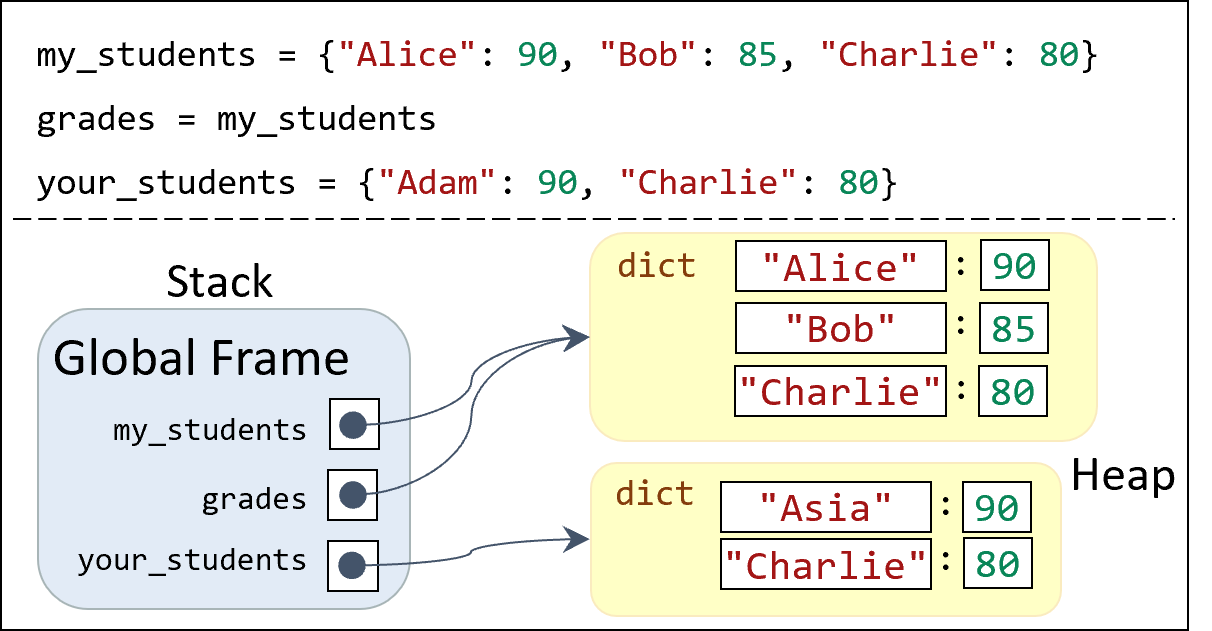
The diagram shown here illustrates the memory layout of the code from the previous example.
The stack contains three variables: my_students, grades, and your_students.
The heap contains two dictionary instances: one for my_students and grades, and another for your_students.
The arrows indicate that my_students and grades reference the same dictionary instance, while your_students references a separate dictionary instance.
Any modifications to the keys and values of the dictionary instance referenced by my_students or grades will affect both variables, while modifications to the dictionary instance referenced by your_students will not affect the other variables.
Or rather, these modifications do not affect the variable at all; they only affect the value of the dictionary instance.
If you reassign either variable to a new dictionary instance, the original instance and the other variable will not be affected.
Membership Testing
grades = {"Alice": 90, "Bob": 85, "Charlie": 80}

if "Charlie" in grades:
    print("Charlie's grade is", grades["Charlie"])

if "David" not in grades:
    grades["David"] = 75

has_bob = "Bob" in grades
print(has_bob)
# Output: True
Dictionaries, like lists or strings, are sequences. They can possess any number of key-value pairs. You can test if a specific key is in a dictionary using the in operator, the same way you would test for lists or strings.
Deleting Items
grades = {"Alice": 90, "Bob": 85, "Charlie": 80}

del grades["Bob"]
You can delete a key-value pair from a dictionary using the del keyword.
In this example, we remove the key-value pair associated with the key “Bob”.
Afterwards, the dictionary grades will no longer contain the key “Bob”.
Iterating Through Dictionaries
grades = {"Alice": 90, "Bob": 85, "Charlie": 80}

# Iterating through keys
for student in grades:
    print("Student:", student)

# Can modify the value associated with the key
for student in grades:
    grades[student] += 5

print(grades)
Dictionaries are a sequence of key/value pairs. Therefore, you can iterate through them like a list. However, there are three different ways to iterate through them: through their keys, their values, or their keys and values at the same time. This first example shows how to iterate through the keys of a dictionary, getting each key one at a time. The second example shows how to iterate through the keys of a dictionary and modify the value associated with each key, increasing each grade by 5.
Dictionary Value Iteration
grades = {"Alice": 90, "Bob": 85, "Charlie": 80}

# Iterating through values
for grade in grades.values():
    print("Grade:", grade)

# Calculate Average Grade
grade_total = 0
grade_count = 0
for grade in grades.values():
    grade_total += grade
    grade_count += 1
average_grade = grade_total / grade_count
print("Average grade:", average_grade)
If you do not need the keys, you can iterate through the values of a dictionary directly.
To do so, we use the .values() method of the dictionary. Do not forget the parentheses, even though the method takes no arguments!
This example shows how to iterate through the values of a dictionary, getting each value one at a time. The second example shows how to iterate through the values of a dictionary to calculate the average grade. Since the average grade does not depend on a students’ name, we don’t need to access the keys. At this point, the dictionary is essentially a list.
Dictionary Item Iteration
grades = {"Alice": 90, "Bob": 85, "Charlie": 80}

# Iterating through keys and values
for student, grade in grades.items():
    print(student, "has a grade of", grade)
If you need both the keys and values, you can iterate through the items of a dictionary using the .items() method.
This method returns a sequence of pairs of keys and values, allowing you to access both at the same time.
We saw very similar syntax when we used the enumerate() function with lists, which returned the index and value at the same time.
Conceptually, the indexes of a list are like the keys of a dictionary, and the values of a list are like the values of a dictionary.
Lists are ordered numerically, while dictionaries have arbitrary keys, but the concept of iterating through them is the same.
Summary
- Dictionaries are a mutable data structure
- You can assign a dictionary to multiple variables, and if its contents change, all variables will reflect those changes (since it is the same data, just through a different access point).
- There are a few key dictionary operations to remember:
- Updating items with assignment
- Membership testing with the
inoperator - Deleting items with the
delkeyword - Iterating through keys, values, and items