Learning goals
- Describe the turtle’s starting position and direction.
- Move and turn the turtle with commands.
The turtle always starts in the middle of the canvas, facing right (east).
You can move the turtle forward or backward. The turtle moves in the direction it is facing:
otto.forward(100)
otto.backward(30)
The turtle can also turn. The number is the angle in degrees. A positive turn with left() goes to the left (counterclockwise). right() goes to the right (clockwise).
otto.left(90)
otto.forward(50)
Example: drawing a square
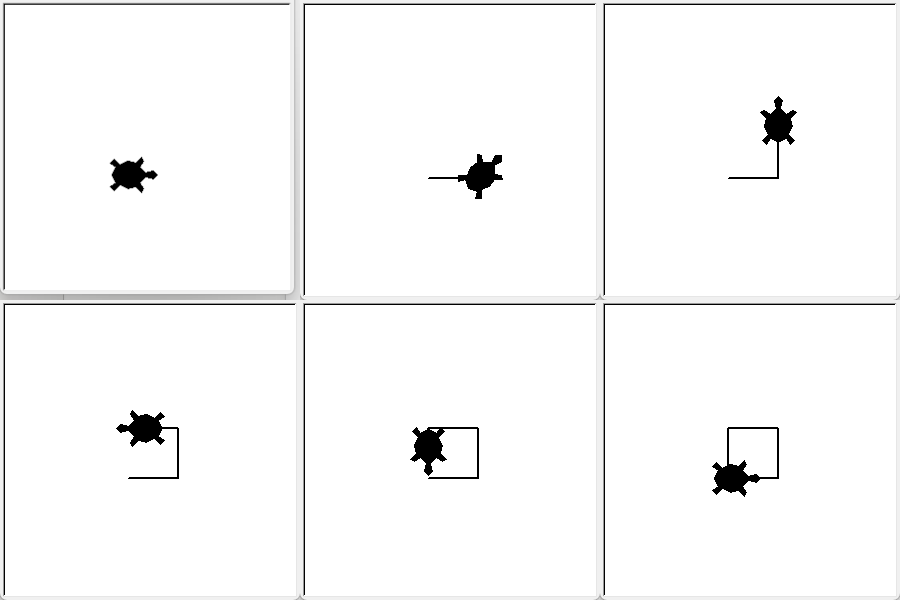
You can combine moving and turning to draw a shape. This program draws a square:
import turtle as otto

otto.forward(50)
otto.left(90)
otto.forward(50)
otto.left(90)
otto.forward(50)
otto.left(90)
otto.forward(50)
otto.left(90)
What happens in this program?
import turtle as ottoloads the turtle module and lets you refer to it with the short nameotto.otto.forward(50)moves the turtle 50 units forward and draws a line, because the pen is down.otto.left(90)turns the turtle 90 degrees to the left, so it is ready to draw the next side.The last two instructions are written four times, once for each side of the square. After the fourth turn, the turtle has drawn four sides of equal length with four right angles. It is back at its starting position and facing its starting direction.
Summary
| Command | What it does |
|---|---|
forward(distance) |
Moves forward by distance in the direction the turtle is facing. |
backward(distance) |
Moves backward by distance, opposite to the direction the turtle is facing. |
left(angle) |
Turns left by the specified angle angle. |
right(angle) |
Turns right by the specified angle angle. |