Bodies and Scopes
- Body: An indented region of code
- Scope: A region describing the lifetime of a variable
Two related but distinct ideas are Bodies and Scopes. Programs have both bodies and scopes, and so do functions. But scope and bodies are not the same thing. Bodies describe a region of code based on indentation. Scopes describe a region of code where variables exist or do not exist. Usually, scopes are a subset of the bodies of the program.
Bodies
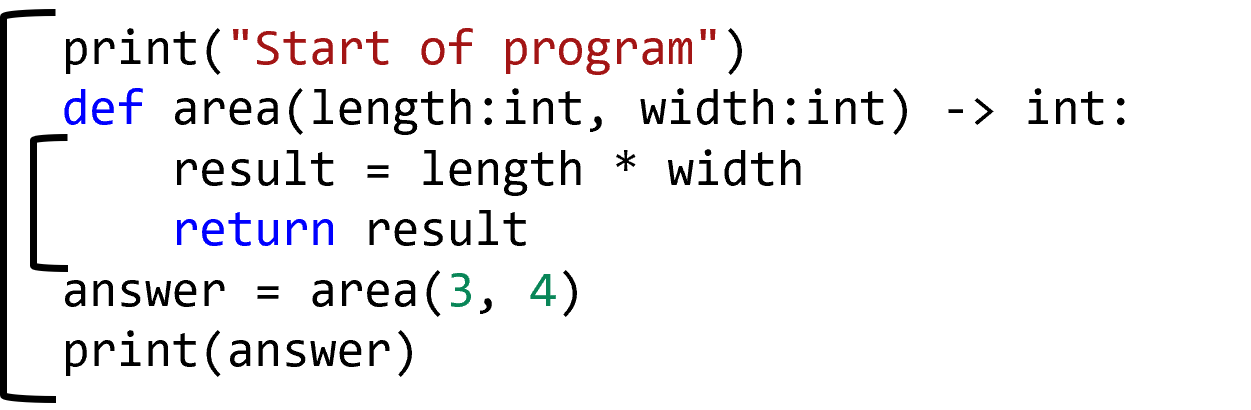
Programs are organized into lines called statements. Every program has at least one body, which is the main global body. Programs can also have additional bodies, though, through indentation. The statements inside of a function are indented, meaning they have four spaces in front of them. These spaces are not just to help make the program more readable, they have a strict influence on the syntactic correctness of the program. Improper number of spaces, or blocks being indented in the wrong places, is a common source of syntax errors. Eventually, we will learn different ways that bodies can be used, but for now they are almost one-to-one with scopes.
Scope
- “Lifetime”
- “Visibility”
- “Availability”
- “How long the variable is available”
In a program, the scope of a variable indicates how long that variable is available. This is also known as the “lifetime” or “visibility” of a variable. When a program is no longer in scope, that variable is no longer available.
Global Scope
print("Starting program")
grade = 64
grade = grade + 5
print("Grade:", grade)
Variables defined at the top level are known as global variables.
Once a variable is defined, it is available on subsequent lines.
That variable lives until the end of the program.
In the program shown here, the grade variable starts its life on the second line and is available until the end of the program.
Local Scope
def calculate_grade(grade:int, weight:float)->float:
    curved = 100 * grade ** .5
    final = curved * weight
    return final

my_grade = 90
the_weight = .1
calculate_grade(my_grade, the_weight)
Each function has its own local scope.
Variables defined as parameters or within a function live until the function ends.
These are local variables.
Variables defined in one function are not available outside the function.
This simplifies the reading of any function - you only need to worry about things defined in the function itself.
In the program shown here, the local variables are grade, weight, curved, and final, because they are all defined inside the body of the function or as parameters.
On the other hand, the my_grade and the_weight variables are global variables.
Returning Values
def get_grade(points:int, possible:int)->float:
    grade = points / possible
    return grade

my_grade = get_grade(70, 100)
# This will work fine, `my_grade` is in scope!
print(my_grade)
# This will cause an error, out of scope!
print(grade)
Functions return values, not variables.
This is so important, I’m going to say it again:
functions return values, not variables.
A variable has a value, so when you write statements like the one shown on the third line, you are returning the variable’s value, not the variable itself.
When the program reaches that line, the variable expression is evaluated for its value, which is then returned.
The variable disappears after the function ends, so returning the value is the only way to make that value available outside of the function.
The grade variable has no existence or meaning outside of the function.
Same Named Variables
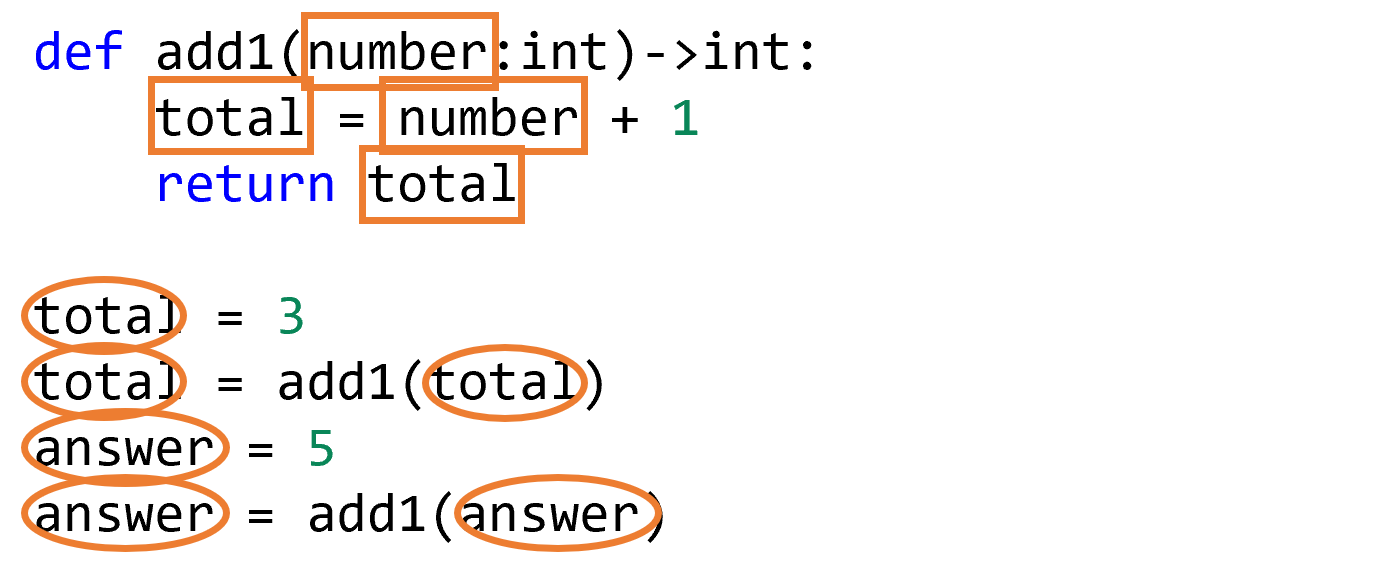
Beginners will sometimes try to reuse a variable name.
Any global variables with the same name are actually unrelated to the variable inside the function.
In the image above, squares are drawn around local variables, and circles are drawn around global variables.
The variable total is a global in some places, and a different local variable in others.
Those two variables just happen to have the same name, but they are NOT the same variable as far as Python is concerned.
Scope Rule of Thumb
- Variables inside a local scope should not be used outside that scope.
- Variables outside a local scope should not be used inside that scope.
Here is a simple pair of rules for working with scope: First, variables inside a local scope should not be used outside that scope. Second, variables outside a local scope should not be used inside that scope. Keeping these two rules in mind will avoid many headaches. At any time, you should be able to look at any program and determine if variables are inside or outside of a function’s scope, and whether that is appropriate for that variable.
Global Variables Are Bad
from bakery import assert_equal

my_title = "Mr. "
def add_title(name: str) -> str:
    titled_name = my_title + name
    return titled_name

assert_equal(add_title("Bart"), "Mr. Bart")
# Dangerous! Do not change global constants
my_title = "Dr. "
assert_equal(add_title("Bart"), "Dr. Bart")
It is technically possible to read a global variable inside a function. However, you must be careful to do so. Every time you refer to global variables, your program becomes more complicated and you have to think about multiple levels of scope. In this code example shown here, the unit tests would fail if we swapped the order of the last two lines. This may work out okay in smaller programs, but causes huge problems as you start writing longer programs. Suddenly, you must keep careful track of what a variable’s value is at any given point in the entire program, rather than just within a function. Whenever you feel the urge to use a global variable, stop and reconsider.
Global Constants Are Good
from bakery import assert_equal

HOURS_IN_DAY = 24

def days_to_hours(days: int) -> int:
    return HOURS_IN_DAY * days

assert_equal(days_to_hours(4), 96)
assert_equal(days_to_hours(0), 0)
The only exception is if you are 100% certain that the global variable’s value will stay constant and never change.
We call these global constants, and unlike global variables, they are a great idea that can dramatically improve the readability of code.
See the example above, where we know that the value of HOURS_IN_DAY will never change.
To make it clear for other programmers that HOURS_IN_DAY is a constant, we write its name in all capital letters.
Now, instead of having the magic number 24 mysteriously in our function definition, other developers reading our code will see that the number represents the number of hours in a day.
That same value could be reused in other parts of the program too.
Summary
- Code indented below a function is said to be in the “body” of the function. The entire program itself is also a body of code.
- The body of a function defines a region with “scope”, which controls the lifetime of a variable.
- Variables defined inside of a function, as well as parameters, are considered local to the function. Variables defined at the top level of the program are considered global to the function.
- Functions return values, not variables. There is no way for a local variable to be used after the function has ended. However, the value inside of the variable can be evaluated and returned from the function.
- There are two scope rules that we follow:
- Variables defined inside of a function cannot be used outside of a function.
- Variables defined outside of a function should not be used inside of the function.
- The exception to the second scope rule is when the variable is a global constant; then it is appropriate to define the variable once outside of the function and then use it anywhere else in the program.
- A global constant is a variable defined at the top level whose value never changes, and has a name written in all capital letters.
- Two variables with the same name in the same scope refer to the same variable. However, two variables in different local scopes should be treated like different variables, even if they do have the same name.