Lists and Dataclasses
- Lists: A sequence of data, accessible in order, all of the same type
- Dataclasses: A bundle of data, accessible by field name, composed of many possible types
Recall our two composite data types that we have learned so far: lists and dataclasses. Lists allow us to represent many of the same kind of thing. Dataclasses allow us to represent one thing that has many different parts. We can access elements of a list in order sequentially or by position. We can access fields of a dataclass by the name of the field. They are both data structures that are composed of simpler primitive types and, as we will soon learn, also compatible with each other.
Nesting Data
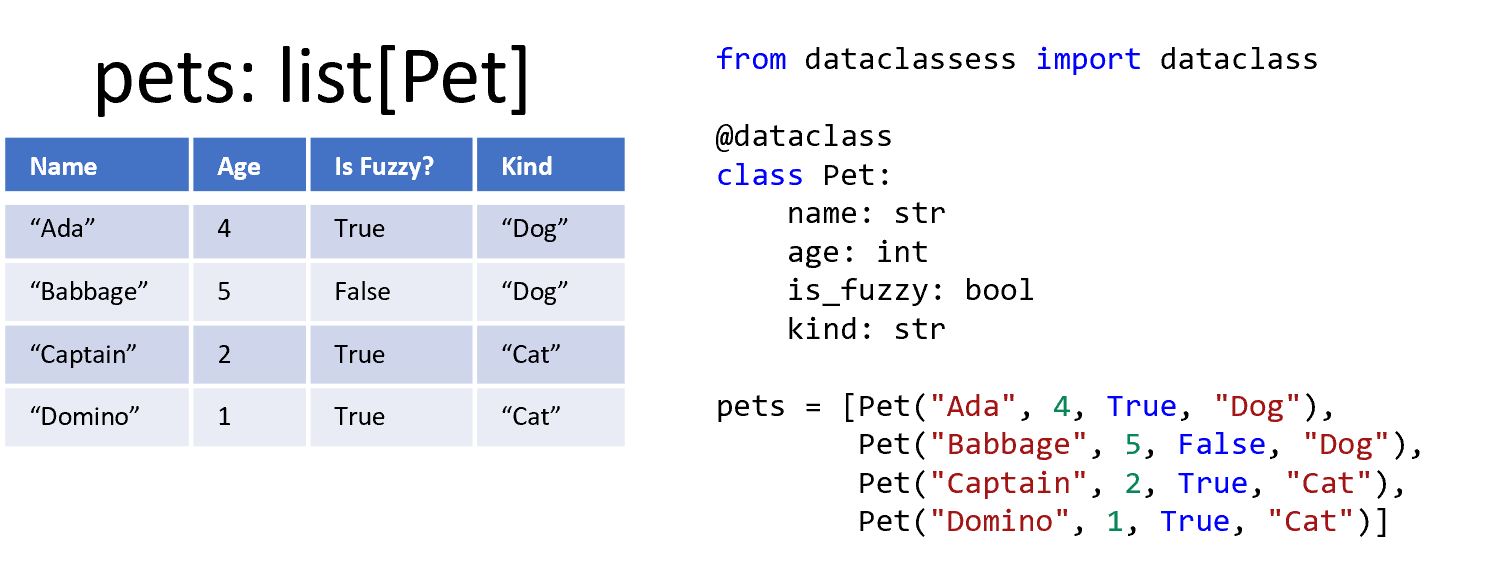
To represent more complicated reality, we must start nesting data structures inside of other data structures. A list of dataclasses is one of the most important ways to nest data structures because it can represent many things. A comparable idea is a table of data, where each column is of the same type and each row represents a single instance. An individual row corresponds to a dataclass, whereas all the rows together represent the overall list. In the image shown here, we have a table on the left representing four pets and code on the right also representing the same pets.
Nested Creation
from dataclasses import dataclass

@dataclass
class Circle:
    color: str
    radius: int

circles = [Circle("red", 4),
           Circle("blue", 10),
           Circle("green", 6)]
print(circles)
To create lists, we use square brackets. To create dataclasses, we call the constructor function. We create a list of dataclasses in the same way: with the constructor calls inside of the square brackets, separated by commas. The amount of whitespace inside of the square brackets and between the commas does not matter. Sometimes, longer lists are placed on multiple lines to make it easier to read them, although that is not required.
What’s in the List?
from dataclasses import dataclass

@dataclass
class Circle:
    color: str
    radius: int

circles = [Circle("red", 4), Circle("blue", 10)]

print(circles[0])
print(circles[1].radius)
Accessing nested data can be quite confusing, but the same consistent rules apply that we have learned throughout this course.
If you have a list of things, you can access specific elements using indexing.
When you index a list of dataclasses, that means you get one dataclass out, and you can then access attributes of that element.
In this code, the first print indexes the first element of the list and looks at the entire instance.
The second print indexes for the second instance and then accesses its radius field.
The Type of the Iteration Variable
from dataclasses import dataclass

@dataclass
class Animal:
    name: str
    weight: int
    friendly: bool

zoo = [Animal("Klaus", 17, True),
       Animal("Tigger", 12, True),
       Animal("Wrex", 2, False)]

for an_animal in zoo:
    print(an_animal)
Since we have a list of dataclasses, we can also iterate through the list.
While inside the body of the iteration, we gain access to each instance and therefore the specific fields of each dataclass instance.
A question to ask yourself is: What type of value is stored in the iteration variable? Many folks will incorrectly answer “a string” or “an integer,” because they are comfortable with those primitive types.
However, the answer is the same as it was back when we were dealing with lists.
The iteration variable’s type is the element type of the list.
If you have a list of dataclasses, then the iteration variable’s type will be the type of the dataclass.
In this example, the zoo variable holds a list of Animal dataclasses.
When we iterate through the zoo with a for loop, we create a new variable named an_animal.
That iteration variable an_animal will be of type Animal.
Not a string representing the animal’s name or its weight, but the entire Animal is stored in that variable.
Using Fields
from dataclasses import dataclass

@dataclass
class Book:
    name: str
    price: float

shelf = [Book("Count of Monte Cristo", 5.00),
         Book("Frankenstein", 10.00),
         Book("To Kill a Mockingbird", 6.00)]

total_price = 0
# Sum Pattern
for a_book in shelf:
    total_price = total_price + a_book.price
print(total_price)
The code here demonstrates how we can still apply the loop patterns we have seen so far.
The only major difference to the sum pattern is that we cannot use the a_book variable directly.
The total_price variable is an integer, while the a_book variable is a Book instance.
The addition operator is not compatible with those datatypes.
Instead, we must specifically access the price field of a_book and add that instead.
By correctly accessing the right field, we can unpack the complex data structure and use its juicy goodness.
Example: Filter and Map
from bakery import assert_equal
from dataclasses import dataclass

@dataclass
class Circle:
    color: str
    radius: int

# Filter and Map
def get_red_circles(circles: list[Circle]) -> list[Circle]:
    filtered = []
    for circle in circles:
        if circle.color == 'red':
            filtered.append(circle)
    return filtered

my_circles = [Circle("red", 4), Circle("blue", 10)]
assert_equal(get_red_circles(my_circles), [Circle("red", 4)])
Putting the for loop and attribute lookups inside of a function does not fundamentally change how everything works, either.
In this example, we have a get_red_circles function, which uses the filter pattern to only get the red circles from a list of circles.
Note the parameter type and return type, which is a list of Circles.
Although there is a lot going on in this code, you have seen each concept before in some form.
The only thing complicating matters is that we are putting them all together in one place.
Example: Find Last
from bakery import assert_equal
from dataclasses import dataclass

@dataclass
class Fruit:
    name: str
    tastes: str
    color: str

def get_last_sweet_fruit(fruits: list[Fruit]) -> Fruit:
    sweet_fruit = None
    for fruit in fruits:
        if fruit.tastes == "sweet":
            sweet_fruit = fruit
    return sweet_fruit

assert_equal(get_last_sweet_fruit([Fruit("lemon", "sour", "yellow"),
                                   Fruit("apple", "sweet", "red"),
                                   Fruit("grapes", "sweet", "purple"),
                                   Fruit("lime", "sour", "green")]),
             Fruit("grapes", "sweet", "purple"))
assert_equal(get_last_sweet_fruit([Fruit("lemon", "sour", "yellow")]), None)
Now let’s study an example function that consumes a list of dataclasses and finds the last element that matches a condition.
Specifically, we will take in a list of fruits (which have a name, taste, and color) and find the last sweet fruit.
If there is no sweet fruit in the list, then the function can return None instead.
If we had only wanted the last fruit in the list, it would have been enough to just return fruits[-1].
But, because we need the last sweet fruit, we use the find pattern to iterate through the list and check each one.
We skip over any fruit that is not sweet, updating the found variable whenever we encounter a sweet fruit.
If there are no sweet fruits in the list, we return None instead.
We wrote a test case to draw attention to this situation (and we would probably write a lot more test cases, in practice). The default value can vary for the find pattern, depending on the needs of the overall program.
You might return a string value, a special default instance of the dataclass, or some other meaningful value.
An important detail is to logically separate the sweet_fruit variable (holding the result) and the fruit iteration variable (holding each possible Fruit in turn). Sometimes, beginners will confuse the two variables and use sweet_fruit as the iteration variable.
Remember, the iteration variable takes on each value of the original list (which is composed of fruits, some of which may not be sweet).
If you named the iteration variable sweet_fruit, then during the first iteration of the loop (the lemon), the variable’s name would be inaccurate (since lemons are not sweet fruits).
Example: Take and Count
from bakery import assert_equal
from dataclasses import dataclass

@dataclass
class Weather:
    temperature: int
    rainfall: int
    is_sunny: bool

def days_until_raining(reports: list[Weather]) -> int:
    non_rainy_days = 0
    found_rainy_day = False
    for report in reports:
        if report.rainfall > 0:
            found_rainy_day = True
        elif not found_rainy_day:
            non_rainy_days += 1
    return non_rainy_days

assert_equal(days_until_raining([]), 0)
assert_equal(days_until_raining([Weather(54, 0, True), Weather(53, 0, True),
                                 Weather(50, 0, False), Weather(52, 1, False),
                                 Weather(55, 0, True), Weather(56, 2, True)]), 3)
The next example will combine two other patterns: take and count. Recall that the take pattern consumes a list and produces a new list with just the elements that match the condition. The count pattern reports how many elements are in the list. In this modification of the take pattern, instead of producing a new list like the map pattern, we can follow the behavior of the count pattern to increment the accumulation variable instead.
As a context, consider a list of weather reports over time. Each report includes the temperature, inches of rainfall, and whether the day was sunny. What if you wanted to know how many days until the first day that it started raining?
The pattern begins by initializing the non_rainy_days to 0 and the found_rainy_day flag to be False.
We go through each Weather report, checking to see if the current report is a rainy day (where the rainfall is greater than 0).
When we find one, we negate the found_rainy_day flag.
If the day is not rainy, then we follow the elif branch and confirm that we have not yet found a rainy day before now.
If we have not, then we increment the number of non_rainy_days seen.
After the loop is over, we return the non_rainy_days as the answer.
The second test case demonstrates the difference between the take pattern and the filter pattern.
If we filtered and then counted the number of non-rainy days, the result would be 4.
However, the take pattern allows us to only consider the non-rainy days before the first rainy day (which is the fourth element of the list).
Example: Maximum
from bakery import assert_equal
from dataclasses import dataclass

@dataclass
class Animal:
    name: str
    weight: int
    friendly: bool

def name_of_biggest(animals: list[Animal]) -> str:
    if not animals: # Remember the empty list case!
        return "No animals found."
    biggest = animals[0]
    for animal in animals:
        if animal.weight > biggest.weight:
            biggest = animal
    return biggest.name

assert_equal(name_of_biggest([Animal("Klaus", 17, True),
                              Animal("Tigger", 12, True),
                              Animal("Wrex", 2, False)]), "Klaus")
assert_equal(name_of_biggest([]), "No animals found.")
Frequently, we want to use one field when applying the pattern but use a different field in the return value. For example, you could filter a list based on an attribute but map the list based on a different attribute. Or, in the case of the following example, we will find the maximum of a list using one field but return the value associated with a different field.
Consider a list of animals representing the creatures of a zoo. We might ask to find the name of the heaviest animal. This would require the maximum pattern, but with careful modifications to the conditional check. Remember, you cannot directly compare the order of two dataclasses. Instead, you need to compare the fields of the dataclasses.
The function begins by checking that the list of animals is not empty.
If the list was empty, then the first line of the maximum pattern would cause an IndexError (since there is no first animal to grab). But, since we return early if there are no animals at all, we can safely start by taking the first animal from the list and treating that animal as the biggest (so far). Then, we iterate through each animal in the animals given, checking if that animal’s weight is greater than the biggest animal so far.
Whenever we find an animal with more weight, we update the biggest variable to reference that animal instead.
Stack/Heap Diagram of Maximum
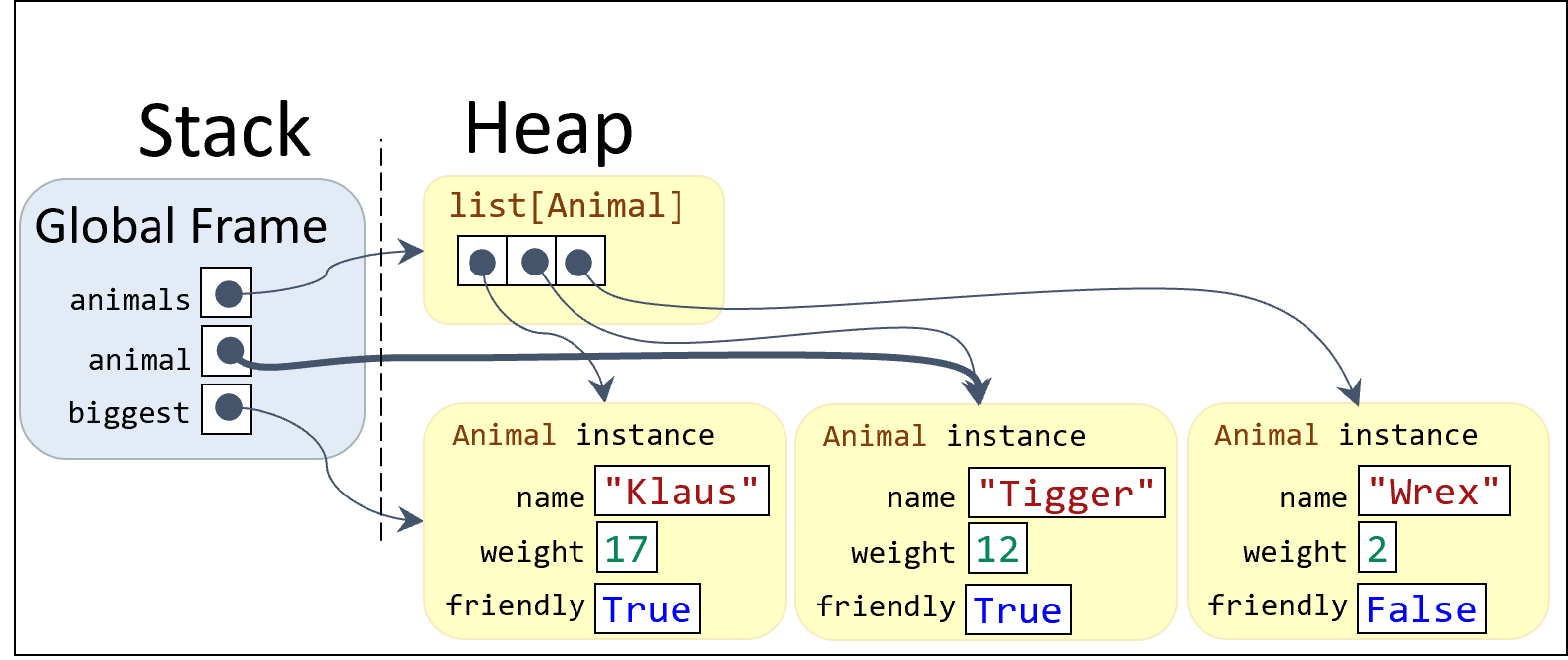
The stack/heap diagram shown here visualizes how the memory is laid out during the second iteration of the loop.
The animals list has three elements, each of which is a dataclass instance of Animal.
During the second iteration of the loop, the animal variable is pointing at the second instance, while the biggest variable is still pointing at the first element.
At the end of the iteration, the biggest will still point to the first Animal.
This allows us to return biggest.name to get the name of the biggest animal.
Example: Max and Filter Composition
from bakery import assert_equal
from dataclasses import dataclass

@dataclass
class Animal:
    name: str
    weight: int
    friendly: bool

def remove_friendly(animals: list[Animal]) -> list[Animal]:
    non_friendly_animals = []
    for animal in animals:
        if not animal.friendly:
            non_friendly_animals.append(animal)
    return non_friendly_animals

def meanest(animals: list[Animal]) -> str:
    animals = remove_friendly(animals) # First remove friendly
    if not animals: # Check empty list case!
        return "No unfriendly animals found."
    biggest = animals[0]
    for animal in animals:
        if animal.weight > biggest.weight:
            biggest = animal
    return biggest.name

assert_equal(meanest([Animal("K", 17, True), Animal("T", 12, True), Animal("W", 2, False)]), "W")
assert_equal(meanest([Animal("K", 17, True), Animal("T", 12, True)]), "No unfriendly animals found.")
This final example will build directly on the previous example by adding one additional step: composing the maximum pattern with the filter pattern.
This time, instead of just looking for the heaviest animal, we will only look for the heaviest animal that is not friendly.
This is a little trickier, since not only could the animals list be empty, but the animals list might only have friendly animals.
To keep things simpler, we will do the new filtering work in a helper function (remove_friendly) that consumes a list of animals and returns a list of animals without any that are friendly.
It is very important that we remove friendly animals before we guard against the empty list case. If we swapped the order of those lines, then we would not correctly handle the case where the list has only friendly animals. Composition is a powerful tool for keeping complex logic in check. If we tried to do the filtering in the same loop as the maximum pattern, we are likely to make a mistake when handling cases like when the first animal of the list is the biggest but also friendly. Another advantage of having the helper function is that the function can be tested separately to ensure that we are correctly removing the friendly animals.
Summary
- Lists can have instances of dataclasses, just like any other primitive type.
- When you index a list of dataclasses, you get a specific instance and can access the instance’s attributes.
- When iterating over a list of dataclasses, the iteration variable will take on the element type of the list, which will be the type of the dataclass.
- Lists of dataclasses are like a table of data that allows you to abstract more complex reality.
- You can create a list of dataclasses using list literal syntax (square brackets) and the dataclass constructor functions.
- You can apply the same loop patterns for primitive data over lists of dataclasses.
- Frequently, the loop pattern will use multiple fields of the dataclass instances.
- When applying the maximum pattern, you cannot directly compare the instances and instead should compare their fields.
- A stack/heap diagram can visualize the relationship between the iteration variable, the iteration list, and the accumulation variable — all of which point to instances of data on the heap.